00192298-02.pdf - 第57页
SIPLA CE SR.502.xx 3 12/00 RU 3.4 57 3.4 Схе м а по льз овательского интерф ейс а 3 SR.502.xx ( . .:001 92382-01) ( . .: 0019 2383-01) . 3 3 Pull-down m enus 3 Error inform ation bar 3 S tatus indica tion and process sta…
SIPLACE SR.502.xx 3
12/00 RU 3.4
57
3.4 Схема пользовательского интерфейса
3
SR.502.xx
( . .:00192382-01) ( . .: 00192383-01)
. 3
3
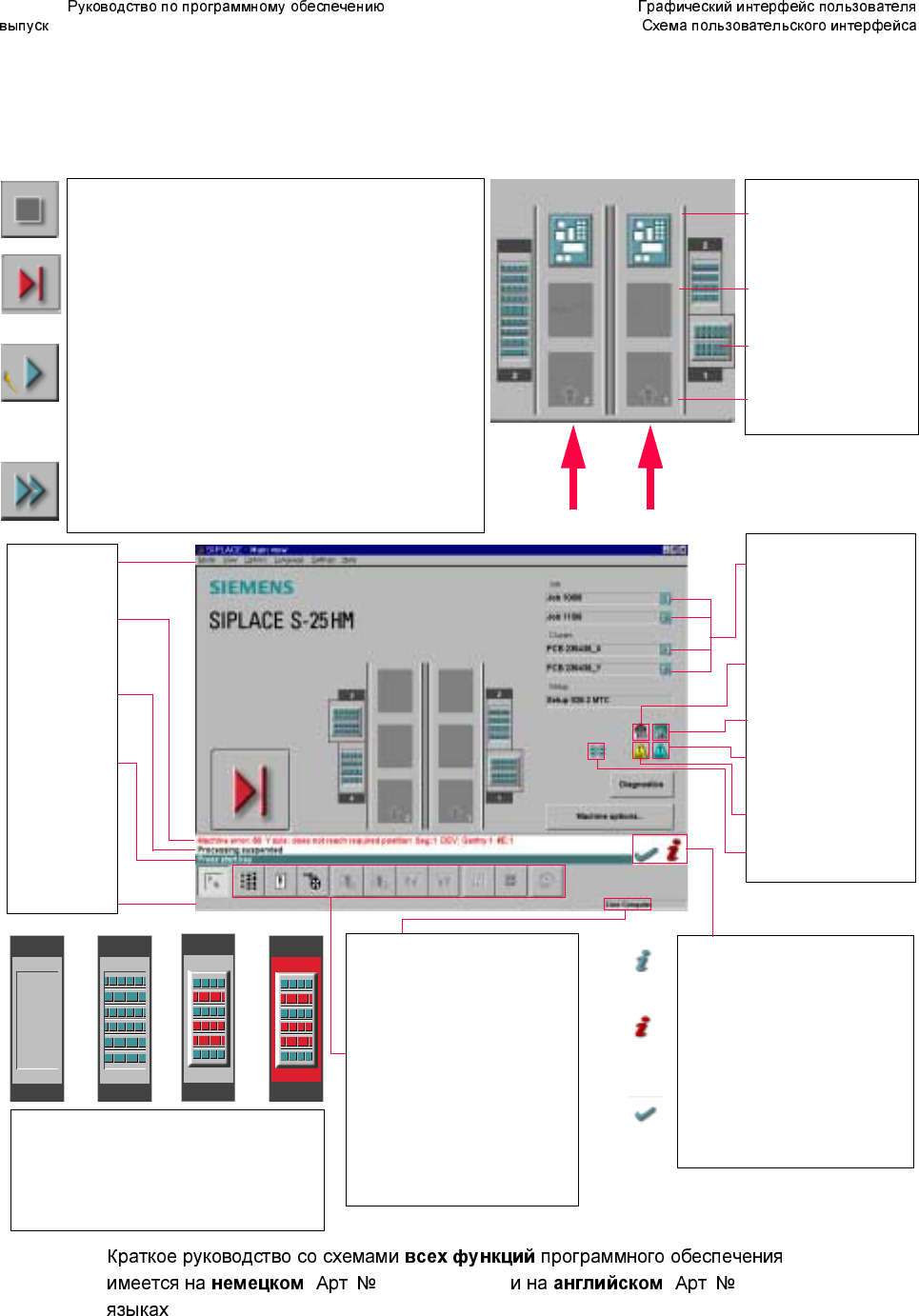
Pull-down menus
3
Error information
bar
3
Status indication
and process status
3
Notificationabout a
specific action to
carry out
3
Information bar
3
Control modes:
Stand alone
GEM Host (not yet available)
Line Computer
SIPLACE Pro
3
Submenu icons with info box:
Setup
Error
Feeders
Gantry 1, 2
PCB conveyor 2, 1
Teach fiducial
Test component
SITEST
GEM
3
Output conveyor
The PCB is supplied.
Central conveyor
The central conveyor is empty.
MTC on location 1
(S-25 HM only)
Input conveyor
The input conveyor is empty.
3
Context-sensitive help system
This also provides a short description of all
displayed operating elements.
3
Help system for errors
Starts a help system displaying possible
causes of the current error along with correc-
tive actions.
3
Error deletion
After the error has been successfully cor-
rected, the currently active error is deleted.
Conveyor 2
Conveyor 1
3
Identifiesthejoborclusterofthe
right conveyor lane, or of the
single conveyor, and of the left
conveyor lane (dual conveyors
only).
3
Barcode-supportedcomponent
refilling
3
PCB barcode is activated.
3
Machine options have been
changed
3
Software options configured
3
Compressed air switch-off
mechanism configured
1234
1 No setup available on the corresponding location
2 Setup available
3 Setup available - at least one empty track error
4 Machine standstill due to track error
3
This display appears during the start-up processof the machine. Only when the
referenÐóêîâîäñòâî ïî ïðîãðàììíîìó îáåñïå÷åíèþ SR.502.xxce run has been com-
pleted successfully will the display appear in the form of a button.
3
Status
The machine is running, or is in its 'ready' state.
Pressing the button:
The machine stops.
3
Status
Themachineisplacingcomponents;'stop'isactivated.TheassemblyofthePCBs
located in processing conveyors 1 and 2 or in the central conveyor will be
terminated and the PCBs will be transported to the intermediate or output
conveyor. Subsequently, the machine will stop.
Pressing the button:
The machine continues to run without interruption.
3
Status
Machine is in the stopped state.
Pressing the button:
The machine resumes the placement operation.

3 SIPLACE SR.502.xx
3.4
12/00 RU
58