00197622-01_IM_OIS_SIS_12.0_DE_EN.pdf - 第32页
SIPLACE O IS V12. 0 / Ins tallatio n Manual Ausgabe 12/2014 Edit ion 32 4 Maint enance of the OI S Database The OIS dat abase should be m aintained bim onthl y to avo id perf ormance los ses in the d atabas e queries. Fo…
SIPLACE OIS V12.0 / Installation Manual Ausgabe 12/2014 Edition
31
3.7 Identify Station (only OIS client)
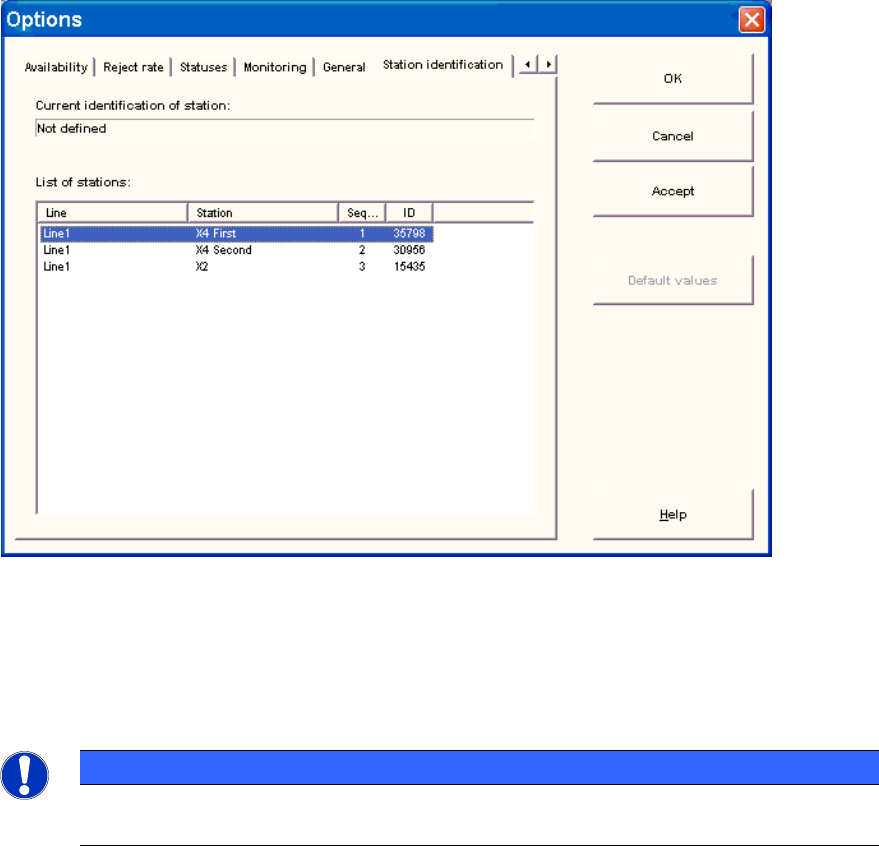
For a station to be monitored, it must be identified.
For a station with station software version 70x, the station identification is not necessary.
► Select the Station identification item from the Options menu.
Figure 3-38: Identifying station
► Select the appropriate station in the OIS Client from the list.
► Double-click the station to identify it.
► Close the dialog by clicking OK.
NOTICE
To select the station, the line configuration must be created first on the OIS Server using
OIS LineConfig, see the Administration Guide, item no. [00197620-xx].
SIPLACE OIS V12.0 / Installation Manual Ausgabe 12/2014 Edition
32
4 Maintenance of the OIS Database
The OIS database should be maintained bimonthly to avoid performance losses in the database
queries. For more details, please refer to the "SIPLACE / OIS Databases Interface Description",
item no: [00197621-xx].
SIPLACE OIS V12.0 / Installation Manual Ausgabe 12/2014 Edition
33