TM2048_Change Explanation of MIS.pdf - 第6页
SMT Software Engineering Group IM Operations Y AMAHA MOTOR CO., L TD. MD OC-SOFT50072 6/7 5. The Cha nge of Pro gram Lo g 5.1. Add i tional I tems and content s The following four item s are added to Board…
SMT Software Engineering Group
IM Operations YAMAHA MOTOR CO., LTD.
MDOC-SOFT50072
5/7
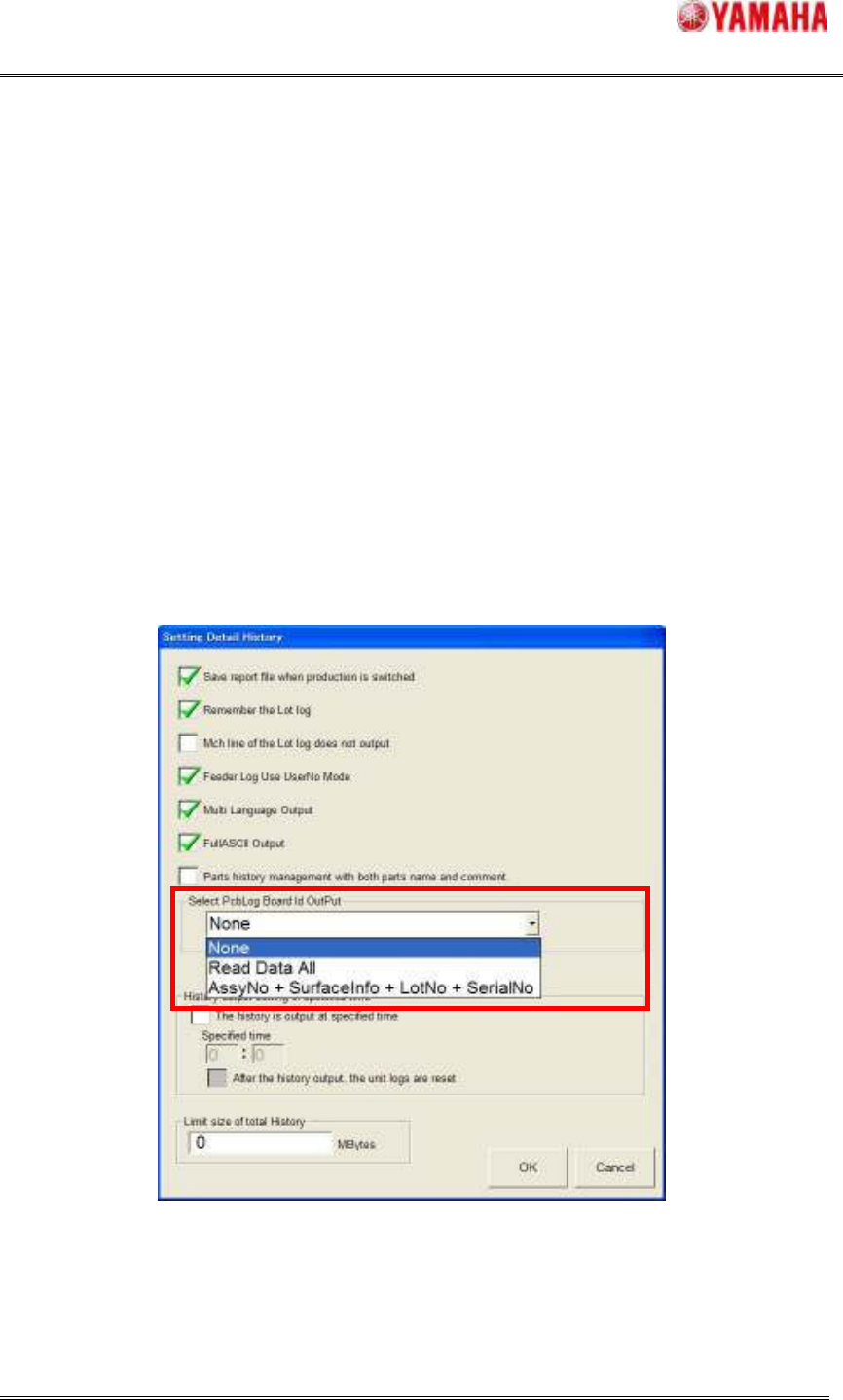
4.3. About “Board ID”
To output this item, please set [Detail History setting] - [Select PcbLog Board Id OutPut] on
[SoftwareSetting] - [History] tab (See Fig.4.4).
This setting can be selected when “Auto Pgm Change Over” function is enabled. If it is not
enabled, this setting become gray out and cannot be selected.
[Read Data All]
Bar Code or Two-dimensional bar code (EX. QR code) information is output without
change. It is output up to 255 characters, and the character string more than it is not
output.
AssyNo + SurfaceInfo + LotNo + SerialNo
Int the output data, these number and info are hyphenated. It is output up to 255
characters. If it is more than that, an excess is not output.
Fig.4.4 Output selection of Board Id
SMT Software Engineering Group
IM Operations YAMAHA MOTOR CO., LTD.
MDOC-SOFT50072
6/7
5. The Change of Program Log
5.1. Additional Items and contents
The following four items are added to Board Log.
1. Lane
The number of the conveyor lane where the board is produced is displayed.
2. Other Lane Wait Time (msec)
The following time is displayed.
C) In the auto-running with an “Each Lanes” mode, it is the time from the end of fixing the
board until the beginning of mounting while the mounting is executed in the other lane.
D) In the auto-running with a “Synchronous Transfer” mode, it is the time from the end of
fixing the board in one conveyor until the end of fixing the one in the other lane.
3. Operation Stop Time (msec)
The time from pushing the [STOP] button until restarting the auto-running is displayed
5.2. Version Change of Board log file
With the change of the Program log, the file version of Program log is changed as follows.
“V3.00” -> “V3.10”
“V3.01” -> “V3.10”
SMT Software Engineering Group
IM Operations YAMAHA MOTOR CO., LTD.
MDOC-SOFT50072
7/7
5.3. About “Program Name” and “Program Comment”
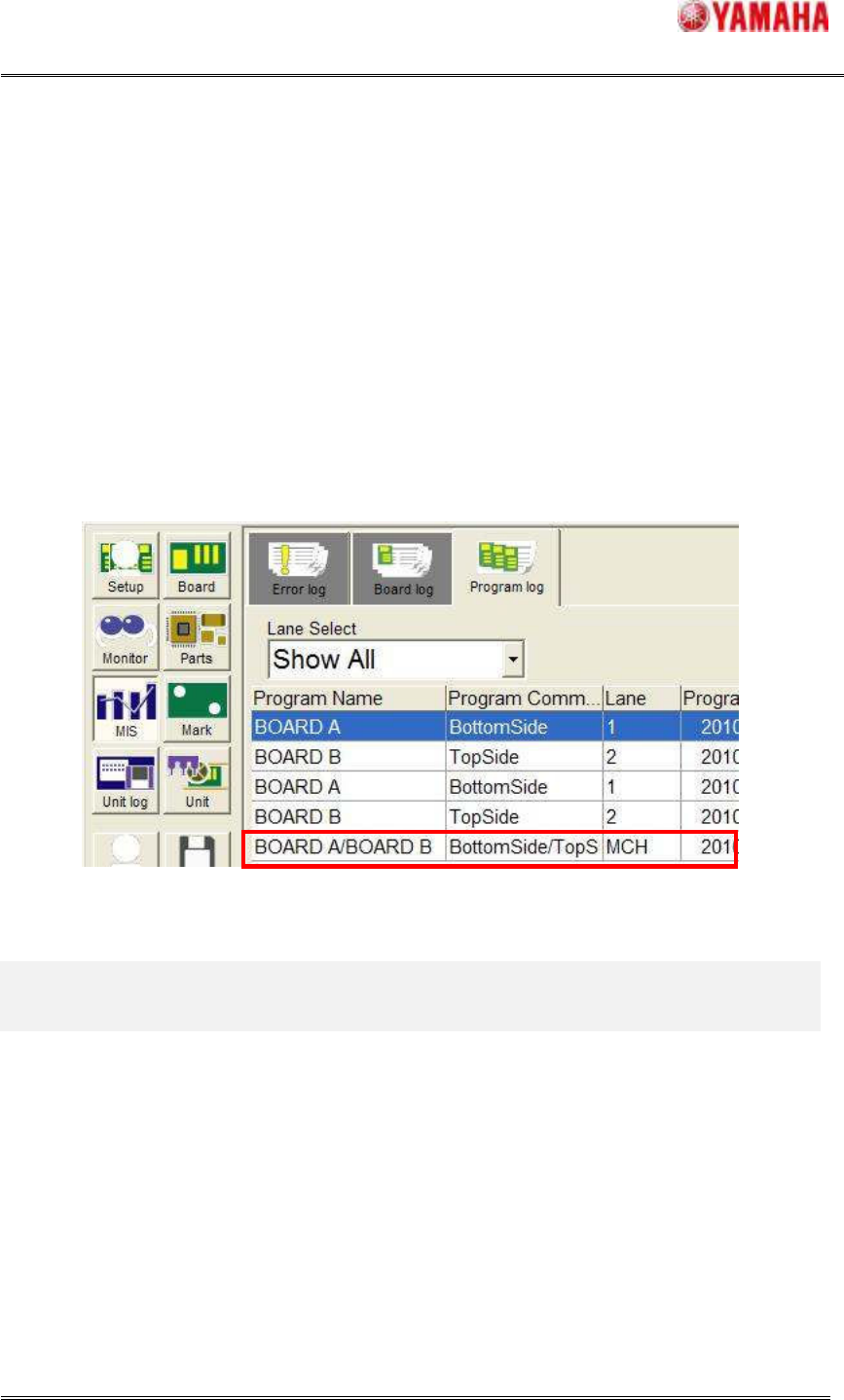
When the board data producing Top/Bottom side, the each “Program Name” and the “Program
Comment” are displayed with slash-delimited.
Example)
Lane1 Board Name : [BOARD A], Board Comment : [BottomSide]
Lane2 Board Name : [BOARD B], Board Comment : [TopSide]
In the case of above “Board name” and “Board comment” of each lane, the item of “Program
Name” and “Program Comment” are displayed as follow (See Fig.5.1).
Program Name : [BOARD A/BOARD B], Program Comment : [BottomSide/TopSide]
Fig.5.1 Program Name and Program Comment
6. Notice
6.1. About the “Remember the Lot log” function
The “Remember the Lot log” is not possible before and after upgrading the version.
Please upgrade the version after carrying out the following procedures beforehand.
1. Change the other board data from board data producing.
2. The Program Log that is produced is output.
3. Confirm that the Program Log is output, and please upgrade the version.