E By DEK Operator Manual 英文版.pdf - 第3页
2 SAFETY GENERAL HAZARDOUS MA TERIALS HAZARDOUS AREAS quick guide to the general operating conditions of the machine. procedures in addition to specific safety precautions laid down in this manual. W ARNING notices draw …
1
SAFETY
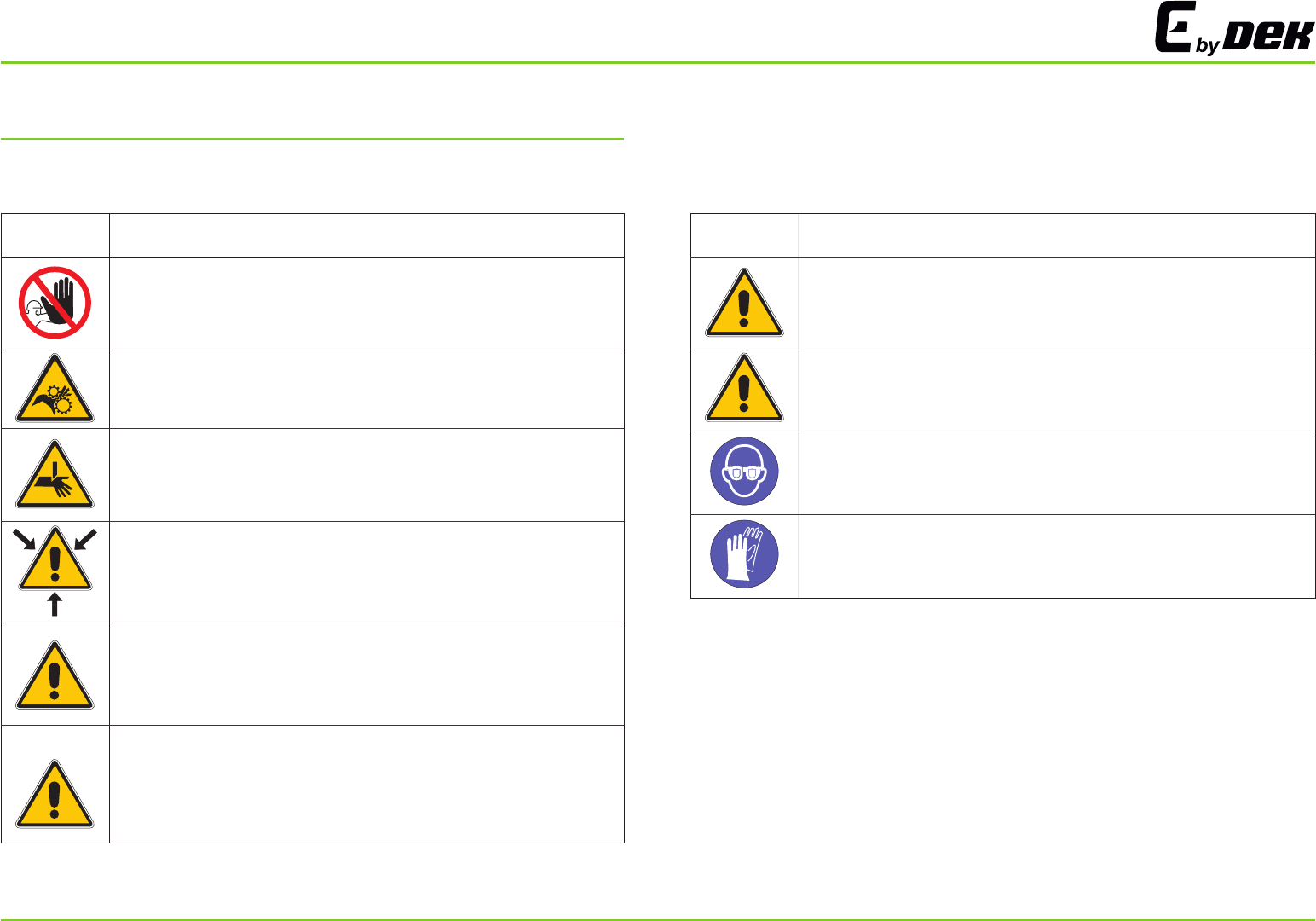
WARNINGS, PROHIBITIONS AND CAUTIONS
The warning, prohibition and caution notices below are fitted to the
machine and shown in the relevant procedures within this manual.
Symbol
Definition
PROHIBITION
.
,
.
.
MACHINE COVERS IN ORDER TO PROTECT PERSONNEL AND TO
PREVENT DAMAGE TO THE MACHINE COVERS ARE FITTED TO
THE MACHINE FRAME THESE PANELS MUST ONLY BE REMOVED
BY SUITABLY QUALIFIED PERSONNEL
PROHIBITION
.
,
.
.
MACHINE COVERS IN ORDER TO PROTECT PERSONNEL AND TO
PREVENT DAMAGE TO THE MACHINE COVERS ARE FITTED TO
THE MACHINE FRAME THESE PANELS MUST ONLY BE REMOVED
BY SUITABLY QUALIFIED PERSONNEL
WARNING
.
,
.
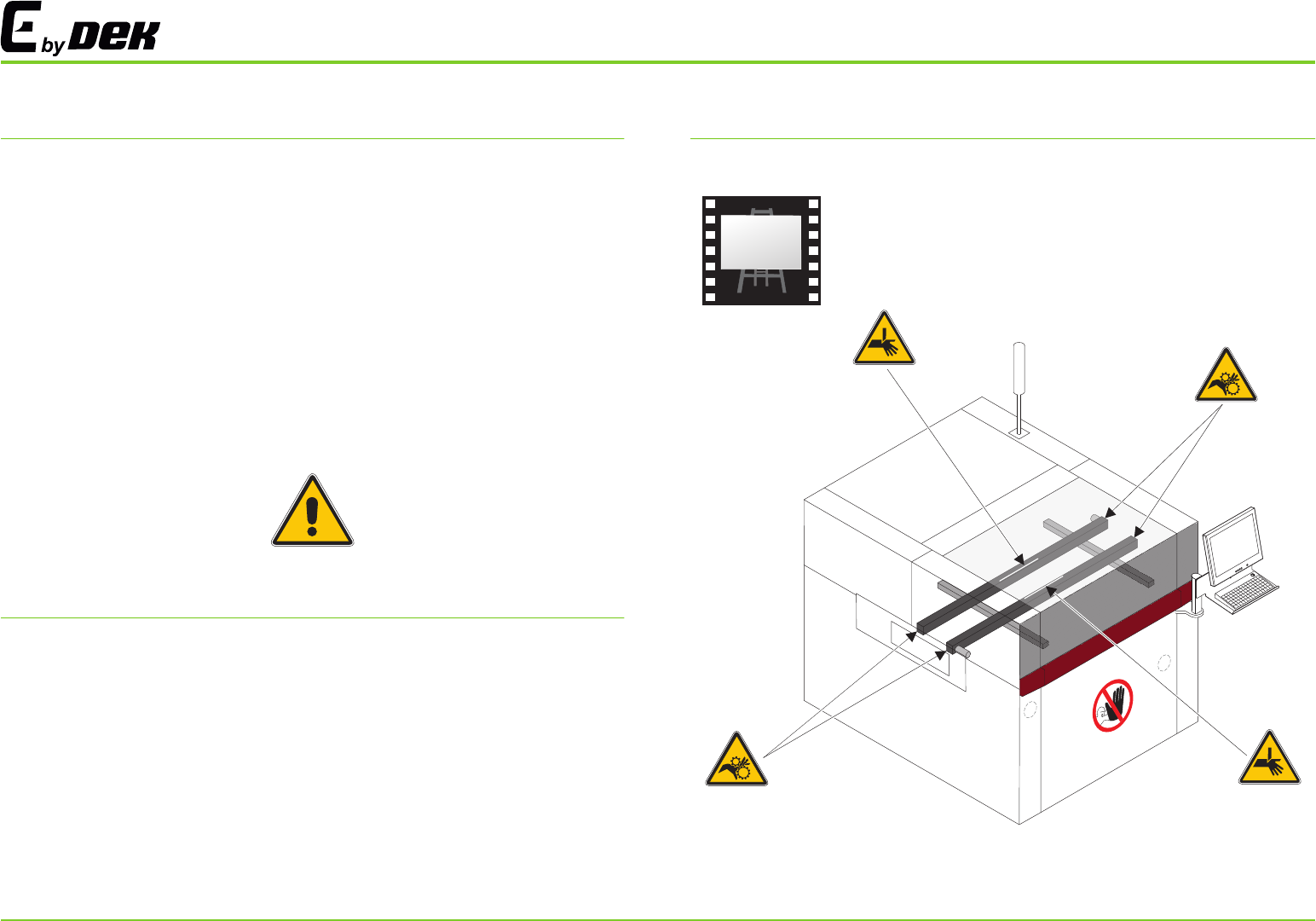
MOVING PARTS MOVING PARTS ARE PRESENT IN THE VICINITY OF
THIS WARNING LABEL THESE PARTS HAVE THE POTENTIAL TO
CAUSE INJURY
WARNING
.
.
.
BOARD CLAMPS EXTREME CARE MUST BE EXERCISED WHEN
WORKING IN THE TOOLING AREA OF THE MACHINE TO AVOID
INJURY THE FOILS ON THE FRONT AND REAR BOARD CLAMPS
ARE VERY SHARP
WARNING
.A
.
.
SOLVENT SPRAY THE UNDERSTENCIL CLEANER SPRAYS FINE
JET OF SOLVENT SOLUTION ON TO THE CLEANER APPROVED
PROTECTIVE CLOTHING SHOULD BE WORN
CAUTION
.
.
,
.
39°C.
RECOMMENDED SOLVENTS ANY SOLVENTS USED MUST COMPLY
WITH LOCAL ENVIRONMENTAL GUIDELINES ASM RECOMMEND
USING SOLVENTS THAT ARE ENVIRONMENTALLY FRIENDLY IE CFC
FREE AND WATER BASED SOLVENTS USED MUST HAVE FAST
EVAPORATION RATES AND FLASHPOINT SPECIFICATIONS
GREATER THAN
WARNING
.
,,
.
PROTECTIVE CLOTHING APPROVED PROTECTIVE CLOTHING
SHOULD BE WORN BY SOLDER PASTE AND SOLVENT HANDLERS
AT ALL TIMES TO ELIMINATE FUME INHALATION EYE CONTACT
SKIN CONTACT AND INGESTION
Symbol
Definition
CAUTION
.
’
.
SOLDER PASTE AND SOLVENTS WHEN USING OR HANDLING ANY
SOLDER PASTE OR SOLVENT FORMULATION THE
MANUFACTURERS SAFETY DATA SHEETS MUST BE STRICTLY
ADHERED TO
CAUTION
..
A
.
SOLVENT SOLUTION DO NOT MIX SOLVENT SOLUTIONS FLUSH
THE SOLVENT TANK THOROUGHLY WHEN CHANGING TO
DIFFERENT SOLVENT SOLUTION
CAUTION
..TOXIC SUBSTANCES MAY BE PRESENT WEAR EYE PROTECTION
CAUTION
..TOXIC SUBSTANCES MAY BE PRESENT WEAR SAFETY GLOVES
2
SAFETY
GENERAL
HAZARDOUS MATERIALS
HAZARDOUS AREAS
quick guide to the general operating conditions of the machine.
procedures in addition to specific safety precautions laid down in this
manual.
WARNING notices draw the attention of operators to possible hazards
which may cause loss of life, serious injury or ill health.
safe at all times, all personnel must follow generally accepted safety
This manual should be used by suitably trained machine operators It is a.
CAUTION notices alert personnel to the possibility of damage occurring to
the machine material.
To ensure that the operating conditions for the printing machine remain
The following label, illustrated below, may be fitted to the machine. This
signifies that the user should refer to the operator manual before
attempting to carry out work on the equipment.
Hazardous materials, as defined by 497 (National Fire Protection
Association), are not recommended by for use on this machine If one
or more hazardous materials are used, decontamination must be carried
out in accordance with S12 or equivalent local regulations.
NFPA
ASM .
SEMI
i
E STOP OPERATION SAFETY INTERLOCKS
TRI COLOUR BEACON
PRINTHEAD COVER
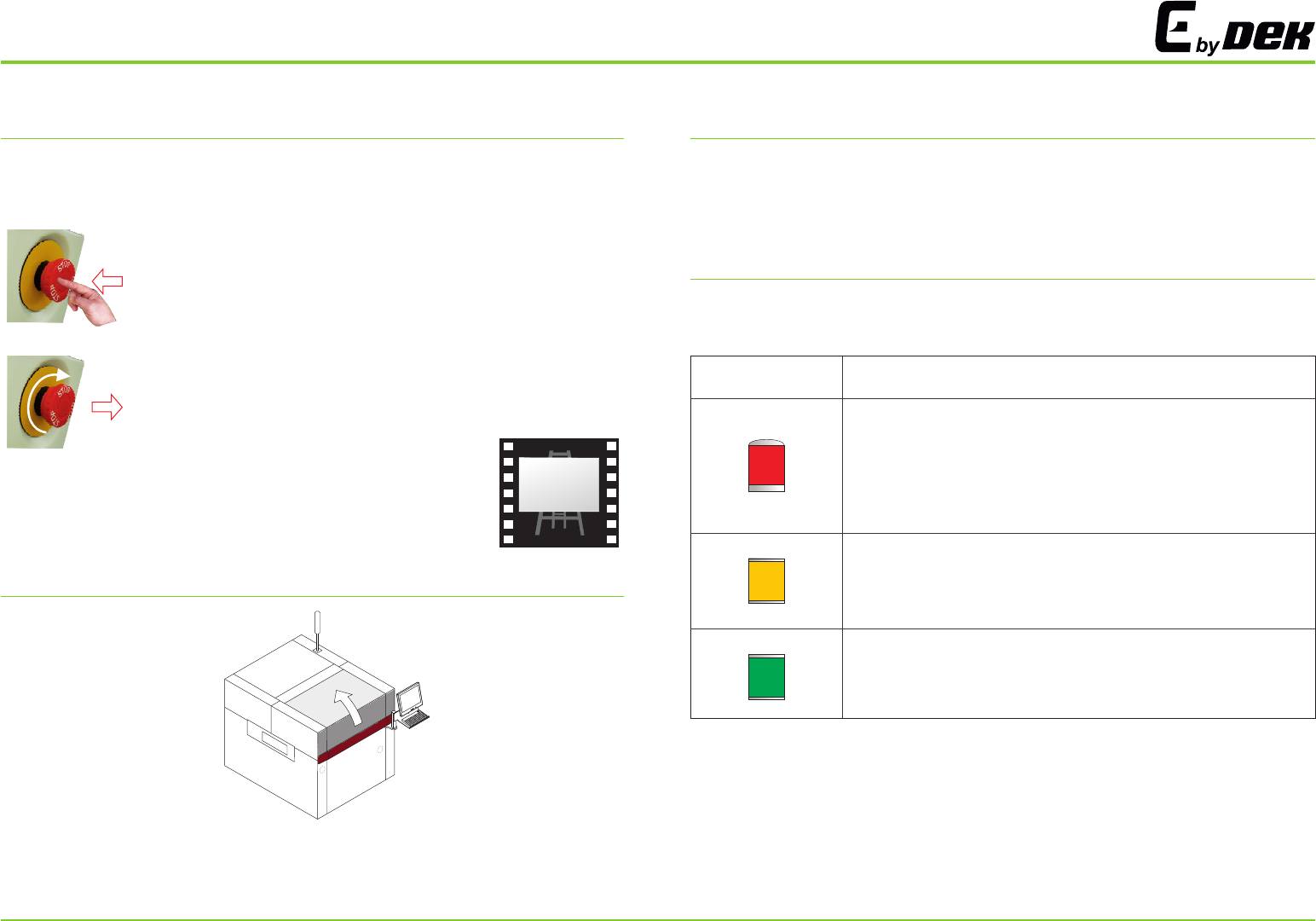
With the machine powered up, activating the red Emergency Stop button
(E Stop) causes the machine to stop in a controlled manner.
The safety features designed into the printer are for the protection of all
operators and maintenance personnel. strongly recommend safety
devices are never overridden.
ASM
The default settings for the beacon indicates the operational status of the
machine:
To activate:
press the E Stop button, electrical power to the machine
is suspended.
To reset:
turn the E Stop button clockwise until it unlatches.
Raising the printhead cover suspends operation of the machine to allow
the operator safe access to the tooling area.
i
SAFETY
Beacon Colour
Operational Status
Machine is not operational
System power is down
Error message displayed
Paper roll is empty
Solvent tank level is low
Machine is not in a ready state
Machine is initializing
Machine is in set up
Machine is in maintenance
Machine is operational
Machine is waiting in a ready state
3