TK52658.PickupBasseMACS.pdf - 第7页
Product Engineering Division SMT Sect ion Robotics Operations Y AMAHA MOTOR CO., L TD. MDOC-SOFT50732 7/7 4 Limi t at i on There is no l imitation in th is function.
Product Engineering Division
SMT Section
Robotics Operations
YAMAHA MOTOR CO., LTD.
MDOC-SOFT50732
5/7
3.2 Operation During Auto-running
You don’t need to perform any special operation to work this function.
BaseMACS is automatically performed at the start of auto-running, and correction is
performed at pickup.
※ Timing of BaseMACS is not changed.
3.3 Utility Operation
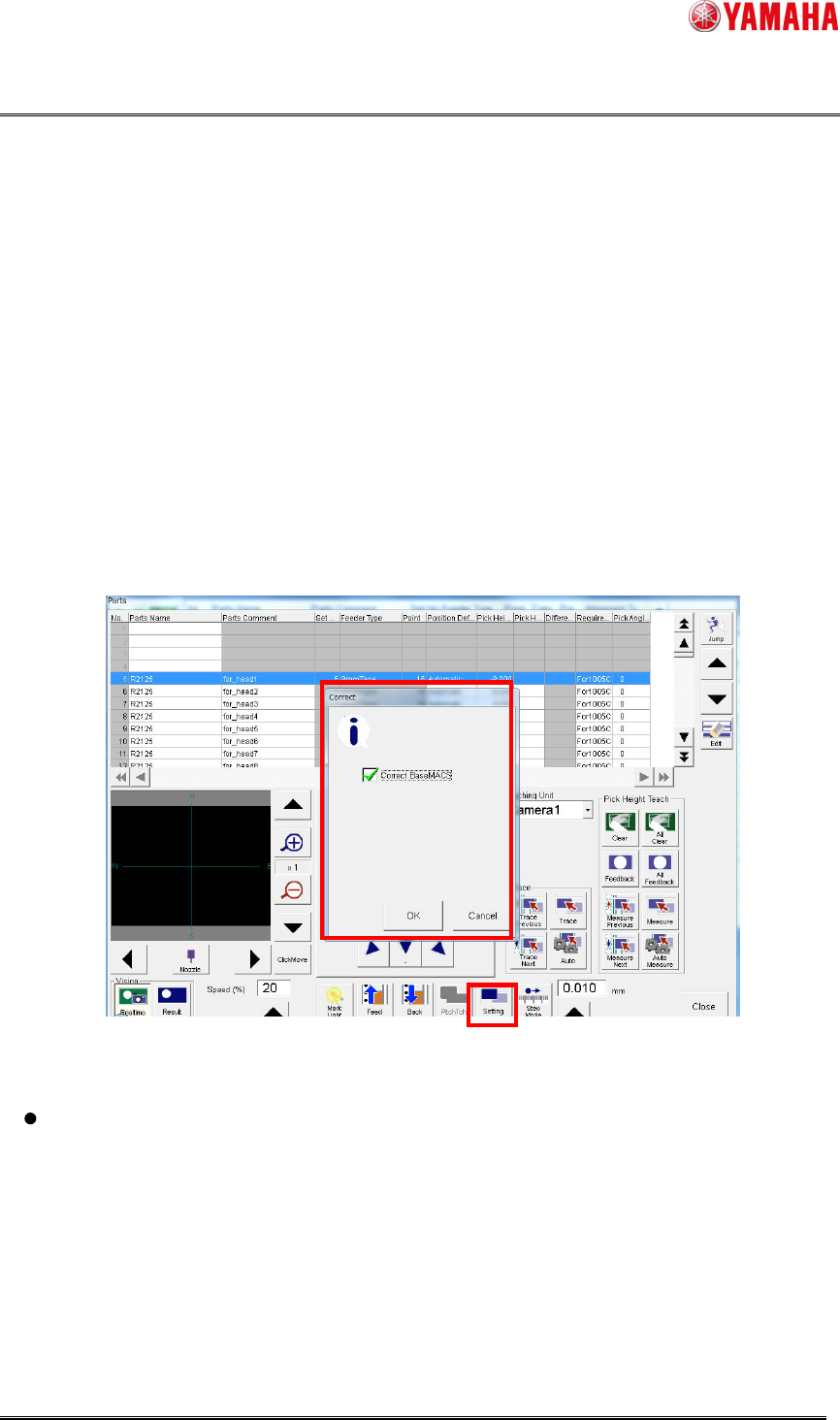
On the [Parts] screen, you can see a pickup position that has been corrected with
BaseMACS.
1. Click the [Parts]-[Teach] button to open the [Parts] screen.
2. Click the [Setting] button to open the [Correct] dialog. Check the [Correct BaseMACS]
check box, then click the [OK] button.
3. BaseMACS is performed. After that, trace and teach are performed with BaseMACS
correction applied.
Fig 3.3.1 The parts teach and trace screen
Also when trace or teach is performed with the [Correct Base MACS] check box
checked or when BaseMACS has not been recognized, the dialog of “Fig 3.3.1” is
displayed. Click the [OK] button to perform BaseMACS before trace and teach.
Also at parts adjustment on the [Parts Adj]-[Pick up] dialog, pickup position is corrected with
BaseMACS.

Product Engineering Division
SMT Section
Robotics Operations
YAMAHA MOTOR CO., LTD.
MDOC-SOFT50732
6/7
3.4 Precaution when you enable this function
If you want to upgrade the machine application from V3.07 STDR1.000 or earlier
(-2009/2/27) to a version with this function implemented, you need to adjust the pickup
positions again.
Also, this function is disabled at upgrade.

Product Engineering Division
SMT Section
Robotics Operations
YAMAHA MOTOR CO., LTD.
MDOC-SOFT50732
7/7
4 Limitation
There is no limitation in this function.