Micron Installation V9 Machine Performance.pdf - 第3页
MACHINE PERFORMANCE MACHINE CAPABILITY Chapter Issue 6, Jan 16 Installation Manual 8.3 7. Record the results of the following in Section 21 of the Installation Checklist: NOTE On occasions no Cp/Cpk values are displayed …
MACHINE PERFORMANCE
MACHINE CAPABILITY
8.2 Installation Manual Chapter Issue 6, Jan 16
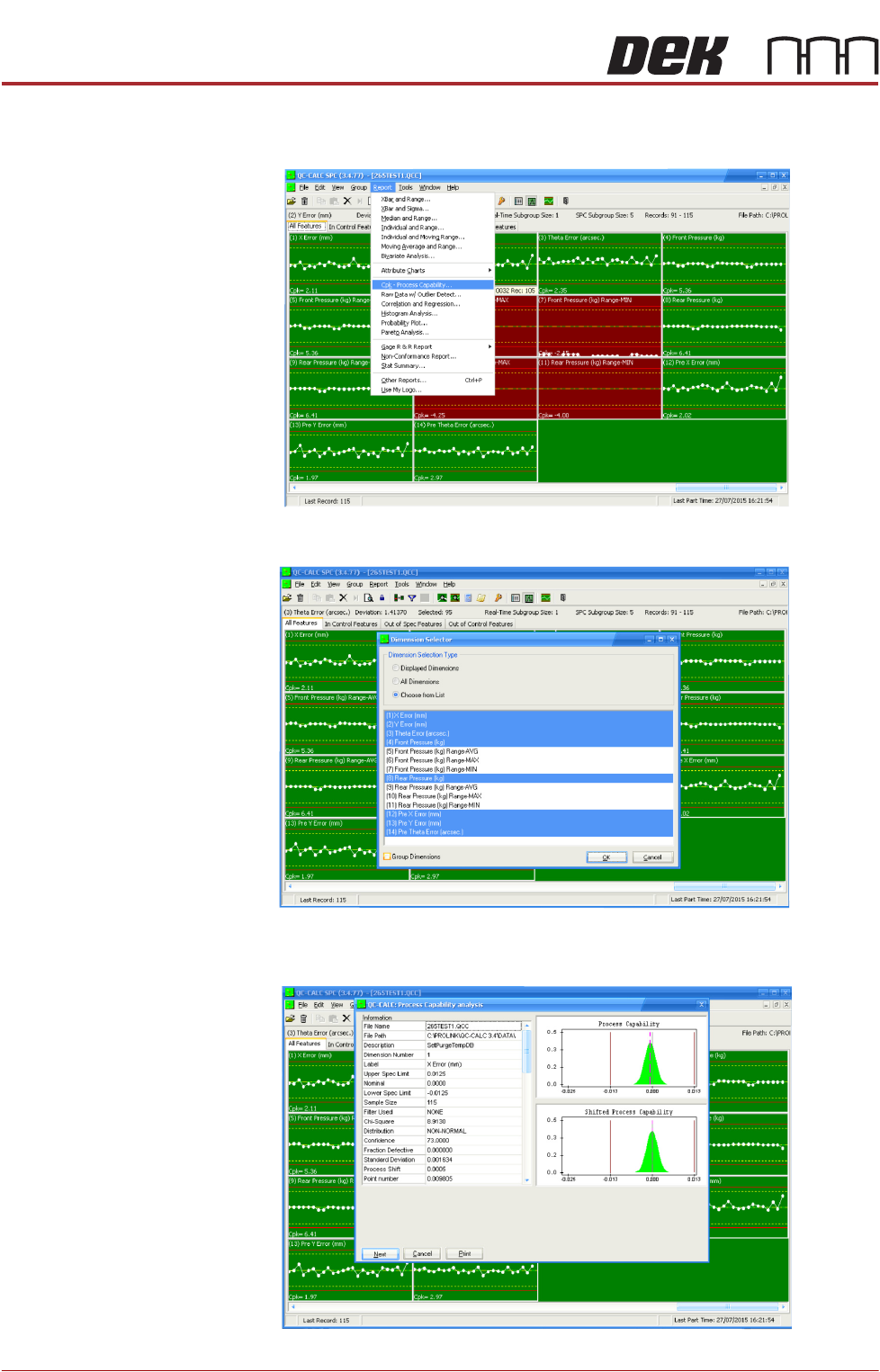
3. Select Report.
4. Select Cpk - Process Capability.
5. Highlight the required dimensions to output and select OK.
6. View the Cp/Cpk values for the dimension illustrated ensuring the values are
within the specification. Select Next to view the further dimensions.

MACHINE PERFORMANCE
MACHINE CAPABILITY
Chapter Issue 6, Jan 16 Installation Manual 8.3
7. Record the results of the following in Section 21 of the Installation Checklist:
NOTE
On occasions no Cp/Cpk values are displayed for pressure and speeds due to
the small size of the error. Pressure is not recorded for ProFlow only machines.
Printer Running
Windows XP
Load the product file named 265test1 from the hard disk and with an ASM
alignment board loaded ensure that the following parameters are correct:
• Screen - Calibration / Dry Align
• Squeegee - Length to suit board / ProFlow - Empty Transfer Head
• Front & Rear Print Speed - 25mm/sec (squeegees) / 70mm/sec (ProFlow)
• Front & Rear Pressure - 5kg (squeegees) / 3kg (ProFlow)
• ProFlow Paste Pressure - 2.2 bar
• ProFlow Idle Pressure - 0.2 bar (ProFlow with SCAR)
• Separation Speed - 1mm/sec.
• Under Board Clearance - 20mm
• Paste Dispense - 0
• Under Screen Rate - 0
• Transport Mode - Left to Left
• SPC Data Output Rate - Every Cycle
• SPC Data Mode - Disk
• SPC Format - Windows
• SPC Align Inspect Mode - Pre & Post Print
Use nine magnetic tooling pins to fully support the board, apply small amount
of paste or suitable lubricant (enough to lubricate squeegees). Record >100 full
machine cycles and setup QC-Cal program as follows:
1. Select QC Calc.
Detail Specification
X Alignment
Refer to the Machine Performance
Document supplied with the machine
for the values of machine and pro-
cess alignment capability.
Y Alignment
θ Alignment
Pressure (See Note)
Print Speed (See Note)
MACHINE PERFORMANCE
MACHINE CAPABILITY
8.4 Installation Manual Chapter Issue 6, Jan 16
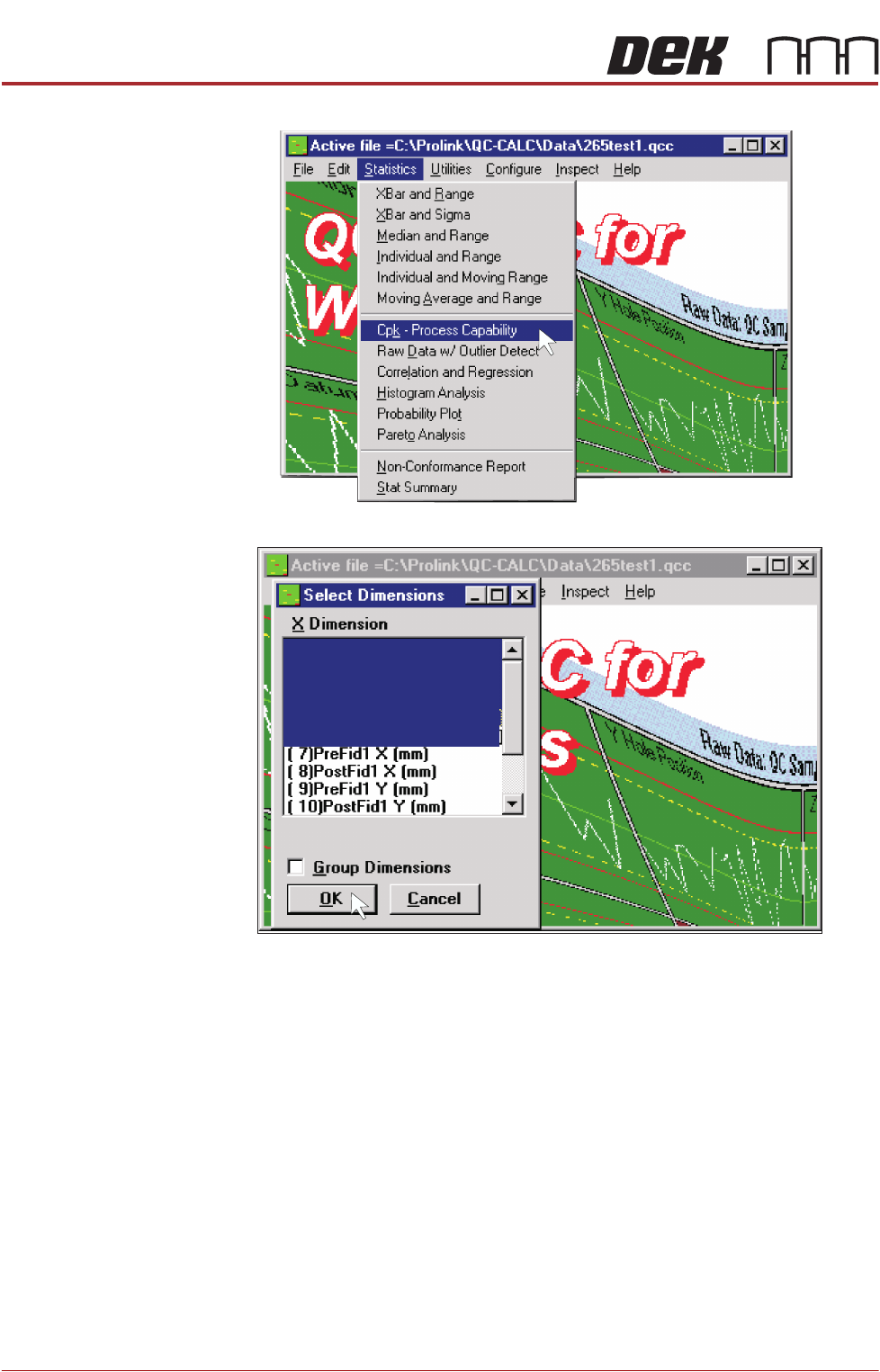
2. Select Statistics, Cpk - Process Capability.
3. Highlight the required dimensions to output and select OK.
4. View the Cp/Cpk values for the dimension illustrated ensuring the values are
( 5)Pre Y Error (mm)
( 6)Pre Theta Error (arcsec. )
( 4)Pre X Error (mm)
( 3)Theta Error (arcsec. )
( 2)Y Error (mm)
( 1)X Error (mm)