TM2832.Badmark Transport.pdf - 第3页
MDOC-SOFT501 16 3/7 2. Outline of the function This functi on transport s bad mark data w hich is loade d in the up stream machine to the downstrea m machine. This can s ave the time t o recognize bad marks on e ach mach…

MDOC-SOFT50116 2/7
Contents
1.Limitations............................................................................................................................................................................ 2
2.Outlineofthefunction.................................................................................................................................................... 3
3.SettingMethod................................................................................................................................................................... 4
4.Others .................................................................................................................................................................................. 5
4.1.
Errormessages
........................................................................................................................................................ 5
4.2.InitialSetupItems..................................................................................................................................................... 6
4.3.FileFormat(forinformation)................................................................................................................................ 7
1. Limitations
This function has the following limitations.
Sending machine and receiving machine should be connected on network(LAN).
A cable for “SMEMA” or “ADVANCED GATE” is necessary.
This function is not supported with Optimizer and CT Estimation.
This function is not supported with a line with single lane and dual lane machines
mixed.
This function is not supported with WPU(Twin Push Up).
Use the same board name and the same bad mark data on a sending machine
and a receiving machine.
MDOC-SOFT50116 3/7
2. Outline of the function
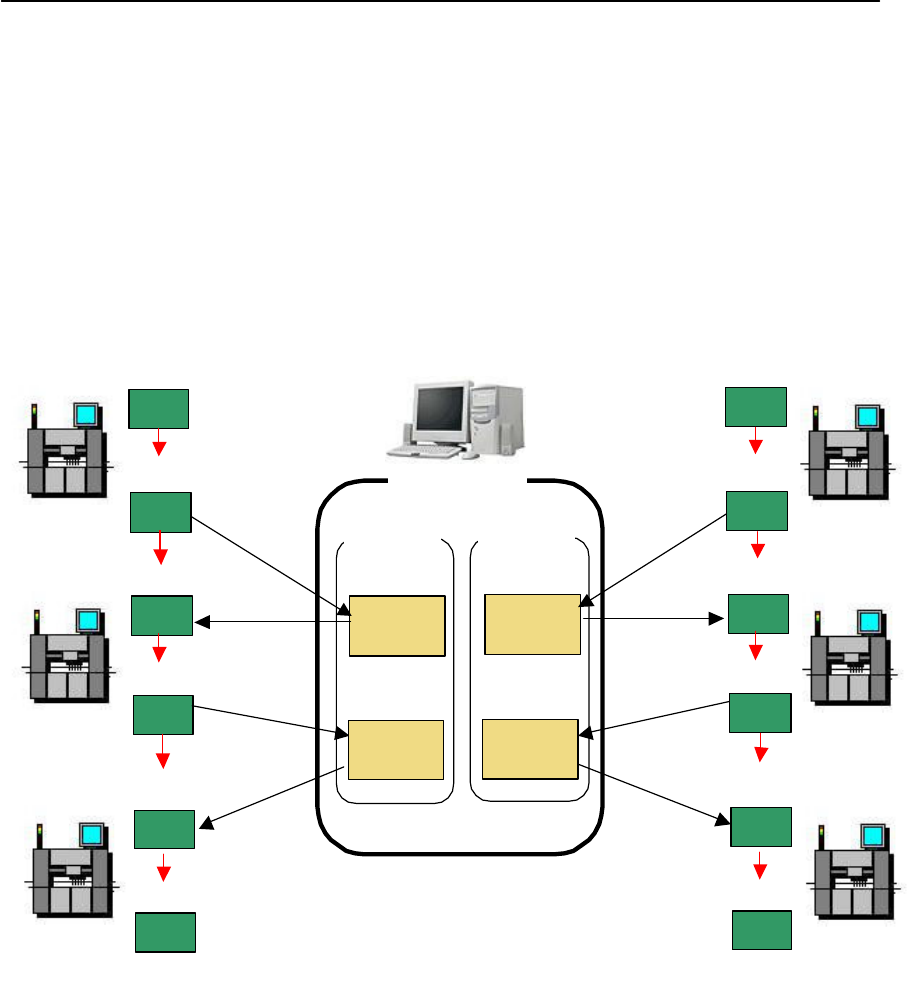
This function transports badmark data which is loaded in the upstream machine to the
downstream machine.
This can save the time to recognize badmarks on each machine, which improves a cycle
time of the whole line.
First machine
Line1
Line2
Network
Machine1
Machine2
Machine3
Shared folder
Folder 1
Folder
for Line1
Write Bad
Mark info
Mount
Completed
Board
carry in
First machine
Machine1
Machine2
Machine3
Folder 2
Folder 1
Folder
for Line2
Folder 2
Board
carry in
Write Bad
Mark info
Read Bad
Mark info
Read Bad
Mark info
Mount
Completed
Board
carry in
Mount
Completed
Mount
Completed
Board
carry in
Board
carry in
Mount
Completed
Board
carry in
Mount
Completed
Write Bad
Mark info
Write Bad
Mark info
Read Bad
Mark info
Read Bad
Mark info
Last machine
Last machine
Fig 2.1 Network Configuration
MDOC-SOFT50116 4/7
3. Setting Method
This chapter explains how to set this function.
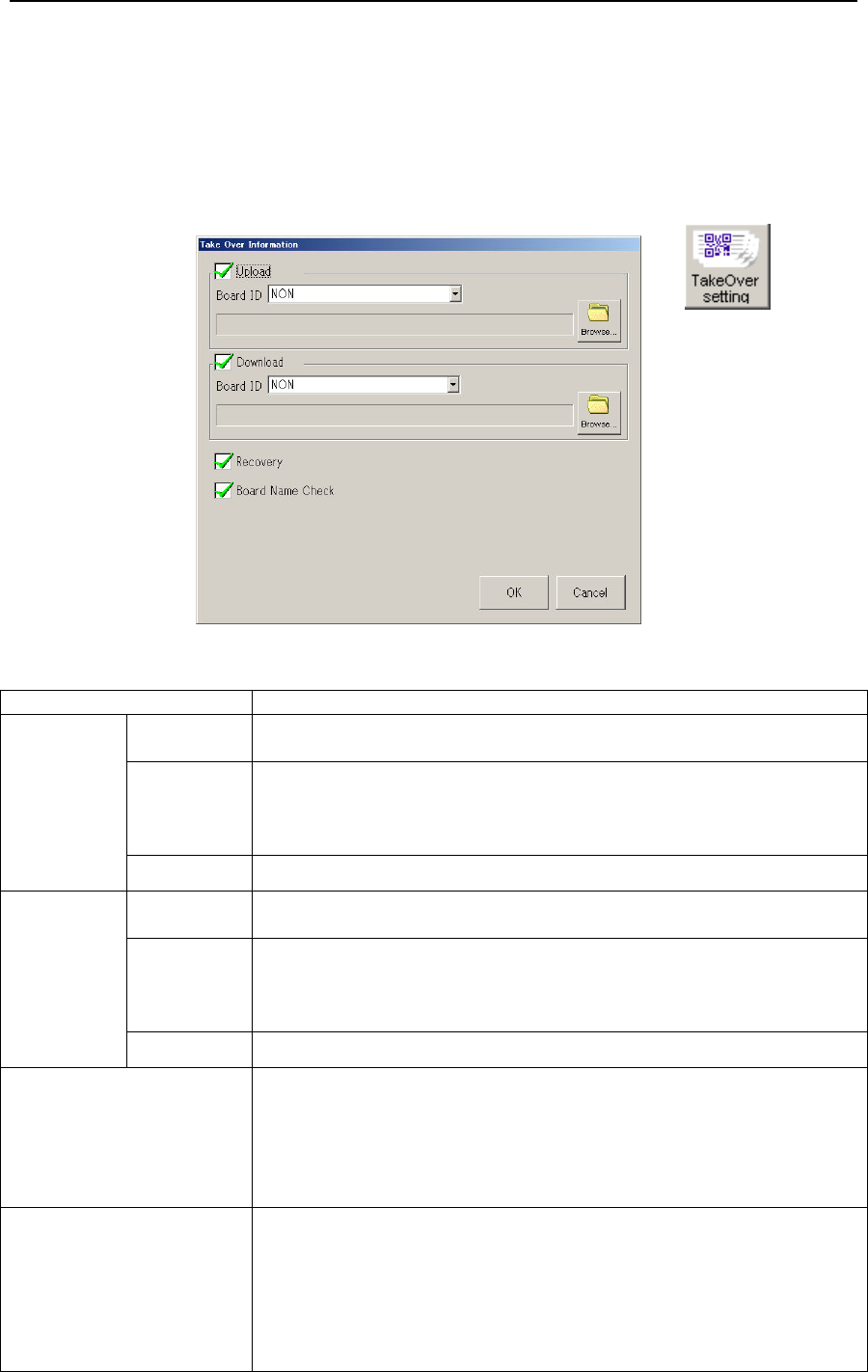
You need Exporting and Importing badmark data on every machine on the line.
Click [Setup] - [Software Setting] - [Basic] - [TakeOver Setting]
Fig 1.2 Setting for Take Over Information
Menu Item
Upload Upload Checked: Imports badmark data from the upstream machine.
Unchecked: Uncheck on the first machine of the line.
Board ID Unchecked: Not use Board ID
SIGNBOARD: Select this if you use “2D code scan (Tok1265)”.
TAKE OVER: Select this if you use “Auto Program Change Over
(Op003)”
Browse Select a folder to import.
Download Download Checked: Exports badmark data to the downstream machine.
Unchecked: Uncheck on the last machine of the line.
Board ID Unchecked: Not use Board ID
SIGNBOARD: Select this if you use “2D code scan (Tok1265)”.
TAKE OVER: Select this if you use “Auto Program Change Over
(Op003)”
Browse Select a folder to export
Recovery If bad mark data desapears for some reasons…
Checked: Executes a badmark recognistion without an error stop.
This is checked by default.
This should be checked on the first machine if you use Recovery.
Unchecked: Makes an error stop.
Uncheck if you want to make a stop with error messages.
Board Name Check Checked: Checks if the same board name as that from the
upstream machine is used, and if not, stops with an
error.
Unchecked: Doesn’t check board names.
Uncheck if you use Board ID.
Uncheck if the line has Xg/Yg Series, and also you
use a board name with more than 20 characters.