TM2832.Badmark Transport.pdf - 第5页
MDOC-SOFT501 16 5/7 4. Others 4.1. Error mess ages These are t he error mess ages displayed only when Rcovery is not activated. Error No. Messages Ea12852 Board Name under the selection are different because of the check…
MDOC-SOFT50116 4/7
3. Setting Method
This chapter explains how to set this function.
You need Exporting and Importing badmark data on every machine on the line.
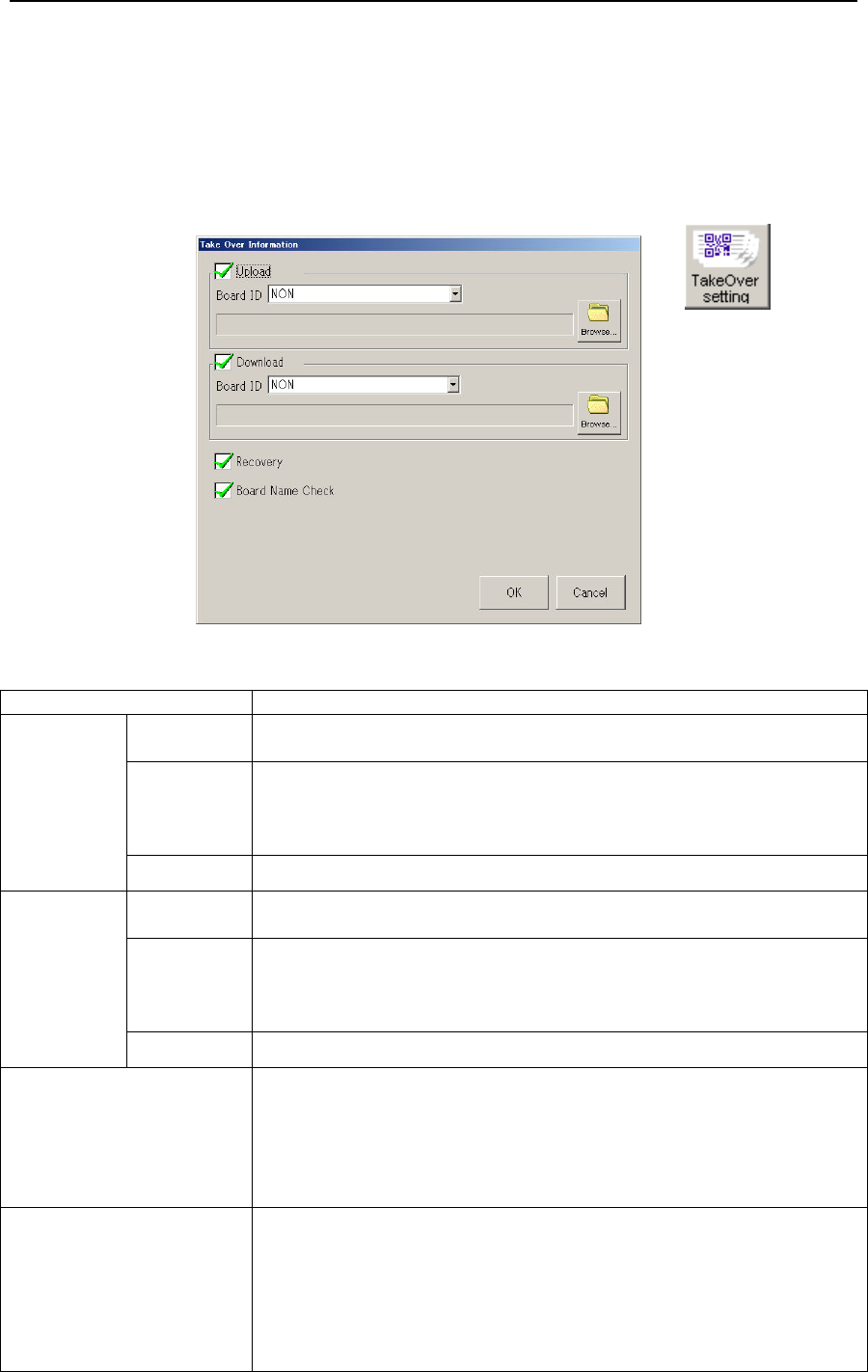
Click [Setup] - [Software Setting] - [Basic] - [TakeOver Setting]
Fig 1.2 Setting for Take Over Information
Menu Item
Upload Upload Checked: Imports badmark data from the upstream machine.
Unchecked: Uncheck on the first machine of the line.
Board ID Unchecked: Not use Board ID
SIGNBOARD: Select this if you use “2D code scan (Tok1265)”.
TAKE OVER: Select this if you use “Auto Program Change Over
(Op003)”
Browse Select a folder to import.
Download Download Checked: Exports badmark data to the downstream machine.
Unchecked: Uncheck on the last machine of the line.
Board ID Unchecked: Not use Board ID
SIGNBOARD: Select this if you use “2D code scan (Tok1265)”.
TAKE OVER: Select this if you use “Auto Program Change Over
(Op003)”
Browse Select a folder to export
Recovery If bad mark data desapears for some reasons…
Checked: Executes a badmark recognistion without an error stop.
This is checked by default.
This should be checked on the first machine if you use Recovery.
Unchecked: Makes an error stop.
Uncheck if you want to make a stop with error messages.
Board Name Check Checked: Checks if the same board name as that from the
upstream machine is used, and if not, stops with an
error.
Unchecked: Doesn’t check board names.
Uncheck if you use Board ID.
Uncheck if the line has Xg/Yg Series, and also you
use a board name with more than 20 characters.

MDOC-SOFT50116 5/7
4. Others
4.1.
Error messages
These are the error messages displayed only when Rcovery is not activated.
Error No. Messages
Ea12852
Board Name under the selection are different because of the check on the forwarding data of
transport badmark result.
[Cause]
The program name under the selection is different from the program name of the forwarding
data.
[Countermeasure]
・Please correct the data that became a disagreement, and turn it on from the upstream
equipment again.
・ Please invalidate "Program name check" when the check on the program name is
unnecessary. Check the upload path by [Software Setting] - [Basic] - [TakeOver Setting].
Program Name
Board Data
Trans Data
Ea12853
The forwarded number of data and the number of data under selections are different because of the
check on the forwarding data of transport badmark result.
[Cause]
The number of data is different in the substrate data and the forwarding data.
[Countermeasure]
Please correct the data that became a disagreement, and turn it on from the upstream
equipment again.
Board Block Local
Board Data
Trans Data
Ea12854
Data other than having recognized it by checking the forwarding data of transport badmark result
were detected.
[Cause]
The number of data is different in the substrate data and the forwarding data.
[Countermeasure]
Please correct the data that became a disagreement, and turn it on from the upstream
equipment again.
Ea12855
It failed in reading transport badmark result file.
[Cause]
It failed in reading transport badmark result file.
[Countermeasure]
Please confirm the folder set to input information can be read.
Check the upload path by [Software Setting] - [Basic] - [TakeOver Setting].
Ea12856
It failed in writing transport badmark result file.
[Cause]
It failed in writing transport badmark result file.
[Countermeasure]
・Please confirm the folder set to output information can be written.
Check the download path by [Software Setting] - [Basic] - [TakeOver Setting].
・Please do the output control when the output is unnecessary.
Please nullify the check on "XXX" by [Software Setting] - [Basic] - [TakeOver Setting].
File name
MDOC-SOFT50116 6/7
4.2. Initial Setup Items
These are items to be initially specified.
Table 4.1 Initial setting items
Menu Items
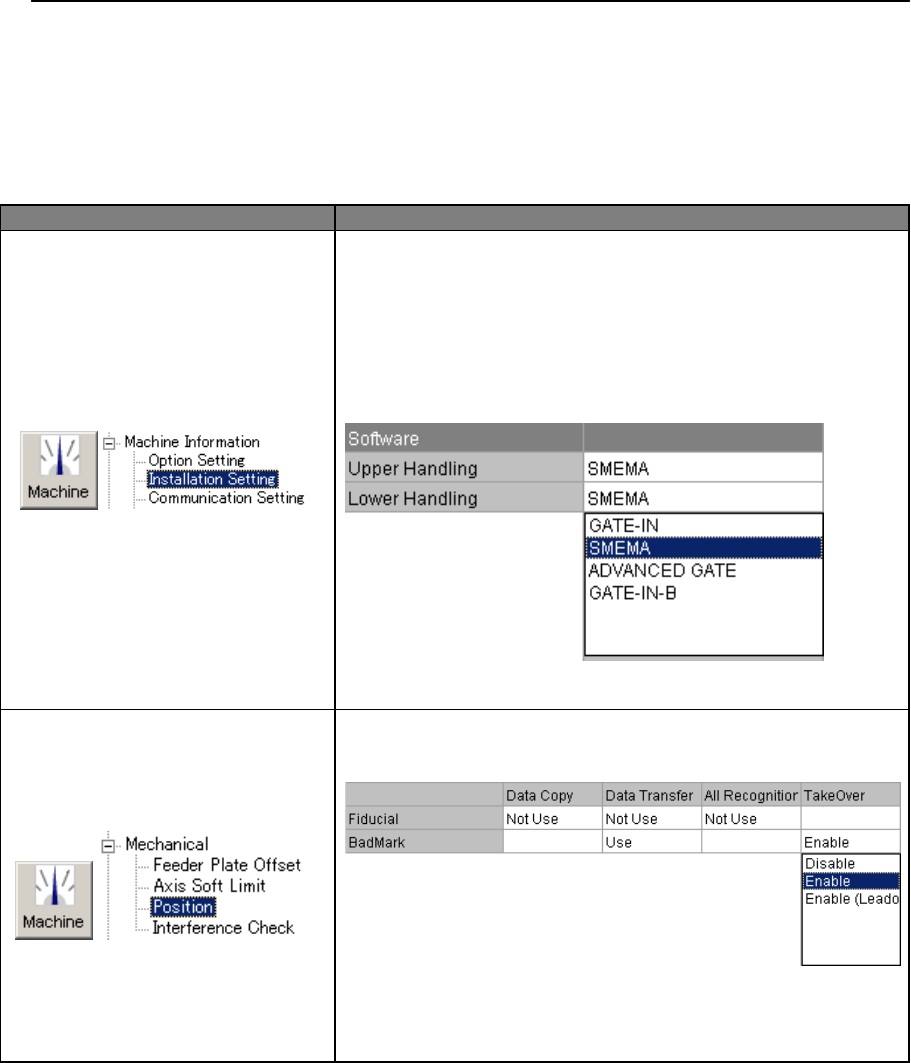
[Upper Handling]
Select ”SMEMA” or ”ADVANCED GATE” to receive a
badmark recognition result from the upstream machine.
[Lower Handling]
Select ”SMEMA” or ”ADVANCED GATE” to send a
badmark recognition result to the downstream machine.
Fig 4.4 Instllation Setting
Set [Take Over] to “Enable” or “Enable()”.
Fig 4.5 Machine Data
It is not necessary to set [Data Transfer] in a single stage
machine.