manual-jtse-control-unit-hot-air-0027698_ID-218375_EN.pdf - 第4页
19:29 20 ºC Power 45% 120ºC Selected TC Te mp . 4m 38s 400 ºC 80 % 400ºC Selected Protection Hot Air T emp. Air Flow Selec. 19:29 20 ºC Power 45% 120ºC Selected TC Te mp . 4m 38s 400 ºC 80 % 400ºC Selected Protection Hot…
33
40 mm
50 mm
60 mm
80 mm
100 mm
130 mm
130 mm
para manuales - negro plano
200 mm
300 mm
E2064*
Extractor 64
(20x26mm)
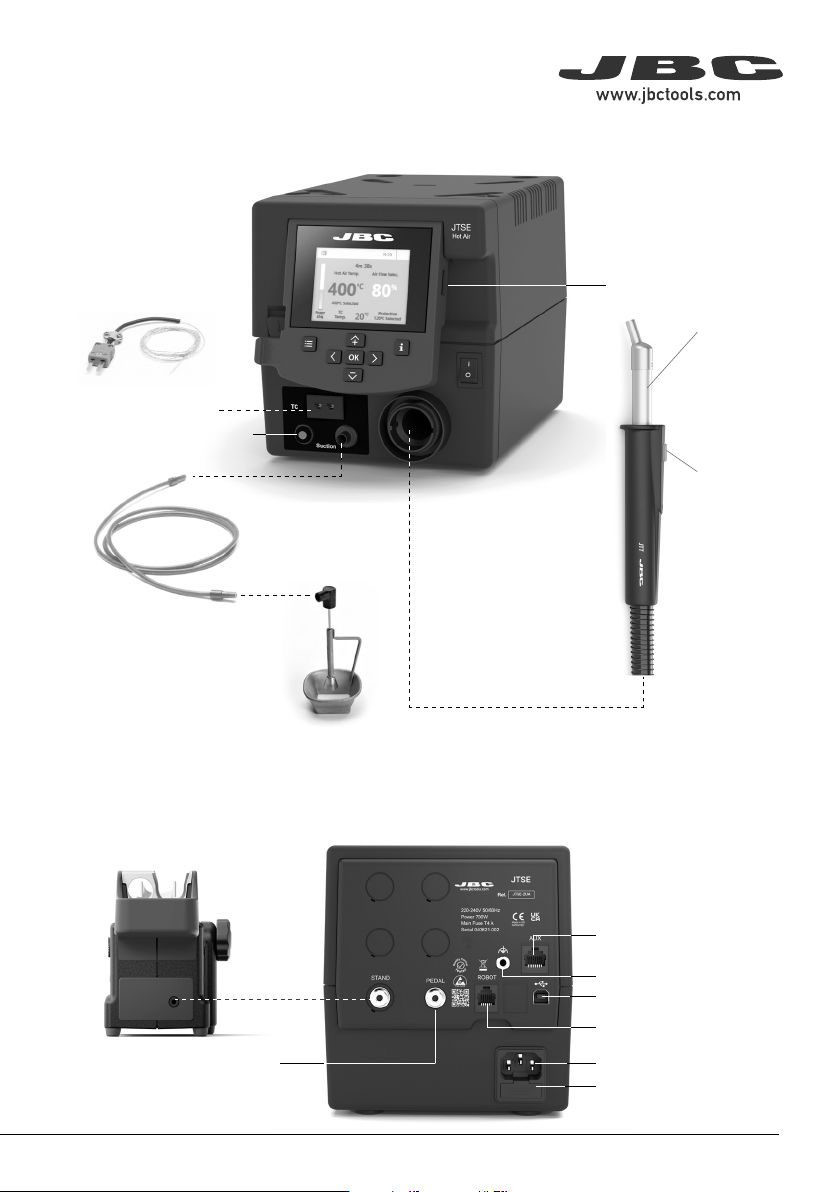
Hot Air Button
(On / Off)
Power Socket
Fuse
USB-B Connector
RJ-12 Connector
P405 Pedal Connector
Equipotential Connector
Auxiliar Connector
Heating Element
JTT*
Heater Hose Set
JTS*
Stand for JT
Heater Hose Set
Thermocouple Type K
Connector
Activates the Suction Pump
USB-A Connector
Features and Connections
A2330*
Suction Tube for
Protectors & Extractors
Power Hot Air
Control Unit
Power Hot Air
Control Unit
* not included, sold separately
19:29
20
ºC
Power
45%
120ºC Selected
TC
Temp.
4m 38s
400
ºC
80
%
400ºC Selected
Protection
Hot Air Temp. Air Flow Selec.
19:29
20
ºC
Power
45%
120ºC Selected
TC
Temp.
4m 38s
400
ºC
80
%
400ºC Selected
Protection
Hot Air Temp. Air Flow Selec.
19:29
20
ºC
Power
45%
120ºC Selected
TC
Temp.
4m 38s
400
ºC
80
%
400ºC Selected
Protection
Hot Air Temp. Air Flow Selec.
· Add point
· Delete point
· Load profile
· Save profile
· Exit
Current
Air
Temp.
Data for
These Points
Profile
Name
Current
Air flow
Current
External
TC Temp.
In this mode you can set up or edit as many as 25 air flow and temperature profiles.
Edit Mode
Menu
Options
Profiles
Advanced Functionalities
To work with profiles it is essential to use RWB / RWS / RWT rework arms. The
Rework Arms supports the Hot Air Heater maintaining the distance and position to
the component.
19:29
20
ºC
Power
45%
120ºC Selected
TC
Temp.
4m 38s
400
ºC
80
%
400ºC Selected
Protection
Hot Air Temp. Air Flow Selec.
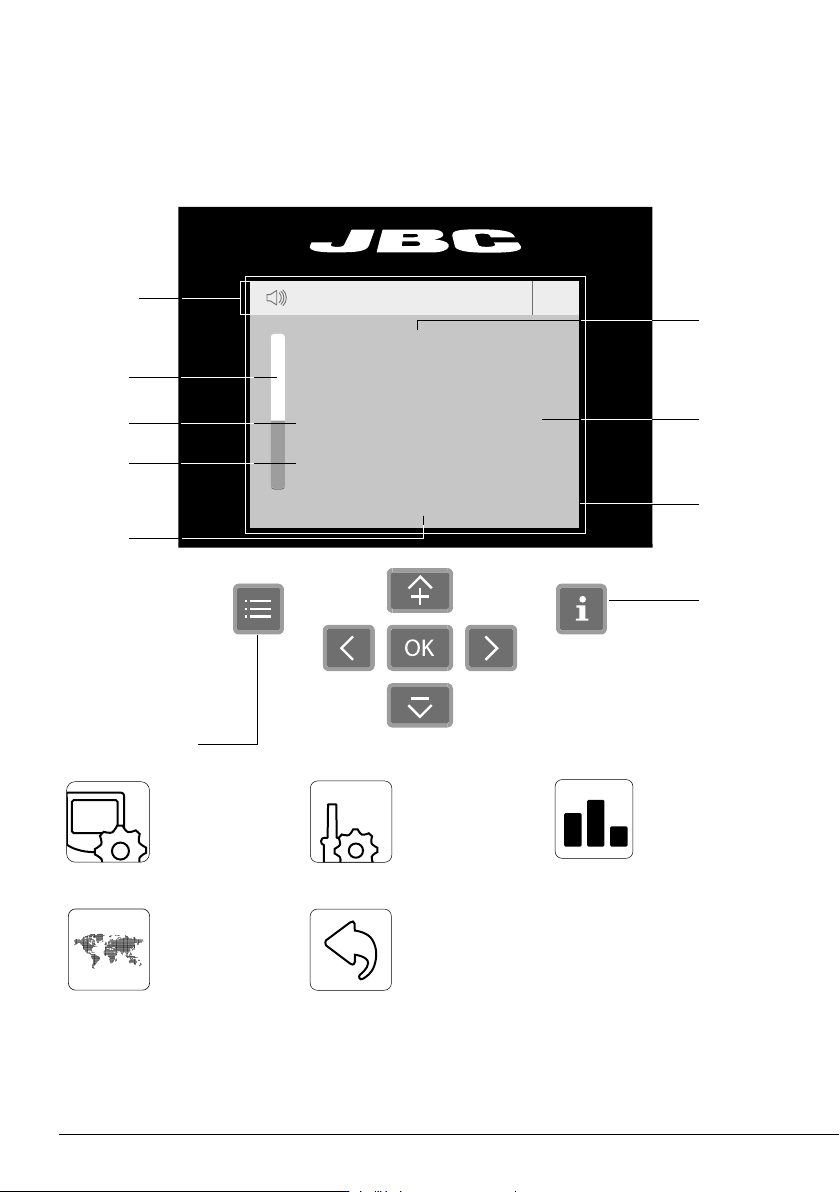
Menu Options
Station
Information
Current
Air
Temp.
Selected
Air
Temp.
Instant Power
Supplied to
Heater
Time to
Stop
Selected
Air Flow
Selected
External TC
Temp.
JTSE / TESE Work Screen
Status Bar
The work screen offers an intuitive user interface which provides quick access to station
parameters. Default PIN: 0105
Current
External
TC Temp.
Station Tools Counters
ResetLanguage
Set the station
parameters
Set the tool
parameters
Display the hours
worked in each cycle
It is possible to
choose the language
from a list.
Allows you to carry
out an overall station
reset restoring all the
parameters to their
default values.
Station troubleshooting available on the product page at www.jbctools.com
Troubleshooting
44
19:29
20
ºC
Power
45%
120ºC Selected
TC
Temp.
4m 38s
400
ºC
80
%
400ºC Selected
Protection
Hot Air Temp. Air Flow Selec.
19:29
20
ºC
Power
45%
120ºC Selected
TC
Temp.
4m 38s
400
ºC
80
%
400ºC Selected
Protection
Hot Air Temp. Air Flow Selec.
19:29
20
ºC
Power
45%
120ºC Selected
TC
Temp.
4m 38s
400
ºC
80
%
400ºC Selected
Protection
Hot Air Temp. Air Flow Selec.
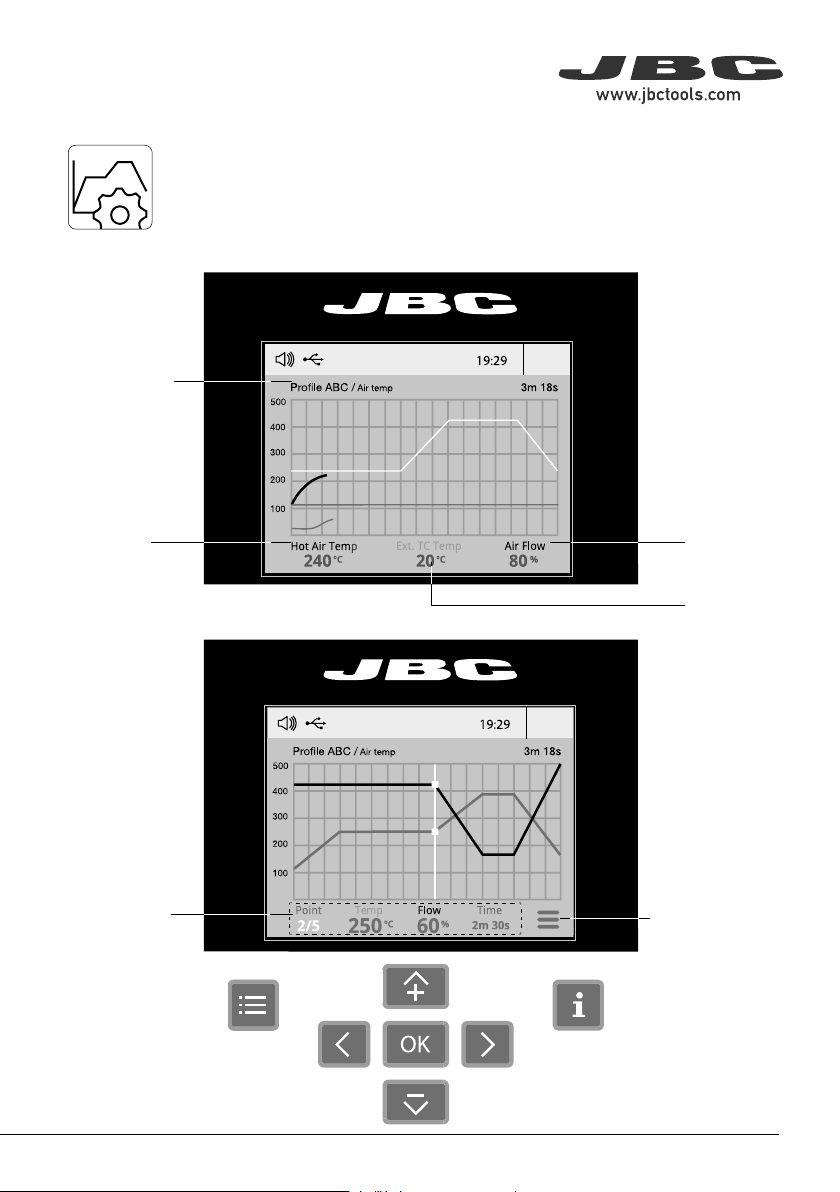
· Add point
· Delete point
· Load profile
· Save profile
· Exit
Current
Air
Temp.
Data for
These Points
Profile
Name
Current
Air flow
Current
External
TC Temp.
In this mode you can set up or edit as many as 25 air flow and temperature profiles.
Edit Mode
Menu
Options
Profiles
Advanced Functionalities
To work with profiles it is essential to use RWB / RWS / RWT rework arms. The
Rework Arms supports the Hot Air Heater maintaining the distance and position to
the component.
55
40 mm
50 mm
60 mm
80 mm
100 mm
130 mm
130 mm
para manuales - negro plano
200 mm
300 mm