Printer 710_810 v8 Machined C Chase Module.pdf - 第4页
MACHI NED C C HASE M ODULE ADJUS TMENTS AN D SETTIN GS 14.4 Technical Reference Manual Chapter Issue 1 Nov 05 ADJUSTMENTS AND SETTINGS Image Scales The machined C chase has two image scales as foll ows: The figur e below…
MACHINED C CHASE MODULE
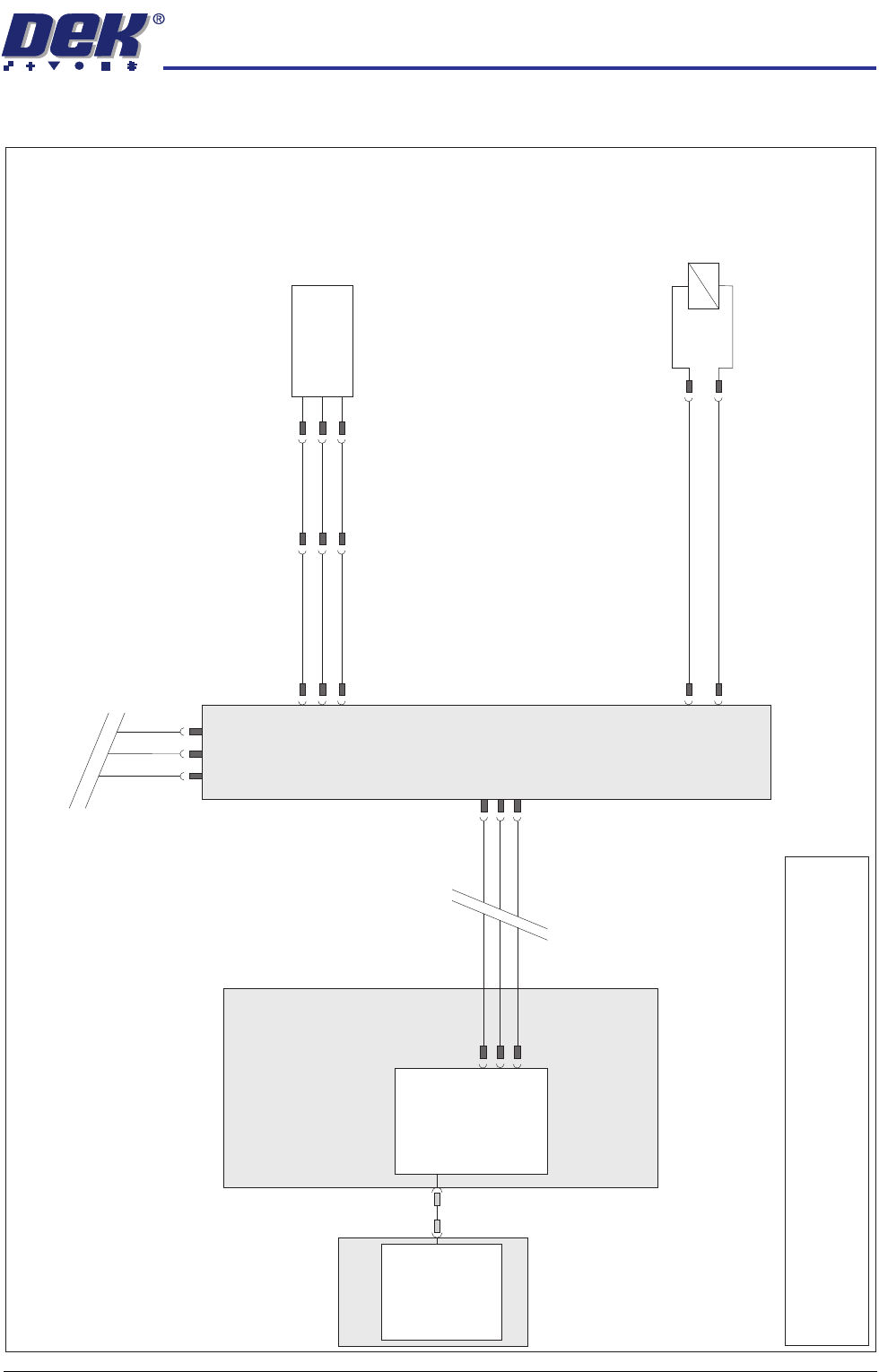
ELECTRICAL SCHEMATIC
Chapter Issue 1 Nov 05 Technical Reference Manual 14.3
ELECTRICAL SCHEMATIC
M36 Machine
Control Enclosure
PC
USB
Motherboard
NextMove ES
(I/O Node 1)
1
2
4
CAN_H
CAN_L
CAN GND
M36PL35
CAN In
CAN Bus
Main
Machine
I/O Node 2
N2SK2
7
2
3
CAN
Out
N2SK3
7
2
3
16SK07
Screen
Clamps
16SOL07
DIG OUT 8
N2PL4
0V
2
15
+
-
N2PL10
1
2
3
13PL01
1
2
3
DIG IN 3
Screen Position
Sensor
13SE25
+12V
Sig
0V
13SK25
1
2
3
NOTE
The breaks in the CAN Bus chain reflect that additional I/O Nodes
may be fitted, refer to Machine Control chapter for the complete
CAN Bus chain.
MACHINED C CHASE MODULE
ADJUSTMENTS AND SETTINGS
14.4 Technical Reference Manual Chapter Issue 1 Nov 05
ADJUSTMENTS AND SETTINGS
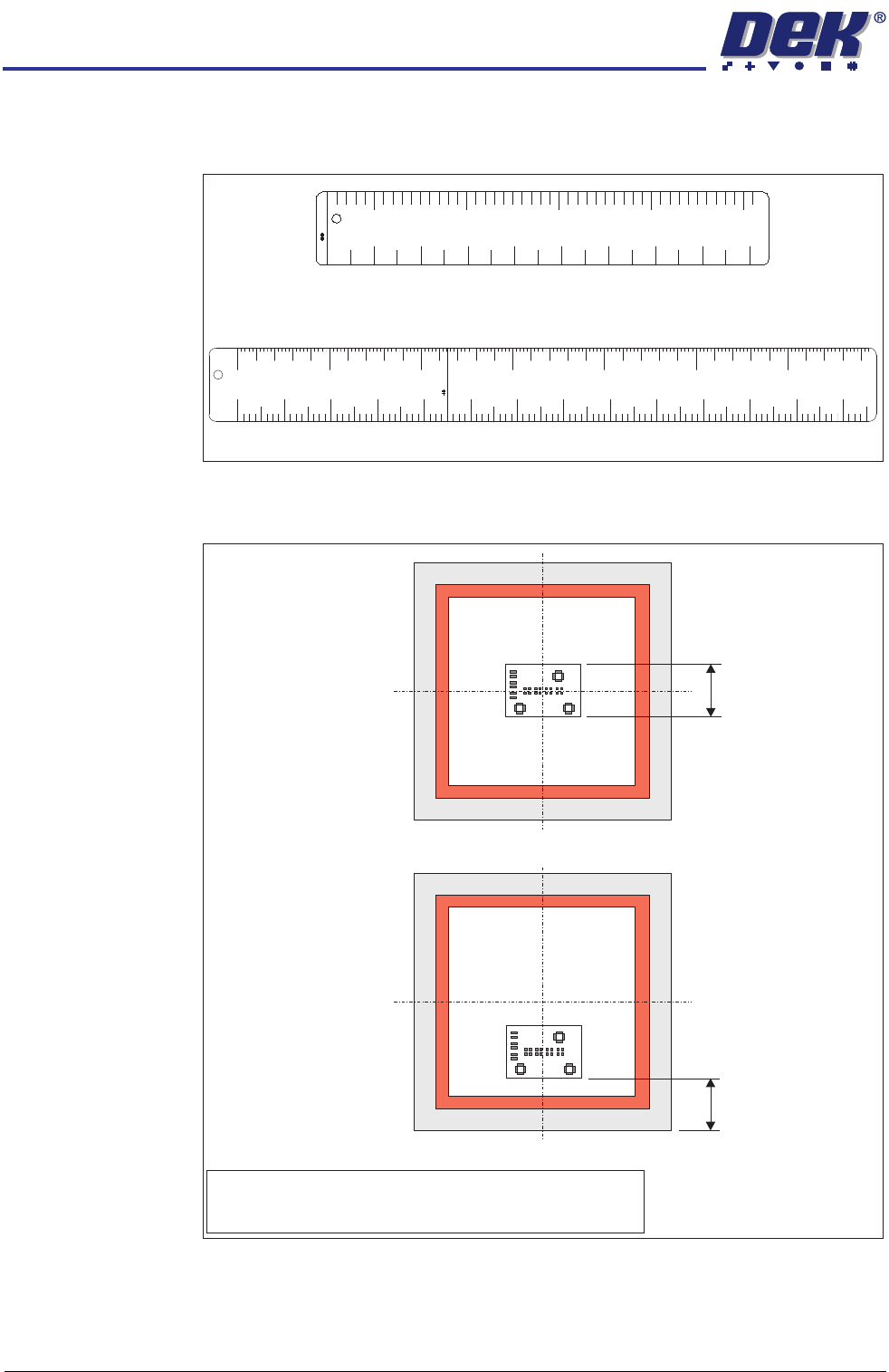
Image Scales The machined C chase has two image scales as follows:
The figure below shows the measurement for both centre and front justified
stencils, when the stencil is 29 inches square.
A mechanical stop can be used instead of the front justified image scale on front
justified 29 inches square stencils. Wind out the mechanical stop when using
larger stencils or when using the stencil frame adaptor. Smaller stencils, both
front and centre justified, use the stencil frame adaptor.
Centre Justified Image Scale
Front Justified Image Scale
FRONT JUSTIFIED IMAGE - DISTANCE FROM FRONT STENCIL TO FRONT IMAGE
45
’’
411
5
mm
50
100
150
200
250
300
0
0”
1”
2”
3”
4”
5” 6”
7” 8”
9”
10”
11” 12”
13”
29’’ - 737mm - CENTRE JUSTIFIED IMAGE - BOARD WIDTH
m
m
5
0
2
’’
100
200
300
400
500
3” 5” 7” 9” 11” 13” 15” 17” 19”
4” 6” 8”
10” 12” 14” 16” 18” 20”
Front Justified
Board Width
Centre Justified
NOTE
Front of stencil to front of image is measured from the front
face of the screen frame to the front edge of the image.
Front of Stencil
to
Front of Image
MACHINED C CHASE MODULE
ADJUSTMENTS AND SETTINGS
Chapter Issue 1 Nov 05 Technical Reference Manual 14.5
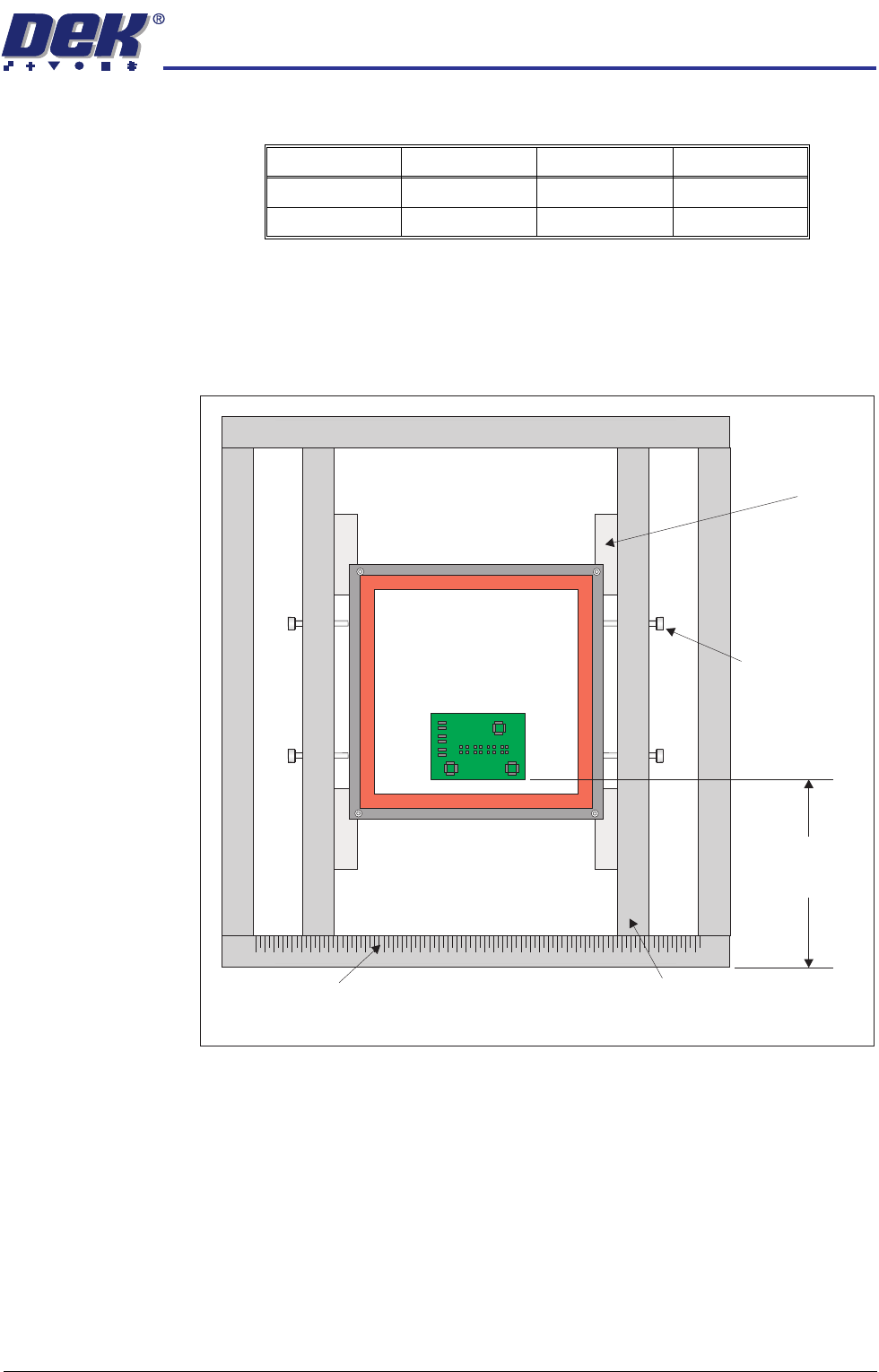
Stencil Frame
Adaptor
The stencil frame adaptor can accommodate screens within the following limits:
Stencil Frame
Adaptor Assembly
To assemble the stencil frame adaptor and position the screen in the adaptor
proceed as follows:
1. Lay the stencil frame adaptor on a flat surface.
2. Place the stencil into the centre of the stencil frame adaptor. Ensure the
stencil is supported by the four stencil supports.
3. Secure the stencil using the four stencil securing screws. Ensure that the
frame is square in the adaptor and that the securing screws are not too tight,
causing the stencil to distort.
To position the stencil frame adaptor and screen correctly within the machined
C chase, proceed as follows:
1. Measure the distance from the front edge to the front of the image.
2. Place the stencil frame adaptor and screen within the machined C chase.
3. Using the measurement taken in Step 1, align the front edge to the corre-
sponding mark on the front justified image scale.
Left/Right Front/Back Thickness
Maximum 660mm 6100mm 36mm
Minimum 300mm 250mm 15mm
Adjustable Rail
(in 2 positions)
Plan View on Stencil Frame Adaptor
Stencil Securing
Bolts
(in 4 positions)
Scale
Stencil Support
(in 4 positions)
Front of Image
to
Front Edge