00197196-02_VB_SetupCenter_5.1_de_en.pdf - 第48页
New Functions in Setup Center 5.1 Bluetooth Barcode Scanner Supporte d Permit Packaging Unit Chains to be Split in the Packaging Unit Editor 48 Version Descriptio n / Versionsbeschreibung SIPLACE Setup Cen ter 5.1 5.5 Bl…
New Functions in Setup Center 5.1
Permit Packaging Unit Chains to be Split in the Packaging Unit Editor User Interface in Polish Chinese
Version Description / Versionsbeschreibung SIPLACE Setup Center 5.1 47
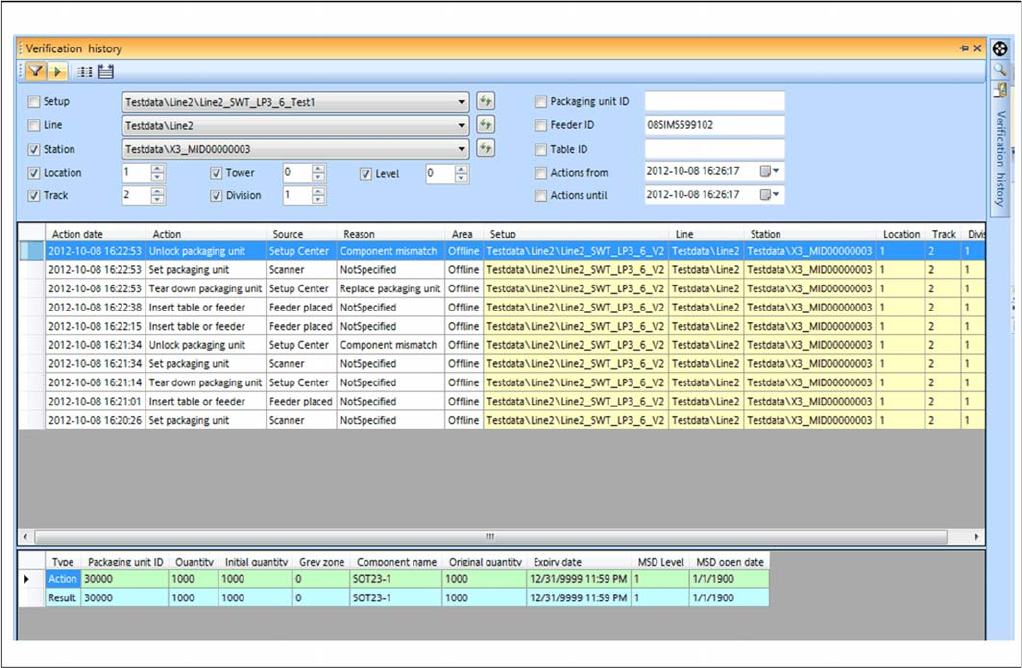
▪ If the verification history is started from the Packaging Unit Editor, the following filter options are
available:
– Pickup point
– Packaging ID
Function
Starting the verification history
► Go to the main menu and select Extras > Verification History to open the Verification History window.
Or
► Alternatively, you can open the Verification History in the Packaging Unit Editor: go to Setup Infor
-
mation and select the Verification History button.
► For detailed information, refer to the user manual "Setup Center 5.1" or the Online Help.
5.4 User Interface in Polish Chinese
The user interface is available as a separate language installation in Polish and Chinese. Once the lan
-
guages have been installed, simply go to Extras => Change Language to enable the required language.
New Functions in Setup Center 5.1
Bluetooth Barcode Scanner Supported Permit Packaging Unit Chains to be Split in the Packaging Unit Editor
48 Version Description / Versionsbeschreibung SIPLACE Setup Center 5.1
5.5 Bluetooth Barcode Scanner Supported
Purpose
The Datalogic Bluetooth
TM
barcode scanner Datalogic PowerScan® BT8300 (1D barcode) is supported.
You also need the base unit BC-8030-BT.
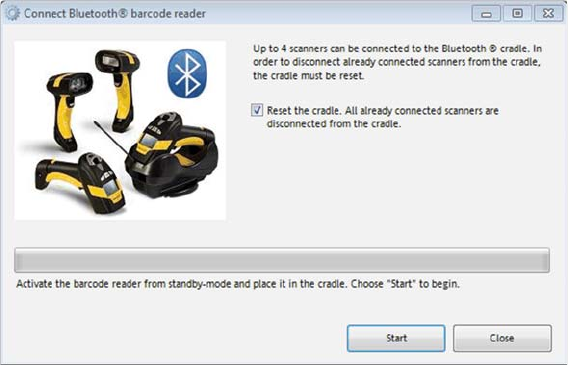
Each Setup Center application supports one base unit with up to four registered PowerScan BT8300 bar
-
code scanners.
Configuration
► In the main menu open Extras > Settings and the Settings window is opened.
► Select the category Scanner and the settings are opened.
► Go to Datalogic Scanner and select Connect Barcode Reader...
► The start page for the installation procedure will open.
► For detailed information, refer to the user manual "Setup Center 5.1".
5.6 Improved Table Management
Function – for forced setup verification
If the changeover table management is active, you need to scan in the table ID. The table ID is then
shown in the graphical view of the table in Setup Center.
If a setup changeover is then performed, the tables will no longer be switched over to offline mode but
will remain logged on. This means that the tables are no longer moved out and do not need to be logged
on again.

Restrictions
SIPLACE Pro Restriction
Version Description / Versionsbeschreibung SIPLACE Setup Center 5.1 49
6 Restrictions
6.1 Restriction
6.1.1 SIPLACE Pro
▪ The following SIPLACE Pro versions are not supported any longer:
– SIPLACE Pro 3.2
– SIPLACE Pro 4.1
6.1.2 Station Software
▪ The following station software versions are not supported any longer:
– 604.xx
6.1.3 Database Views
▪ The following Setup Center database views are not supported any longer:
– v_PackagingUnitInSetup_Short
– v_PackagingUnitInSetup
– v_PackagingUnitInSetup2
– v_PackagingUnitInSetup3
– v_PackagingUnit
– v_PackagingUnit2
– v_PackagingUnit3
– v_PackagingUnit4
– v_PackagingUnit5
– v_PackagingUnitInUse
– v_PackagingUnitInUse2
– v_TableInventory
– v_VerificationHistory
A part of the existing interface is lost because of the omission of the views named above. Due to
the modified database scheme, however, it is not possible to offer the views any longer.
6.1.4 Windows Vista / 64 Bit Operating Systems
▪ The WLAN modules Scalance W788/W744 cannot be configured on 64 Bit operating systems with
the PST tool.
6.1.5 Splice Points
▪ When using splice sensors don't repair damaged packaging units with splice because repair splice
points cannot be distinguished from the normal splice points.
NOTICE
The data access via OIB interface is recommended.