00198442-04_UM_TX-V2_EN.pdf - 第195页
Instruction manual SIPLACE TX 4 Setting up and commissioning From software version 714.0 12/2020 4.5 Setting up the placement machine 195 4.5.2 Removing the shipping braces from the gantries The gantries are secured with…
4 Setting up and commissioning Instruction manual SIPLACE TX
4.5 Setting up the placement machine From software version 714.0 12/2020
194
4.5 Setting up the placement machine
4.5.1 Fitting attached parts
The placement machine is delivered with the monitor and indicator lamp dismantled. To fit the in-
dicator lamps and the monitors, proceed as follows.
4.5.1.1 Fitting the indicator lamp
Insert the indicator lamp into the hole until the lamp tube projects sufficiently into the terminal
beneath.
Pull the connector slightly out of the lamp base.
Plug the connector into the bottom of the upper section of the lamp.
Turn the signaling lamp, until it engages.
4.5.1.2 Fixing the monitors
Use the two fastening screws to fix the monitor to the monitor mount and then connect the
monitor cable (voltage, signal, USB and earth).
Check the cable connections.
Fasten the monitor cable to the monitor with a strain relief.
Instruction manual SIPLACE TX 4 Setting up and commissioning
From software version 714.0 12/2020 4.5 Setting up the placement machine
195
4.5.2 Removing the shipping braces from the gantries
The gantries are secured with a shipping brace in both the X and Y directions. After transportation
of the placement machine, remove the shipping braces.
4.5.2.1 Removing the shipping brace on the X axis
4
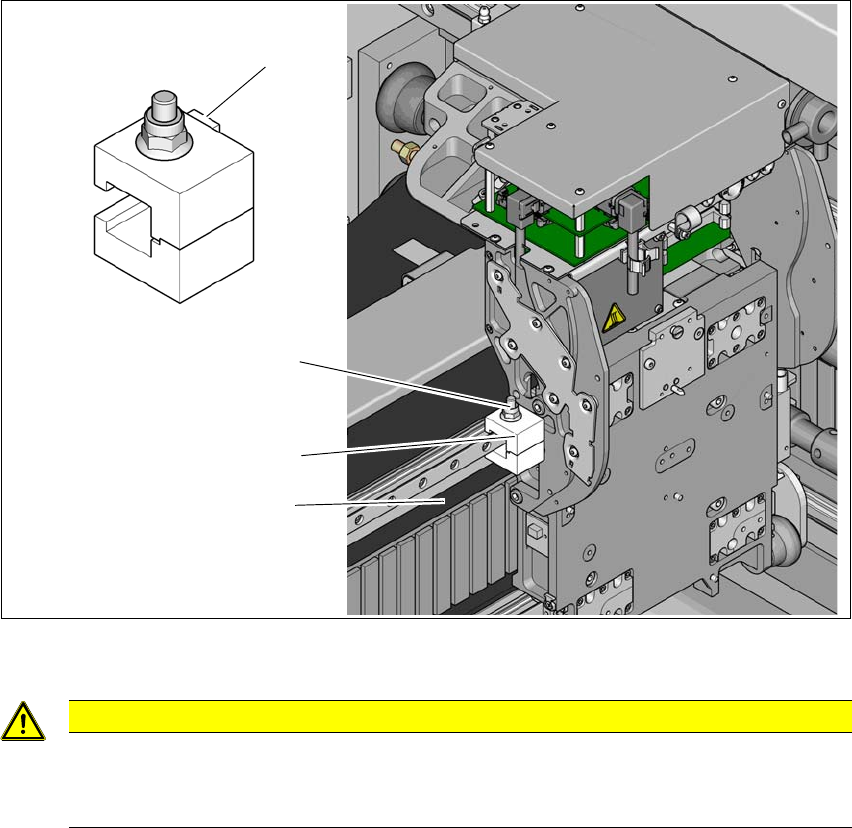
Fig. 4.5 - 1 Shipping brace on the X axis
4
Loosen the screw (1) on the shipping brace (2) so that the shipping brace can be easily taken
off the linear guide.
4
CAUTION
Do not damage the scale!
The scale is located under the shipping brace (2).
Make sure that the scale (3) under the shipping brace is not damaged.
(1)
(3)
(2)
(4)
4 Setting up and commissioning Instruction manual SIPLACE TX
4.5 Setting up the placement machine From software version 714.0 12/2020
196
4.5.2.2 Removing the shipping brace on the Y axis
4
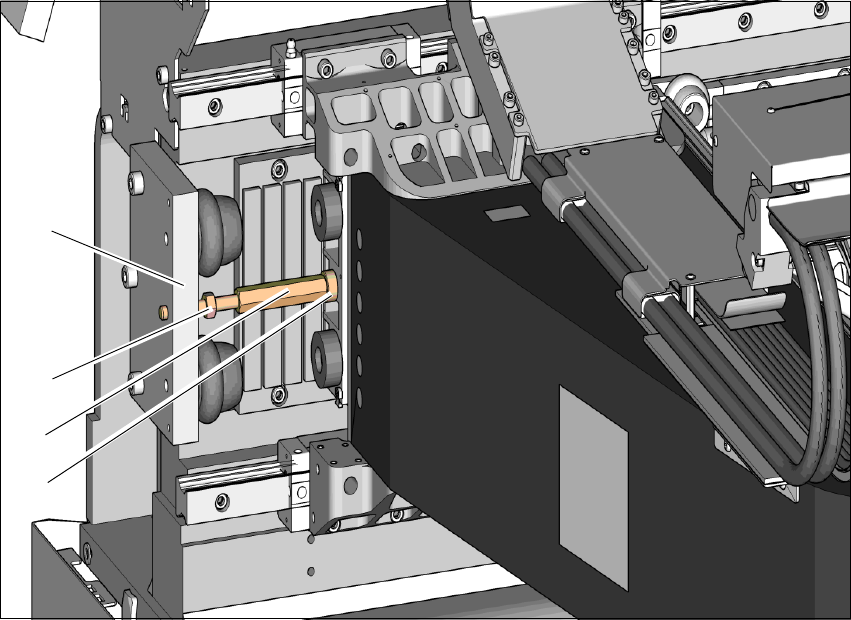
Fig. 4.5 - 2 Shipping brace on the Y axis
Loosen the counternut (2) holding the shipping brace (3) on the buffer plate (1) of the end
position stop.
Unscrew the counternut (2) 20 to 30 mm away from the buffer plate (1).
Use a size 13 fork wrench to loosen the shipping brace (3) from the gantry end (4) and un-
screw the shipping brace (3). Make sure you use the correct direction of rotation so that the
thread is not damaged.
Push the gantry to one side.
Unscrew the shipping brace completely from the buffer plate.
Keep the shipping brace safely for use later on. If the SIPLACE placement machine needs to
be transported, always fit the shipping braces again.
4.5.3 Fitting the shipping braces on the gantry axes
Before you transport the placement machine, always secure the X and Y axis of the gantry axes
with a shipping brace each. Fit these shipping braces.
(1)
(3)
(2)
(4)