00197457-01_IM_EDM_2.2_en.pdf - 第21页
EDM V2.2 / I nstal lation M anual 10/2013 Edit ion 21 Figure 6-1 : Basic EDM Configuration dial og This dial og provid es acc ess to bas ic settin gs that are comm on to al l EDM com puters : ● Mast er Server is t he EDM…

EDM V2.2 / Installation Manual 10/2013 Edition
20
6 Basic Configuration
This chapter describes some basic settings that have to be adapted after installation. Further
configuration steps and advanced settings can be found in the EDM User Guide, item no.
[00197458-xx].
6.1 Settings in SIPLACE Pro Desk
To guarantee proper operation of SIPLACE EDM, it is necessary to change some settings in
SIPLACE Pro Desk.
● SIPLACE EDM associates objects on the Master Server and the Line Servers using their
names, i.e. an object must have the same name on all computers. It is recommended to
suppress the ability to rename and create objects on EDM lines using the user permissions
management facilities in SIPLACE Pro.
● The Vision Data Manager (VDM) must be activated on all SIPLACE Pro Desk installations that
are to participate in EDM to allow Vision data (BLOBs), camera parameters and illumination
parameters to be processed for the line and the station.
● Some settings for SIPLACE Pro Desk (under Tools – Settings - General Settings) must be
consistent across all EDM Client computers and the EDM Master. Currently, this only applies to
the two options for the extended custom nozzle number range (Twin Head and CPP head)
6.2 EDM-specific Settings
CAUTION
After any change has been made (and saved) to the configuration, the changes will
immediately be applied to the local EDM service. If the "Send configuration" prompt is
confirmed, the changes will be distributed immediately to all selected EDM Configuration
Clients.
6.2.1 Basic EDM Configuration Dialogs
During the setup procedure, the user might want to adjust several vital settings. Based on the setup
type, two different dialogs are available.
6.2.1.1 Basic Configuration for Configuration Server
The Configuration Server Basic Configuration dialog is presented during the setup procedure.
If needed, the dialog is recalled via the EDM Post-Configuration Tool shortcut in the
SIPLACE EDM\Tools start menu.
EDM V2.2 / Installation Manual 10/2013 Edition
21
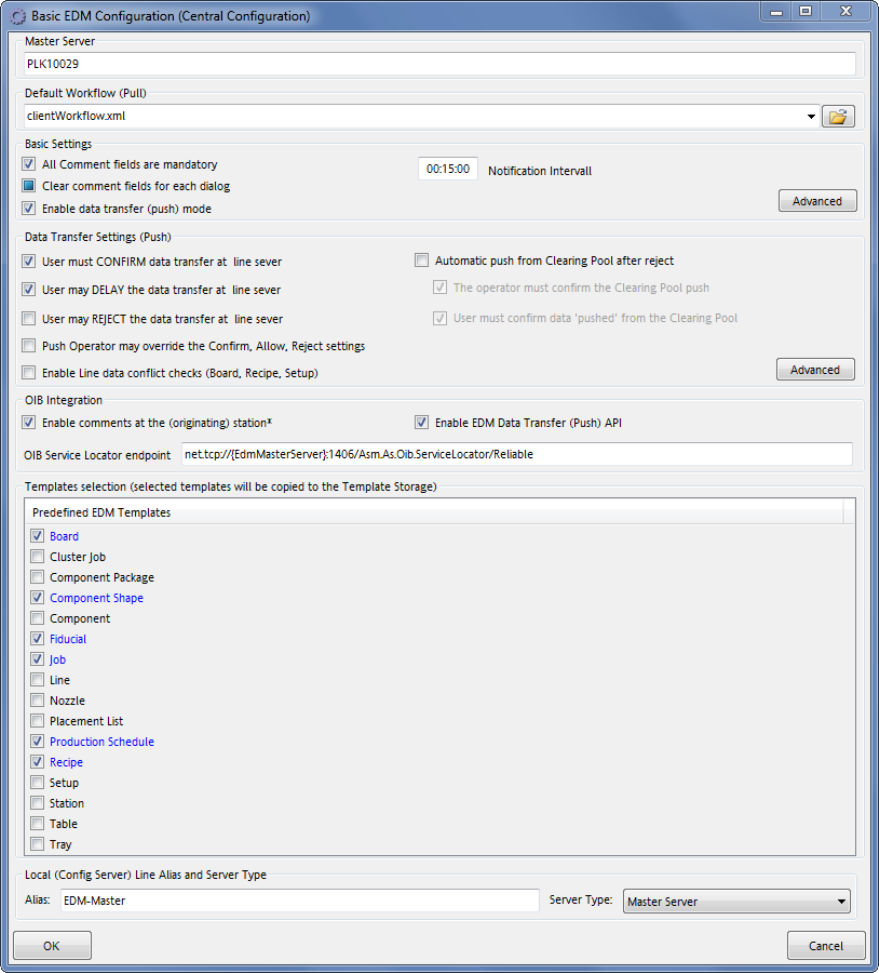
Figure 6-1: Basic EDM Configuration dialog
This dialog provides access to basic settings that are common to all EDM computers:
● Master Server is the EDM Master Server's hostname.
● Default Workflow (Pull) defines the workflow document to be used by default in EDM Line
"pull" scenarios.
● Basic Settings define the behavior of the comment dialog on EDM Lines.
● The Data Transfer Settings group configures the Push Mode settings.
● Templates selection provides the user with a list of predefined application templates that may
be installed onto the master server.
● The Local group contains the configuration server's basic settings.
● The Advanced button opens an editor to adjust all advanced settings as described in the EDM
User Guide.
EDM V2.2 / Installation Manual 10/2013 Edition
22
● The OIB Integration group contains settings needed in connection with OIB:
Enable comments at the (originating) station
Option to globally enable or disable the feature to display the EDM comment dialog at the
station triggering the change (e.g. when teaching a component shape). This feature requires
the OIB Display Service and Viewer to be installed according to the OIB Installation Manual.
NOTICE
If the dialog cannot be displayed at the station, the normal EDM comment dialog will be
displayed at the corresponding EDM Line Server. The issue will be indicated by a yellow
warning icon next to the OK button:
The tool tip of the warning icon may contain additional information about the cause.
The comment behavior for individual stations can be configured by specifying a
processing rule filter to change the behavior.
Enable EDM Data Transfer (Push) API
Option to enable or disable the EDM Push API Web Service. If the option is enabled, EDM will
try to register the service with OIB (as "SIPLACE.EDM.DataTransfer"). If the OIB Service
Locator is unavailable, this may increase the startup time of the EDM service.
OIB Service Locator endpoint
The endpoint Uri of the OIB Service Locator (part of the OIB Core). If the OIB Core is installed
on the EDM Master Server, there is no need to change the default value. The host name part of
the endpoint can be replaced by two special tokens:
– "{EdmMasterServer}" which will be replaced by the host name of the EDM Master
Server (as configured in the MachineConfig)
and
– "{EdmConfigServer}" which will be replaced by the host name of the EDM
Configuration Server (as configured during installation (in the EDM registry)).
6.2.1.2 Basic Configuration for EDM Client Computers
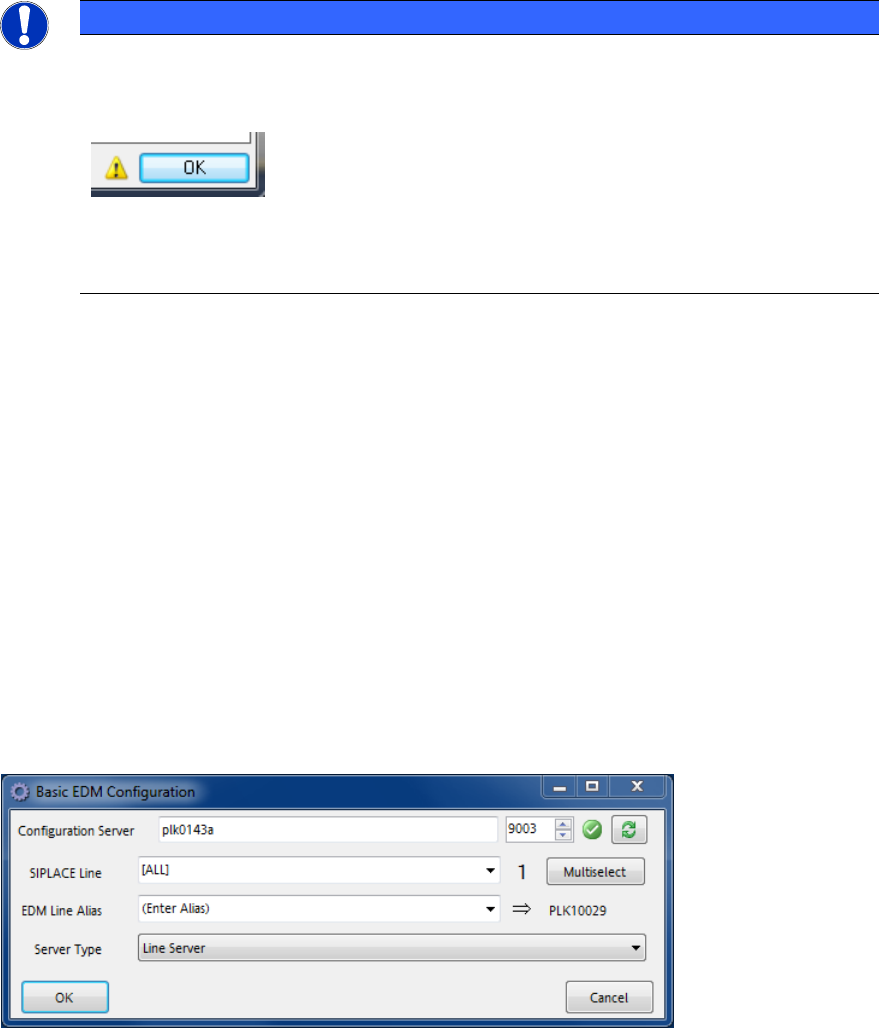
Figure 6-2: Basic EDM Configuration for Clients dialog
● Each EDM-Service needs access to a Configuration Server. The user might change it in the
Configuration Server text box.
● The SIPLACE Line control contains the SIPLACE Pro names of the (physical) lines that are
assigned to this Client computer. If needed, multiple lines may be selected via the Multiselect
button.