00194422-09_MM_X-Series_en.pdf - 第45页
Major Maintenance 5.3.3 Performing Maintenance Ta sks Maintenance Tasks for the Com ponent Docking Unit Maintenance Manual SIPLACE X Series 45 5.3.3.5 5 . 3 . 3 . 5 G r e a s in g t h e C O T I n s e r t Greasing the COT…
Major Maintenance
Maintenance Tasks for the Component Docking Unit 5.3.3 Performing Maintenance Tasks
44 Maintenance Manual SIPLACE X Series
5.3.3.4
5.3.3.4 Greasing the Cutting Blade of the Tape Cutter
Greasing the Cutting Blade of the Tape Cutter
Risk of injury when working near the tap e cutter
WARNING
Risk of injury when working near the cutter.
When working in the area of the tape cutter, move the component trolley out of the machine
and disconnect the machine from the mains supply and the compressed air supply.
► Wait until the operating pressure has dropped to 0 MPa.
► Always secure the machine against unauthorized reactivation.
► Do not reach into the tape cutter.
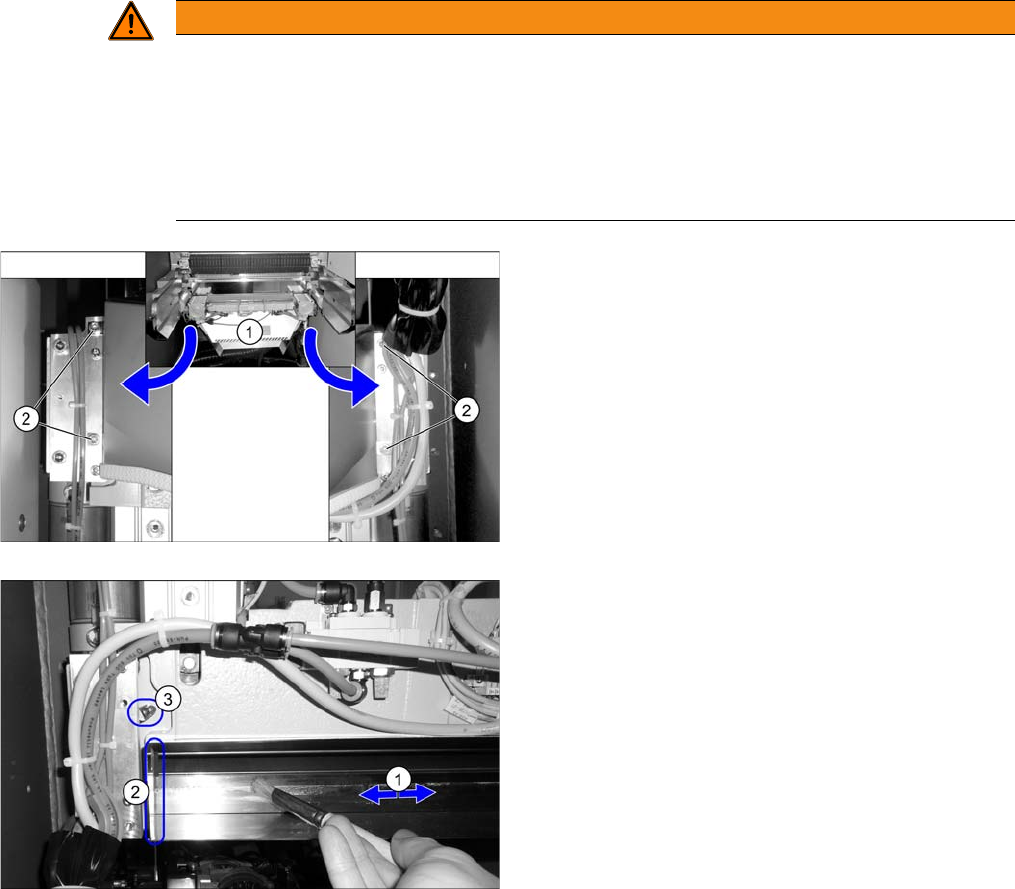
► Dismantle the waste slide (1). Loosen the four
fastening screws (2) and lift off the used tape chute.
► Spray a bit of Interflon Fin grease [03020782-xx] into
a suitable container.
► Distribute the grease with a new brush to the under
-
side of the fixed blade (1) as shown in the figure.
► Use a lint-free cloth to remove any excess grease
from the contact surfaces of the cutting blades (2)
and the grease nipple (3).
► Install the waste slide.
Major Maintenance
5.3.3 Performing Maintenance Tasks Maintenance Tasks for the Component Docking Unit
Maintenance Manual SIPLACE X Series 45
5.3.3.5
5.3.3.5 Greasing the COT Insert
Greasing the COT Insert
5.3.3.6
5.3.3.6 Greasing the Locator Bearing on the Component Trolley for X Feeders
Greasing the Locator Bearing on the Component Trolley for X Feeders
5.3.3.7
5.3.3.7 Greasing the Centering Strip on the Component Trolley for X Feeders
Greasing the Centering Strip on the Component Trolley for X Feeders
NOTICE
Undocking many times
If the component trolley is frequently undocked, we recommend that you grease the engaging
pins.
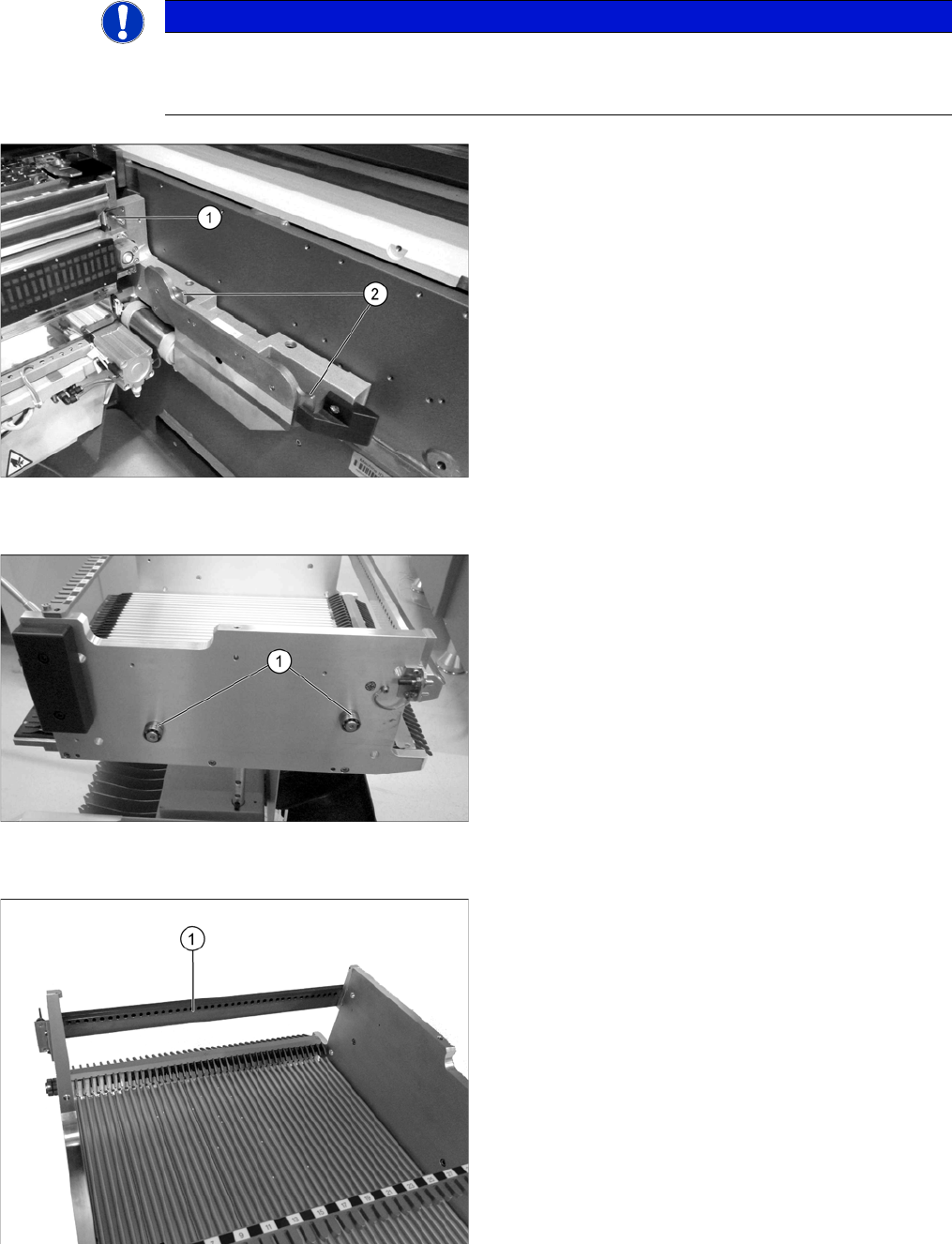
► Grease the engaging pin (1) with a SIPLACE clean
-
ing cloth.
► Grease the hooks (2) on the left and right of the com
-
ponent docking unit with a SIPLACE cleaning cloth.
► Repeat these tasks at all locations.
► Grease the rollers (1) (two per side) on the changeo
-
ver table with a SIPLACE cleaning cloth.
► Repeat these tasks at all component trolleys.
► Apply "Surface Shield oil spray" to a lint-free cloth
and then thinly oil the centering strip (1). Pay particu
-
lar attention to the centering holes.
Alternatively, you can also use a SIPLACE cleaning
cloth.
► Then wipe the centering strip with a lint-free cloth.
► Repeat these steps for all component trolleys and
manual tables.
Major Maintenance
Maintenance Tasks for the Component Docking Unit 5.3.3 Performing Maintenance Tasks
46 Maintenance Manual SIPLACE X Series
5.3.3.8
5.3.3.8 Greasing the Plunger Pins on the Component Trolley for S Feeders
Greasing the Plunger Pins on the Component Trolley for S Feeders
5.3.3.9
5.3.3.9 Removing and Preserving the Magnetic Strip on the Component Trolley for S Feeders
Removing and Preserving the Magnetic Strip on the Component Trolley for S Feeders
► Return the feeders to the feeder area.
NOTICE
Undocking many times
► Perform this task if the component trolley is undocked on a frequent basis.
► Dock out the component trolley.
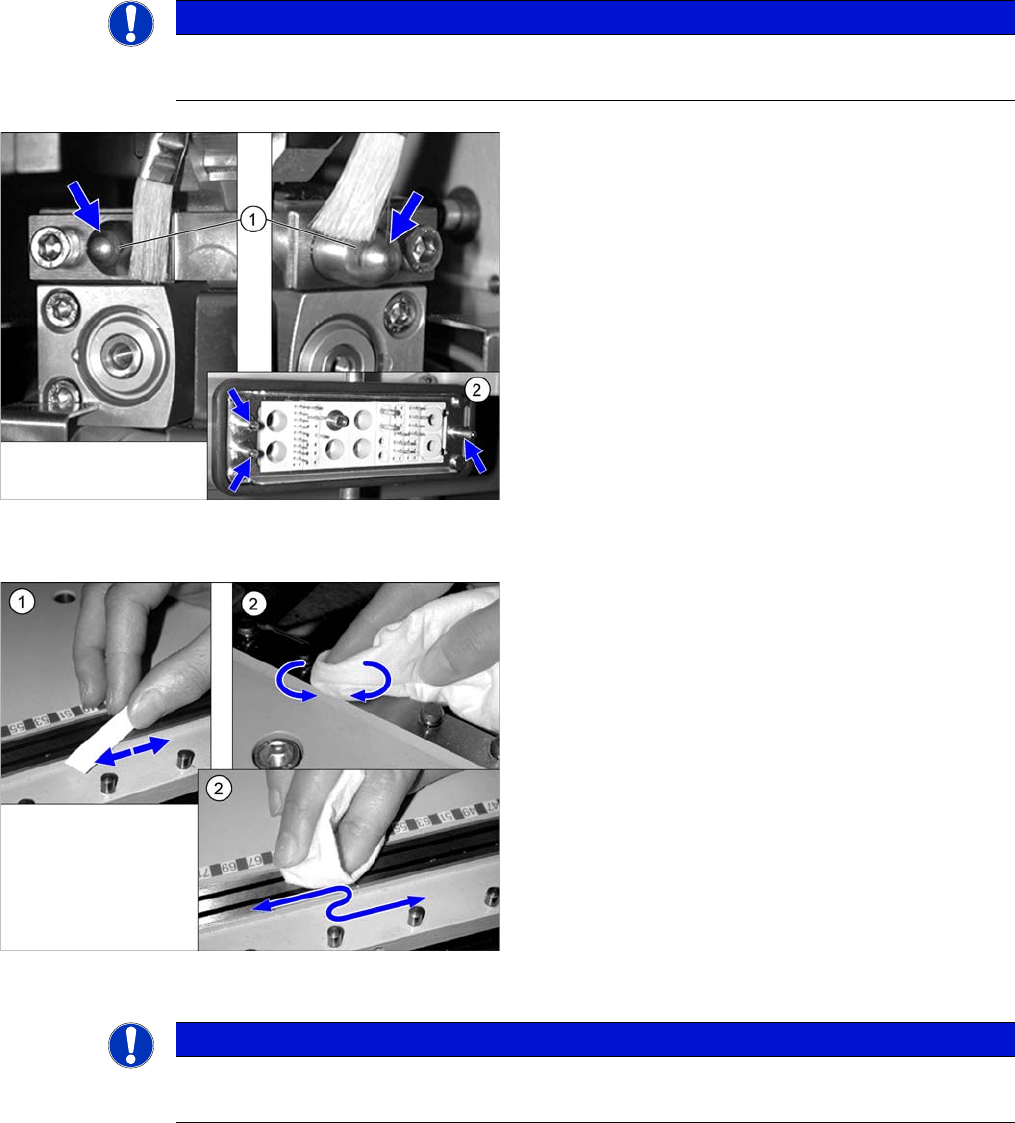
► Greas the plunger pins (1) of the change over table
insertwith a brush and UNISILKON L250L.
► Grease the plunger pins (2) of the ODU connector on
the component trolley docking unit with a brush and
UNISILKON L250L.
► Dock in the component trolley once more.
► Clear the feeder area.
► Remove any loose components from the component
feeder table using the vacuum cleaner.
► (1) Use a whetstone to remove any bumps on the
magnetic rail.
► (2) Preserve the feeder area using a lint-free cloth
sprayed with WD40.
► Vacuum up any loose components from the tape con
-
tainer and remove any unwanted stickers and adhe
-
sive tape.
NOTICE
Pay attention to location and connection
► Make sure that each feeder is in the correct location and is connected properly.