SP08.pdf - 第13页
MAINTENANCE CHECKS Suction Hose Tools required: None 1. Ensure that the suction hose is fitted securely to the outlet on the DEK printing machine and has not suffered any distortion or breakage. 2. Ensure that the suctio…

GENERAL SERVICING & MAINTENANCE INFORMATION
General The frequency of maintenance required will vary according to the usage of the
unit (measured in hours, see Sevice Meter) and the types of solvents used. This
can vary accordingly between periods of three to twelve months.
Filters To ensure that the vacuum/suction filtration unit always performs at peak
performance it is essential to replace the main carbon filter before twelve months
and sooner if non-water based solvents are used.
Vacuum Motors The special acoustic vacuum motors, 2 off, are fitted with auto-stop carbon
brushes, to protect the motors. The brush is designed to disengage the contact
between the carbon brush and the commutator. It is recommended that the
carbon brushes are inspected and/or replaced after a period of between
1000-1500 hours, see Service Meter. This will save any down-time should the
carbon brush autostop.
Service Meter A service meter is fitted to the front control panel showing the machine useage in
hours. The meter is provided as a reference as part of a routine maintenance
programme.
Hoses Clear flexible spiral interlocked E.V.A. hose. Crush resistant and durable,
requiring only visual inspection.
Cabinets The tough high-impact ABS cabinet requires little or no maintenance, other than
ensuring that the fixtures at the rear of the lid are always in place and that the unit
is situated on level ground.
Access Tools required: 1x No.3 Pozidrive Screwdriver
To gain access to the service items, by remove the cabinet lid as follows:
1. Unplug the unit from the mains supply.
2. Unplug the 24V remote switching connector.
3. Undo the 3 pozidrive headed screws at the rear of the lid.
4. Lift up the rear of lid until it clears the top edge of the cabinet.
5. Slide forward to disengage the tongue from the front recess (hidden).
6. Lift the lid from its position to expose all internal all internal components &
modules.
10 DEK Printing Machines Ltd Issue 3. Nov 00
DEK VACUUM AND FILTRATION UNIT SP08
GENERAL SERVICING & MAINTENANCE INFORMATION

MAINTENANCE CHECKS
Suction Hose Tools required: None
1. Ensure that the suction hose is fitted securely to the outlet on the DEK
printing machine and has not suffered any distortion or breakage.
2. Ensure that the suction hose is securely fitted to vacuum and filtration unit.
3. Replace if necessary.
NOTE:
Replacement hoses and ends are available as spares.
Replacing the
Hose Ends
1. Firmly grip the suction hose with one hand and hold the hose steady.
2. Firmly grasp the cuff ends with the other hand and unscrew with a snap
action in a clockwise direction to break the seal.
3. Before replacing the new cuff end, apply a small amount of adhesive on the
1st two threads of the hose and screw on the new cuff in an anti-clockwise
direction.
4. It is recommended that the adhesive is left to set for a period of 1 hour before
use.
Issue 3. Nov 00 DEK Printing Machines Ltd 11
DEK VACUUM AND FILTRATION UNIT SP08
MAINTENANCE CHECKS
INSPECTION AND REPLACEMENTS
Electric Motor Carbon Brushes
Inspection Tools Required: 1x Pozidrive screw driver medium
1x Pozidrive screw driver small
1x Flat-bladed Screw driver small
1. Isolate the unit from the machine supplies and mains power.
2. Identify the 3 pan head screws at the top of the rear panel and remove them.
3. Remove the top cover by lifting it from the rear and sliding to the front of the
unit.
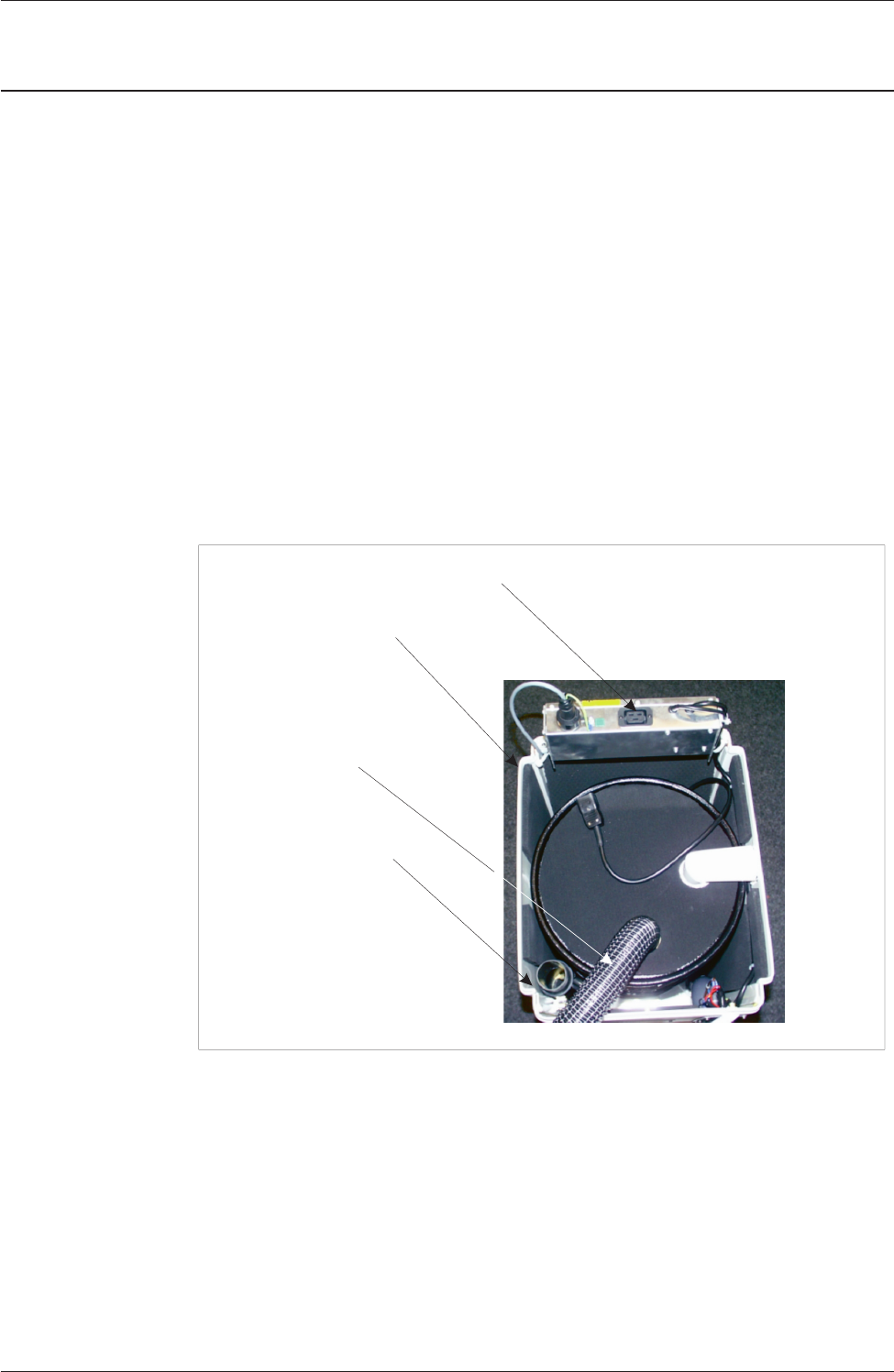
4. Disconnect the motor supply IEC connection from the electrical enclosure,
pivot the electrical enclosure to give full access to the top of the unit.
5. Remove the “Air Out” flexible hose from the exhaust positioned in the rear
right-hand corner, this requires a firm twist and pull to remove the hose.
6. The motor enclosure may now be lifted clear of the vacuum unit and placed
on a work surface.
7. Removal of the motor enclosure exposes the third stage filter ozone filter and
pre-filter should these need checking or replacement.
12 DEK Printing Machines Ltd Issue 3. Nov 00
DEK VACUUM AND FILTRATION UNIT SP08
INSPECTION AND REPLACEMENTS
IEC Cover
Electrical Enclosure
Exhaust Silencer
Air Out Hose
Figure 4 Vacuum Motor Components