00193910_Install_SQL2000Server_manual.pdf - 第22页
Installation of SQL Server 2000 Edition 10/2005 US The following dialog appea rs: Fig. 3-29: The "SQL Server Properties" dialog box → Select the tab Processor . Deactivate the option Use Windows NT fibers . → C…
Installation of SQL Server 2000 Edition 10/2005 US
3.3 After the installation
After installation you have to ensure, that the option NT fibers is not set:
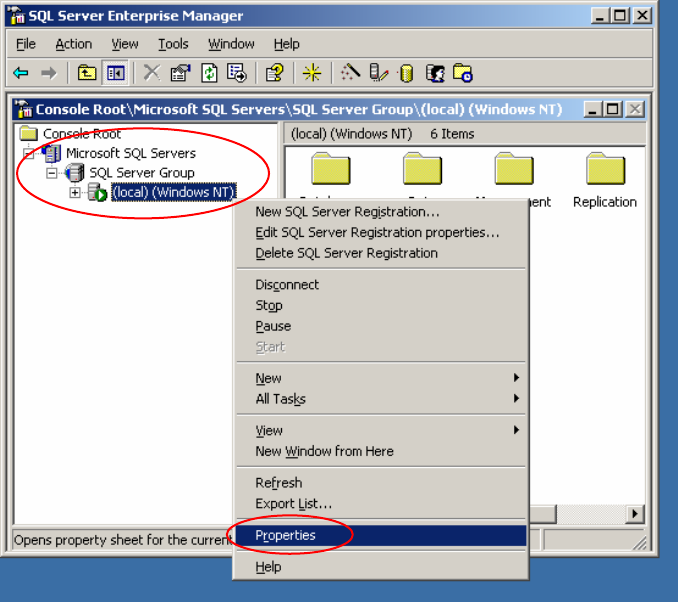
→ Click Start – Programs – Microsoft SQL Server – Enterprise Manager
The following dialog appears:
Fig. 3-28: The "SQL Server Enterprise Manager" dialog box
→ In the SQL Server Enterprise Manager select Microsoft SQL Servers, SQL Server Group and
(local)(Windows NT).
→ Right-click on it and select Properties.
21 / 24
Installation of SQL Server 2000 Edition 10/2005 US
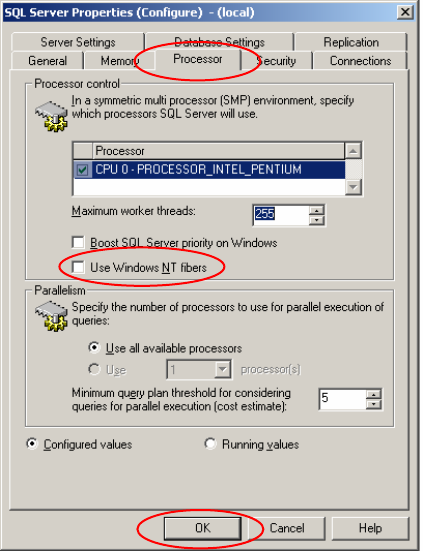
The following dialog appears:
Fig. 3-29: The "SQL Server Properties" dialog box
→ Select the tab Processor. Deactivate the option Use Windows NT fibers.
→ Click the OK button and exit the SQL Server Enterprise Manager.
2
22 / 24