00193910_Install_SQL2000Server_manual.pdf - 第5页
Installation of SQL Server 2000 Edition 10/2005 US 5 / 24 1 Introduction SIPLACE software systems are using a database to store data o n disc. For scalable sol utions Siemens AG recommends the SQL Serv er 2000 Standard v…
Installation of SQL Server 2000 Edition 10/2005 US
4 / 24
Installation of SQL Server 2000 Edition 10/2005 US
5 / 24
1 Introduction
SIPLACE software systems are using a database to store data on disc. For scalable solutions
Siemens AG recommends the SQL Server 2000 Standard version which operates on Windows
Server operating system versions.
2 Scope of delivery
This document describes the manual procedure to install the SQL Server 2000 including SP4 for
usage of SIPLACE software systems.
Installation of SQL Server 2000 Edition 10/2005 US
3 Installation
3.1 Installation of SQL Server 2000
→ Please follow the instructions below for the manual installation of SQL Server 2000.
Note:
Close all other applications before you start with the installation of SQL Server 2000.
→ Insert the installation CD into the CD-ROM drive. Be sure to use the CD marked Standard Edition
and not Personal Edition.
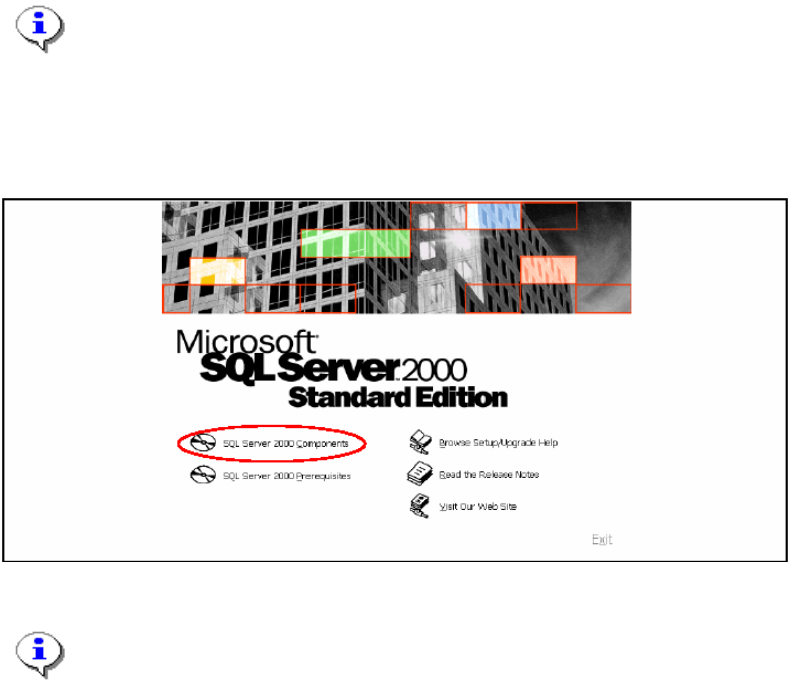
The following dialog appears:
Fig. 3-1: The "Setup SQL Server 2000" dialog box
Note:
If the dialog will not appear click on windows main menu Start
Æ
Run and click the file
autorun.exe on the SQL Server 2000 installation CD.
→ Click SQL Server 2000 Components.
6 / 24