00197479-02_IM_BoardGateKeeper1.2-SP1_EN.pdf - 第16页
Uninstalling 16 Installation Manual SIPLACE BoardGateKeeper 1.2 SP1
Uninstalling
Installation Manual SIPLACE BoardGateKeeper 1.2 SP1 15
5
5 Uninstalling
Uninstalling
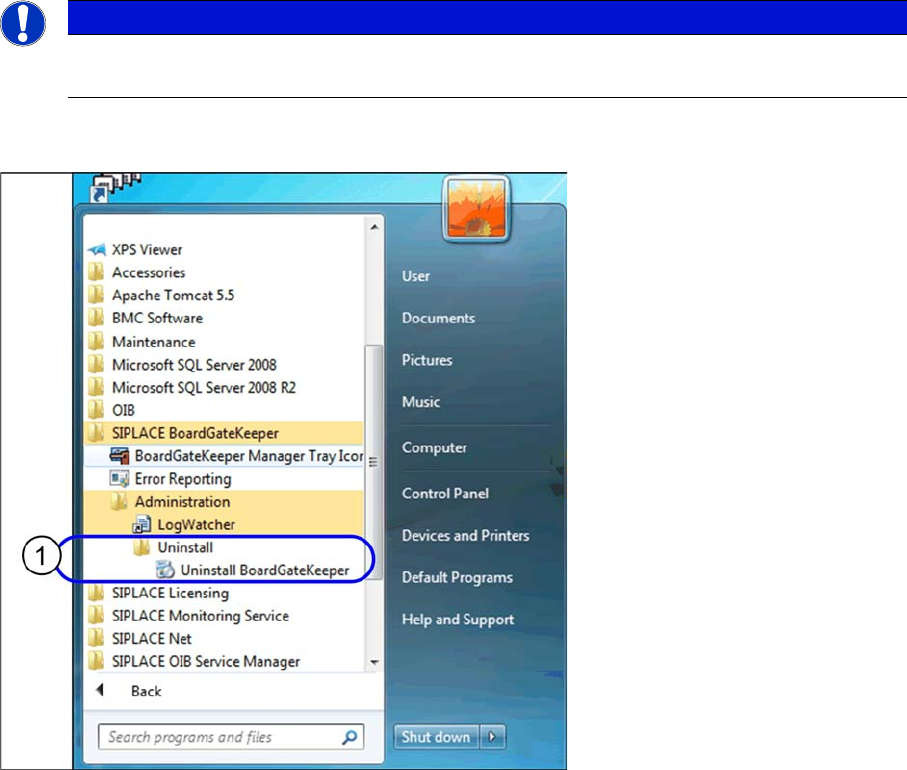
► In the Start Menu select the SIPLACE BoardGateKeeper program group -> Uninstall BoardGate-
Keeper.
► The Application Setup is started where you can choose to repair or remove the installation.
⇨ You are prompted to confirm uninstalling BoardGateKeeper.
► The Install Shield Wizard will start and uninstalling BoardGateKeeper will be prepared. BoardGate-
Keeper will be uninstalled.
⇨ BoardGateKeeper is no longer available.
NOTICE
Requirement
You need administrator privilege for your operation system in order to perform this installation.
Uninstalling
16 Installation Manual SIPLACE BoardGateKeeper 1.2 SP1
acpage