00196591-04 UM S-Feeder Test Station EN.pdf - 第31页
Service Work Conveyor 6.1.1 Required Tools Replace the ring light illumination board User Manual SIPLACE S-Feeder Test Sta tion 31 6 6 S e r v ic e W o r k C o n v e y o r Service Work Conveyor 6.1 6 . 1 R e p la c e t h…
Operating the S-Feeder Test Station
Creating an Error Report 5.2.3 Error Images
30 User Manual SIPLACE S-Feeder Test Station
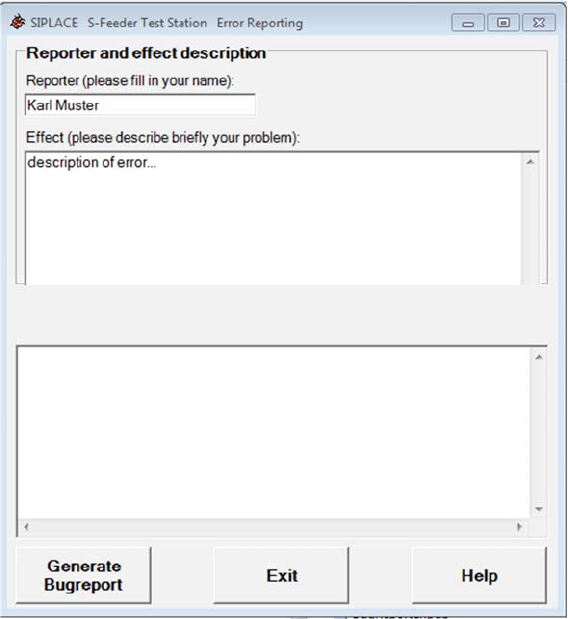
► Enter your name and a detailed description of the error.
► Click on the Generate Bugreport button.
A confirmation dialog will be shown.
► Click on the OK button.
The bug reporter will collect the required information and save this in a ZIP file.
A dialog box for saving the ZIP file will be shown.
► Connect a memory stick to the PC.
► Navigate to your memory stick in the dialog box and save the ZIP file there.
► Click on the Exit button to terminate the bug reporter.
► Send the ZIP file per e-mail to the SIPLACE service team.
Service Work Conveyor
6.1.1 Required Tools Replace the ring light illumination board
User Manual SIPLACE S-Feeder Test Station 31
6
6 Service Work Conveyor
Service Work Conveyor
6.1
6.1 Replace the ring light illumination board
Replace the ring light illumination board
6.1.1
6.1.1 Required Tools
Required Tools
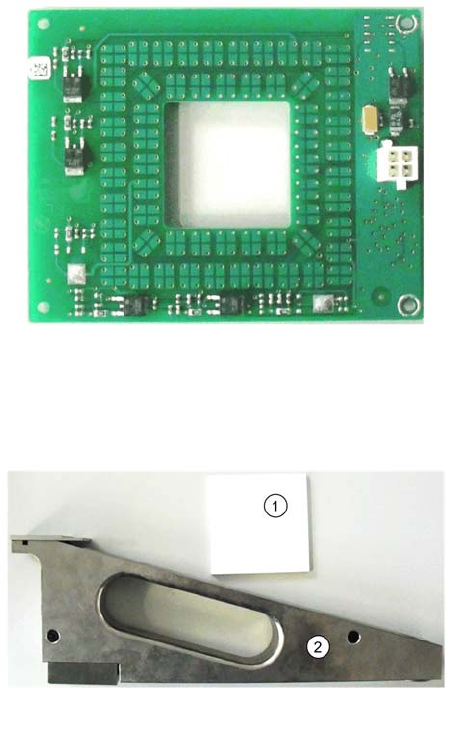
Spare part
Calibration tools
Tools
▪ Allen key set
▪ Set of socket keys
▪ Adjustment tool (plastic or ceramic - non-conductive!)
▪ 03072792-xx Ringlicht Beleuchtungspl.
1. 03048660-03 Normal White 70x70
2. 03073729-01 calibration part SFTS
Service Work Conveyor
Replace the ring light illumination board 6.1.2 Removal/installation of Lightning Board
32 User Manual SIPLACE S-Feeder Test Station
6.1.2
6.1.2 Removal/installation of Lightning Board
Removal/installation of Lightning Board
Removal
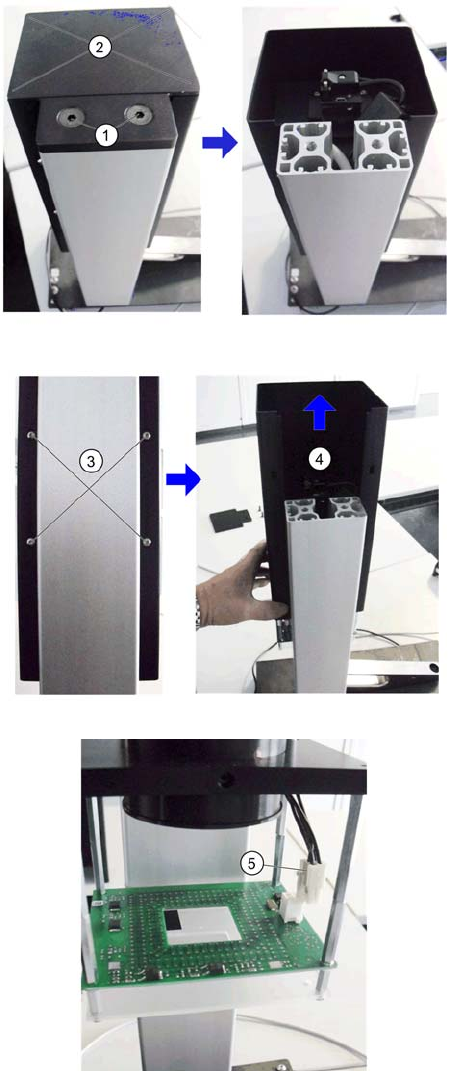
1. Open the two screws (1)
2. Lift up the cover (2).
3. Hold the camera body firmly and open the 4 fix-
ing screws (3).
4. Slide the housing (4) upwards.
5. Put it on the cable (5) of the lighting board.