00900170-01_ID_OIS_SIS_16.0_R18-2_EN_DE.pdf - 第12页
ASM OIS/SIS Datab ases 16.0 (R18 -2) / Interf ace Description 11/2018 Edition 12 4.4.2 A utomatic Re organization of Indexes and Statistics The removal of old dat a may lead to f ragmented datab ase indexes an d distorte…

ASM OIS/SIS Databases 16.0 (R18-2) / Interface Description 11/2018 Edition
11
● If the database was created with version 5.2 (or later), the password is Ois&Sis.1.
● If the database has been created by a previous version of OIS/SIS and is now
upgraded to version 16.0, the password is not modified, even if the new version
would configure a new password in case of creating a new database.
This procedure has been chosen to provide an unchanged interface to 3
rd
-party client
applications that are allowed to access the upgraded database as before. 3
rd
-party
client applications must adapt to the new password only if accessing a newly-created
OIS/SIS database.
The passwords for the needed internal users have the following characteristics:
● The password does not contain all or part of the account name of the user. Part of an account
name is defined as three or more consecutive alphanumeric characters delimited on both ends
by a white space such as space, tab and return, or any of the following characters: comma (,),
period (.), hyphen (-), underscore (_) or number sign (#).
● The password is at least 8 characters long.
● The password contains characters from 3 of the following 4 categories:
– Latin uppercase letters (A through Z)
– Latin lowercase letters (a through z)
– Base 10 digits (0 through 9)
– Non-alphanumeric characters such as: exclamation point (!), dollar sign ($), number sign
(#) or percent (%).
4.4 Database Maintenance
4.4.1 "DB remove old data"
The OIS database has a stored procedure ESP_REMOVEOLDDATA that removes old data from
the OIS database. The stored procedure is called regularly to remove OIS data older than 40 days
(default value). Allowed values are 40 days to 400 days. As of OIS 5.0 the SQL statement EXEC
SiplaceOIS..ESP_REMOVEOLDDATA 40 is executed every two hours from the OisServerDb
service process for all SQL Server versions. OIS 4.1 and earlier versions had installed a job for the
SQL Server-Agent that executed the same remove old data SQL statement once a day.
The SIS database has a stored procedure ESP_REMOVEOLDDATA that removes old data from
the SIS database. The stored procedure is called regularly to remove SIS data older than 400
days. As of SIS 5.0 the SQL statement EXEC SiplaceSIS..ESP_REMOVEOLDDATA 400 is
executed every 24 hours from the SisServer service process, for all SQL Server versions. SIS 4.1
and earlier versions had installed a job for the SQL Server-Agent that executed the same remove
old data SQL statement once a day.
ASM OIS/SIS Databases 16.0 (R18-2) / Interface Description 11/2018 Edition
12
4.4.2 Automatic Reorganization of Indexes and Statistics
The removal of old data may lead to fragmented database indexes and distorted statistics. Thus,
indexes and statistics have to be reorganized regularly. The OIS service checks the database
fragmentation at regular intervals (configured: 40 days). If the database fragmentation exceeds the
configured limit, the reorganization is started. All OIS connections are disabled and the OIS service
starts rebuilding the database indexes and statistics. This will take about 5 minutes. Reading and
writing are not possible during the reorganization.
After reorganization, all OIS connections will be enabled again.
4.4.3 Periodic Manual Maintenance of the OIS Database in OIS V10.x / V11.x
In these versions, the OIS database should be manually maintained bimonthly. If the maintenance
is not performed, there will be performance losses in the database queries after some time.
Preparations
● Log in as a system administrator (sa) to have access to the database.
● Stop all OIS clients (such as SIPLACE Explorer).
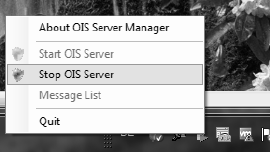
● Stop the OIS Server by right-clicking the OIS Server Manager icon.
Execution
● Execute the MaintainOISDatabase.cmd script.
The database will be reorganized and locked during the maintenance. Therefore it is essential that
no other programs access the OIS or SIS databases during this time. The lines can continue
to produce because they buffer the incoming data.
However, the script should not run longer than 10 minutes. Otherwise, the database is probably in
use by other programs. In this case, the script has to be canceled and the OIS Server rebooted to
collect the incoming data at the stations. After the active program has been identified and the OIS
connection to the machines exists for about 10 minutes the process can be restarted.
Files
● <Monitoring Service InstallDir>\MaintainOISDatabase.cmd
● <Monitoring Service InstallDir>\DBSkripts\MaintainOISDatabase.sql
● <Monitoring Service InstallDir>\DBSkripts\OIS_RebuildIndexAndStatistics.sql

ASM OIS/SIS Databases 16.0 (R18-2) / Interface Description 11/2018 Edition
13
4.5 Tables
The layout of the individual tables is illustrated below. The specified data types correspond to the
naming scheme in the MS-SQL-Server.
NOTICE
The sole purpose of the following tables is to clarify the views. No write access is
permitted to these tables. Backward compatibility cannot be guaranteed if you access
the tables directly. Use the provided views instead.
Legend for the following tables
CI
=
Clustered index
I
=
Index
P
=
Primary key