Hybrid Calibration Offset Measurement and Correction Operation Manual.pdf - 第5页
H ybrid Cali bration Offset M easurement and Correction Operation Manual N XT V8.95 FUJI CORPORAT ION 5/18 MP05 ca mera, MP05CL Y es

Hybrid Calibration Offset Measurement and Correction Operation Manual NXT V8.95
FUJI CORPORATION 4/18
3. Specifications and caution points
Specifications and limitations when performing hybrid calibration offset measurement
are as follows:
Head type Is this function supported?
H01 Yes
H02(F) Yes
G04(F)/G04Q(F) Yes
H12S/H12SQ Yes
H12HS/H12HSQ Yes
H12L Yes
V12 Yes
V12D Yes
H08/H08Q Yes
H08M Yes
H04/H04S(F) Yes
OF Yes
H24 Yes
DX Yes
Heads other than those above No
Module type Is this function supported?
M3(S), M6(S) No
M3-2(c), M6-2(c), M6-2SP Yes
M3-3(c) , M3-3S,
M6-3(c), M6-3L
Yes
Parts camera type Is this function supported?
Standard camera, P04CL,
BP04CL
Yes
Sidelight camera Yes (H01, H02, OF)
P03 camera Yes (H01, H02)
MP03 camera, MP03CL Yes (H01, H02, G04)

Hybrid Calibration Offset Measurement and Correction Operation Manual NXT V8.95
FUJI CORPORATION 5/18
MP05 camera, MP05CL Yes
Hybrid Calibration Offset Measurement and Correction Operation Manual NXT V8.95
FUJI CORPORATION 6/18
4. Enabling hybrid calibration offset measurement
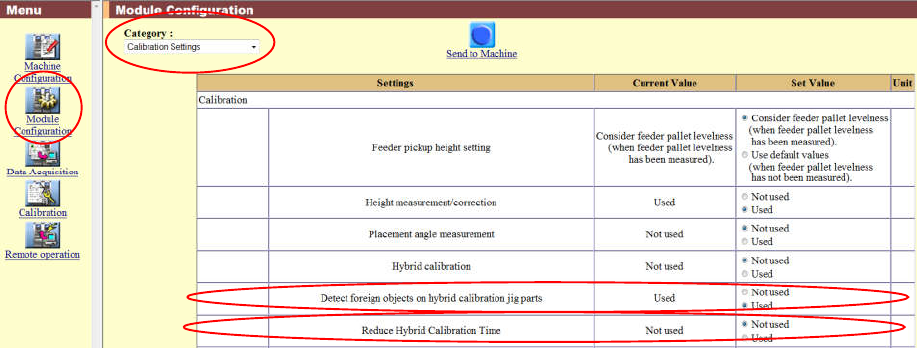
The setting can be enabled in [Module Configuration] - [Calibration Settings]. The
default is "Used".
1. Select [Used] for the [Hybrid calibration] setting.
2. [Send to Machine] transmits the setting to the machine.
3. The setting is enabled only for the specified modules.
Notes:
Ÿ Modules with no parts camera will perform hybrid calibration regardless of what
is set for this setting.
Ÿ When you want to detect foreign objects such as dust attached to the hybrid
calibration jig parts, specify "Used" for the following setting.
Ø Detect foreign objects on hybrid calibration jig parts