00196151_Upgrade_WinXPSP3_unattended.pdf - 第5页
Installation Manual for Upgrade to Windows XP SP3 (unattended setup) Edition 04/2008 Installationsanleitung für Upgrade auf Windows XP SP3 (unattended setup) 5 / 19 1.3 Information regarding th e inst allation process • …

Installation Manual for Upgrade to Windows XP SP3 (unattended setup) Edition 04/2008
Installationsanleitung für Upgrade auf Windows XP SP3 (unattended setup)
Overview
1.1 Scope of the document
Using this manual will enable you to perform the unattended installation of Windows XP Service
Pack 3 on the SIPLACE computers belonging to a workgroup within the SIPLACE network.
It describes the retrofitting of Service Pack 3, i.e., the installation when the SIPLACE applications
are already on the computer.
1.2 Requirements for the installation
Warning
It is mandatory to have Service Pack 2 already installed on the computer. If Service
Pack 2 is not installed please use SW Update (unattended) WIN XP SP, Item no.:
00376942-01 to install Service Pack 2.
• You require the update CD WIN XP SP3 (see Section 6.4
).
Warning
The installation routine for Service Pack 3 has been adapted for the computers of the
SIPLACE family by Siemens AG, IS DT EA
Installation of this update CD is only permitted in the SIPLACE network, on SIPLACE
computer in a workgroup.
• The upgrade of Service Pack 3 supports the same computer hardware as Windows XP
unattended setup version 2.0 and higher.
• There must be 1 GB of available memory on the hard disk.
4 / 19
Installation Manual for Upgrade to Windows XP SP3 (unattended setup) Edition 04/2008
Installationsanleitung für Upgrade auf Windows XP SP3 (unattended setup)
5 / 19
1.3 Information regarding the installation process
• The SMD service engineer of Siemens AG, IS DT EA installs Service Pack 3.
• It is mandatory to install SP2 beforehand SP3.
• The installation takes approximately 45 minutes per computer.
1.4 Scope of delivery
SW Update (unattended) WIN XP SP3, Item no.: 00386910-01
consisting of:
• Update CD Windows XP Service Pack 3
• Installation Manual
Upgrade to Windows XP SP3 (unattended), Item no.: 00196151-01
(this manual)
Installation Manual for Upgrade to Windows XP SP3 (unattended setup) Edition 04/2008
Installationsanleitung für Upgrade auf Windows XP SP3 (unattended setup)
2 Preparatory Steps
→ Back up data (machine data, user data) via network to another computer or to a USB hard disk.
If possible, create an image of the installation.
→ Make certain that any installed software is compatible with Service Pack 3
→ Make certain that 1 GB of space is available on the hard disk of the computer for the
installation of SP3.
3 Installation
→ Log in with an administrative account.
→ Insert the installation CD. The installation starts with various queries.
You can find possible error messages in Chapter
4.
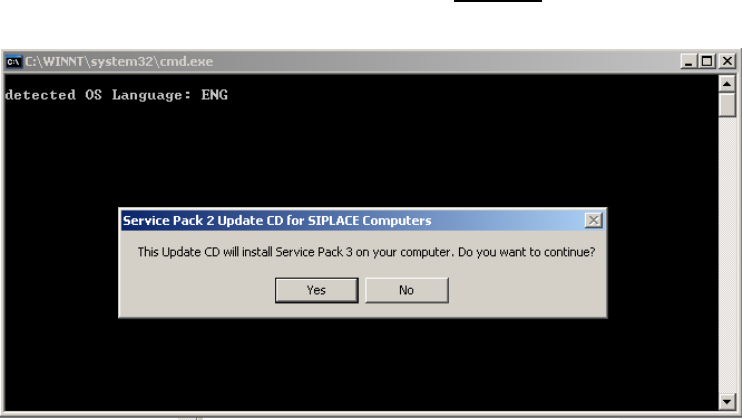
If all requirements are met, the following dialog appears:
→ Press the “NO” button if you want cancel the installation.
→ Press the “YES” button if you want to continue the installation.
The following setup screen appears:
6 / 19