00196151_Upgrade_WinXPSP3_unattended.pdf - 第7页
Installation Manual for Upgrade to Windows XP SP3 (unattended setup) Edition 04/2008 Installationsanleitung für Upgrade auf Windows XP SP3 (unattended setup) Here, you have not to do anything, just wait for the process t…
Installation Manual for Upgrade to Windows XP SP3 (unattended setup) Edition 04/2008
Installationsanleitung für Upgrade auf Windows XP SP3 (unattended setup)
2 Preparatory Steps
→ Back up data (machine data, user data) via network to another computer or to a USB hard disk.
If possible, create an image of the installation.
→ Make certain that any installed software is compatible with Service Pack 3
→ Make certain that 1 GB of space is available on the hard disk of the computer for the
installation of SP3.
3 Installation
→ Log in with an administrative account.
→ Insert the installation CD. The installation starts with various queries.
You can find possible error messages in Chapter
4.
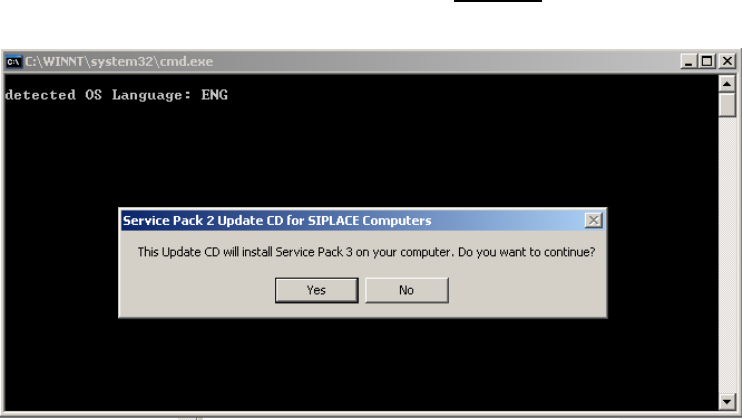
If all requirements are met, the following dialog appears:
→ Press the “NO” button if you want cancel the installation.
→ Press the “YES” button if you want to continue the installation.
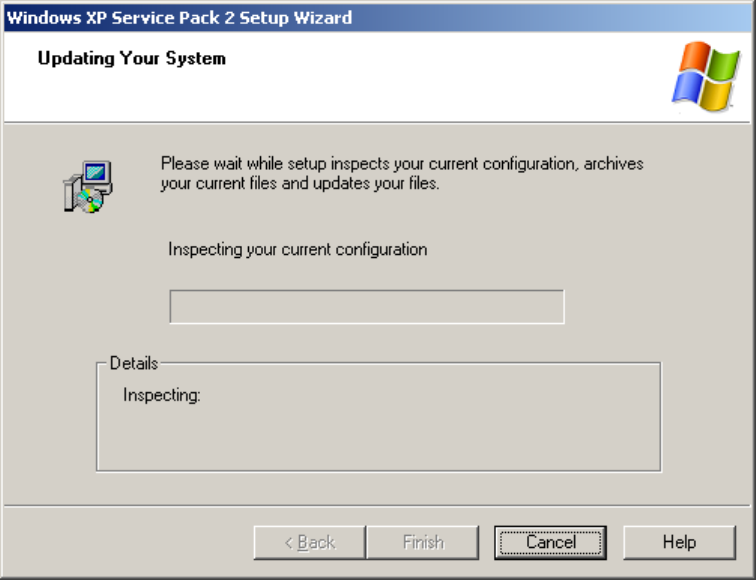
The following setup screen appears:
6 / 19
Installation Manual for Upgrade to Windows XP SP3 (unattended setup) Edition 04/2008
Installationsanleitung für Upgrade auf Windows XP SP3 (unattended setup)
Here, you have not to do anything, just wait for the process to resume,
duration ca. 45 minutes.
→ In the interim, initiate the installation process at the rest of the stations of the line, as described
below.
→ Once the automatic installation is finished, the computer is restarted automatically. This
successfully concludes the installation.
→ Proceed as follows to check whether Service Pack 3 was installed correctly:
Click on Start J Run J and enter winver. Afterwards a window with the current service pack
version of the operating system appears. After a check, you can close this by clicking on “OK”.
→ Make certain that the computer and his software function satisfactorily once again.
→ In this case delete the backup data files if the customer’s administrator so desires to ensure
that his data is protected.
7 / 19
Installation Manual for Upgrade to Windows XP SP3 (unattended setup) Edition 04/2008
Installationsanleitung für Upgrade auf Windows XP SP3 (unattended setup)
4 Possible Error Messages during Installation
Sequence
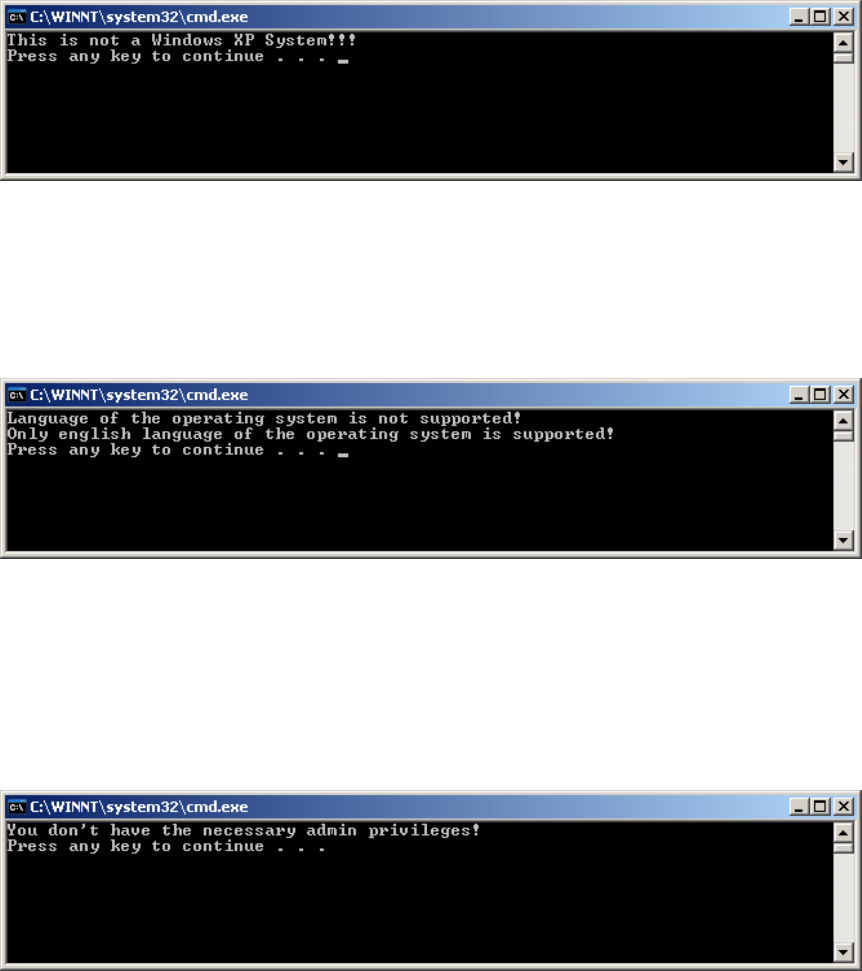
4.1 The existing operating system is not a Windows XP System
If the operating system Windows XP has not been installed yet, the following error message will appear:
→ Press any key. The installation is cancelled.
4.2 The existing language of the operating system is not english
The installed operating system is not english, only english version of Windows XP is supported
→ Press any key. The installation is cancelled.
4.3 You don´t have administrative permissions
If you didn’t login with administrative permissions, the following message appears:
→ Press any key. The installation is cancelled.
8 / 19