00196151_Upgrade_WinXPSP3_unattended.pdf - 第6页
Installation Manual for Upgrade to Windows XP SP3 (unattended setup) Edition 04/2008 Installationsanleitung für Upgrade auf Windows XP SP3 (unattended setup) 2 Prep aratory S tep s → Back up data (machine data, user data…
Installation Manual for Upgrade to Windows XP SP3 (unattended setup) Edition 04/2008
Installationsanleitung für Upgrade auf Windows XP SP3 (unattended setup)
5 / 19
1.3 Information regarding the installation process
• The SMD service engineer of Siemens AG, IS DT EA installs Service Pack 3.
• It is mandatory to install SP2 beforehand SP3.
• The installation takes approximately 45 minutes per computer.
1.4 Scope of delivery
SW Update (unattended) WIN XP SP3, Item no.: 00386910-01
consisting of:
• Update CD Windows XP Service Pack 3
• Installation Manual
Upgrade to Windows XP SP3 (unattended), Item no.: 00196151-01
(this manual)
Installation Manual for Upgrade to Windows XP SP3 (unattended setup) Edition 04/2008
Installationsanleitung für Upgrade auf Windows XP SP3 (unattended setup)
2 Preparatory Steps
→ Back up data (machine data, user data) via network to another computer or to a USB hard disk.
If possible, create an image of the installation.
→ Make certain that any installed software is compatible with Service Pack 3
→ Make certain that 1 GB of space is available on the hard disk of the computer for the
installation of SP3.
3 Installation
→ Log in with an administrative account.
→ Insert the installation CD. The installation starts with various queries.
You can find possible error messages in Chapter
4.
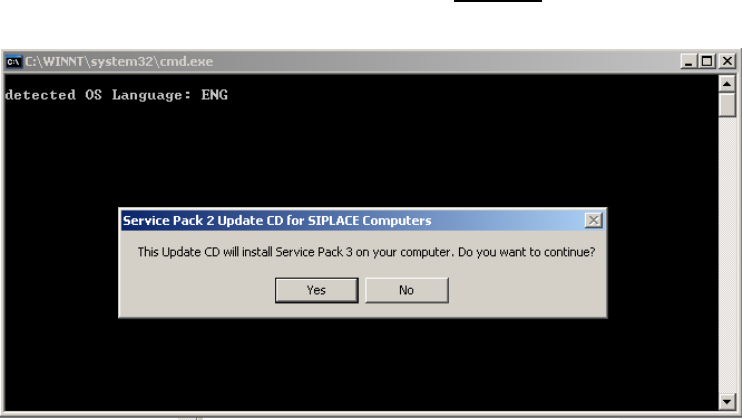
If all requirements are met, the following dialog appears:
→ Press the “NO” button if you want cancel the installation.
→ Press the “YES” button if you want to continue the installation.
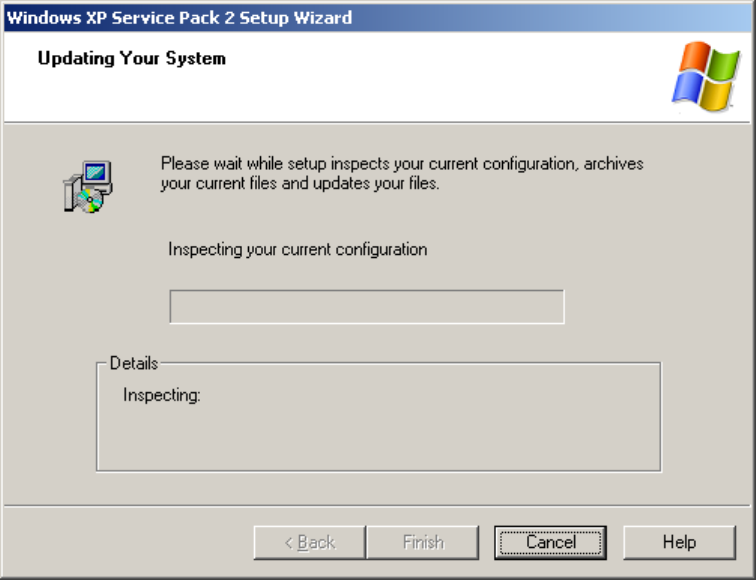
The following setup screen appears:
6 / 19
Installation Manual for Upgrade to Windows XP SP3 (unattended setup) Edition 04/2008
Installationsanleitung für Upgrade auf Windows XP SP3 (unattended setup)
Here, you have not to do anything, just wait for the process to resume,
duration ca. 45 minutes.
→ In the interim, initiate the installation process at the rest of the stations of the line, as described
below.
→ Once the automatic installation is finished, the computer is restarted automatically. This
successfully concludes the installation.
→ Proceed as follows to check whether Service Pack 3 was installed correctly:
Click on Start J Run J and enter winver. Afterwards a window with the current service pack
version of the operating system appears. After a check, you can close this by clicking on “OK”.
→ Make certain that the computer and his software function satisfactorily once again.
→ In this case delete the backup data files if the customer’s administrator so desires to ensure
that his data is protected.
7 / 19