00196804-02_SiplaceProInstall_en.pdf - 第9页
1 Introduction Installation Manual Edition 05/2011 SIPLACE Pro 9.3 7 1 1.3.2 Resource Requirements 1 Client Computer System Sof tware (required) Hardware (recommended) – Preferred : Windows 7 SP1 (64 Bit) – Comp atible :…
Installation Manual 1 Introduction
SIPLACE Pro 9.3 Edition 05/2011
6
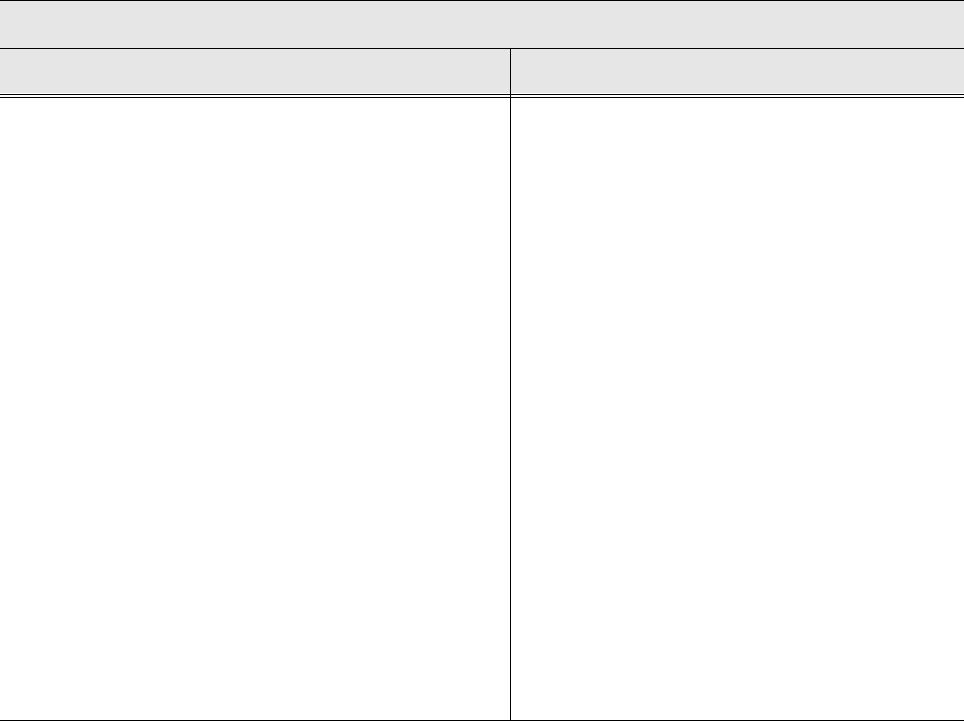
1.3.1 Computer
1
Server / Database Computer System
Software (required) Hardware (recommended)
– Preferred:
Windows Server 2008 R2 SP1 (64 Bit)
– Compatible:
Windows Server 2003 SP2 (32 and 64 Bit) 1
Windows Server 2003 R2 (32 and 64 Bit) 1
Windows Server 2008 SP2 (32 and 64 Bit) 1
– Preferred:
Microsoft SQL Server 2008 R2 /
Express Edition R2 (64 Bit)
– Compatible:
Microsoft SQL Server 2005 SP4/
Express Edition SP4 (32 and 64 Bit) 1
Microsoft SQL Server 2008 SP1 /
Express Edition SP1 (32 and 64 Bit) 1
Microsoft SQL Server 2008 R2 /
Express Edition R2 (32 Bit) 1
– Microsoft .NET Framework 3.5 SP1
– e.g. 2x Intel E5520 2.26 GHz 8MB
– 4096 MB RAM (2048 MB at least), depending
on the complexity of the data content.
– HDD SATA II 500GB
– Optional Backup drive (e.g. DAT, DVD)
– 21" monitor (19" monitor at least)
– Optional: Uninterruptible power supply
1 Introduction Installation Manual
Edition 05/2011 SIPLACE Pro 9.3
7
1
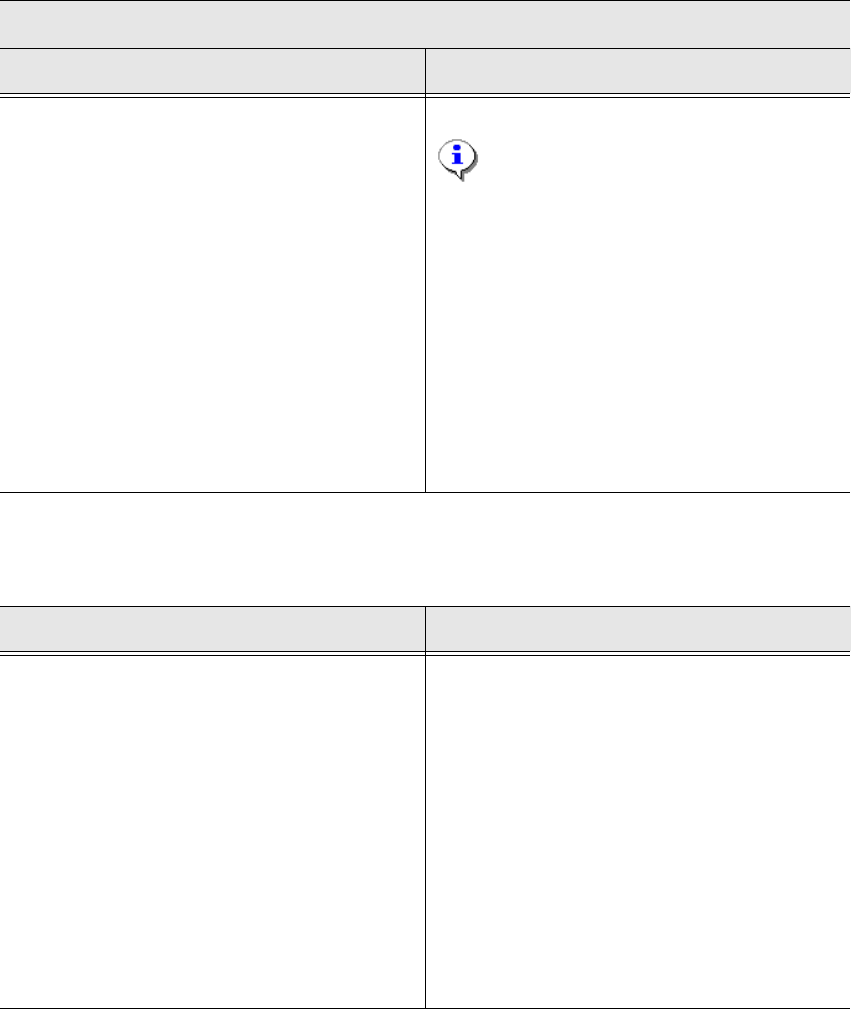
1.3.2 Resource Requirements
1
Client Computer System
Software (required) Hardware (recommended)
– Preferred:
Windows 7 SP1 (64 Bit)
– Compatible:
Windows XP SP3 (32 Bit) 1
Windows Vista SP2 (32 and 64 Bit) 1
Windows 7 SP1 (32 Bit) 1
– Microsoft .NET Framework 3.5 SP1
– e.g. 1x Core 2 Duo E8500
Note: The SiCluster Professional GUI e.
g. uses multi core processors during parallel
optimization.
– 4096 MB RAM (2048 MB at least),
depending on the complexity of the data
content.
– HDD SATA II 250GB
– 21" monitor (19" at least) with a screen
resolution of at least 1024 x 1280 pixel
(small fonts)
Hard disk Main Memory
– Windows and program files:
= ~4000 MB
– Database and Backup:
= ~Number of optimized recipes x 20 MB
– Windows:
= ~200 MB.
– SQL Server:
= typically 500 MB (RAM requirement
depends on the data volume)
– LineControl Server:
= ~100 MB
– For every client (Desk, LineControl GUI,
Optimizer Toolkit) each:
= ~100 MByte + number of recipes x
number of placement positions / 1000 MB
Installation Manual 1 Introduction
SIPLACE Pro 9.3 Edition 05/2011
8
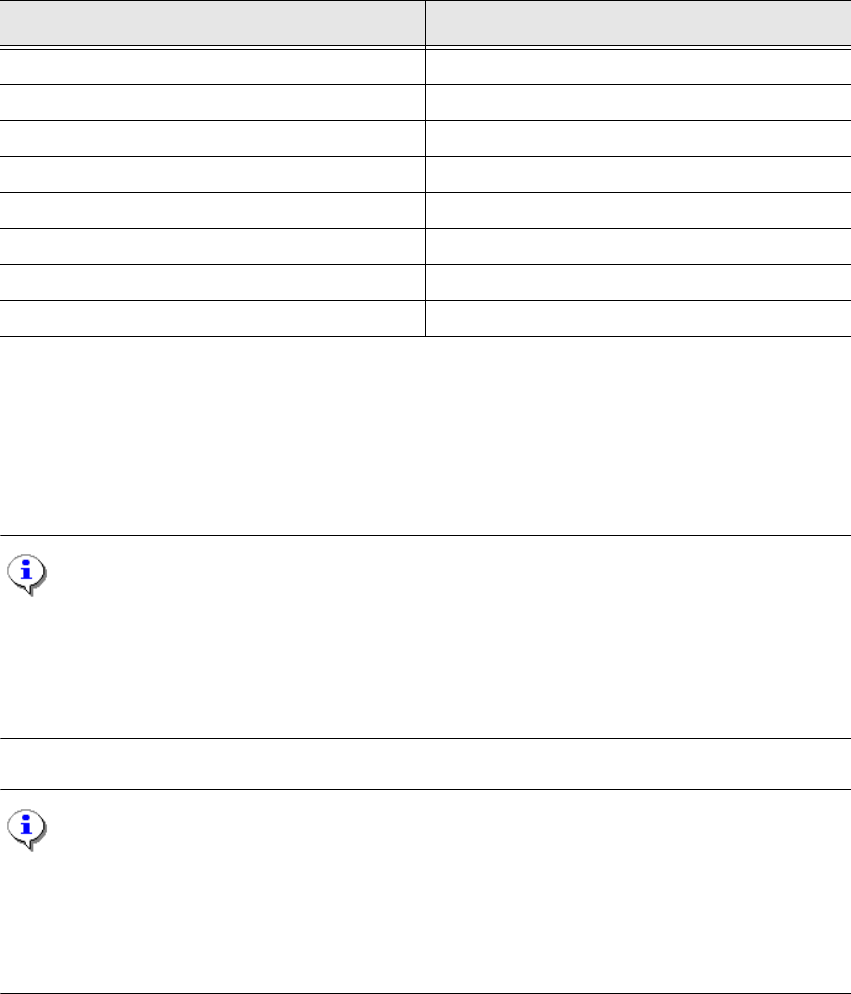
1.3.3 Products Compatible with SIPLACE Pro 9.3
1
Former SIPLACE Pro Versions 1
SIPLACE Pro 9.3 is compatible with SIPLACE Pro 1.x, 2.x, 3.x, 4.x, 5.x, 6.x, 7.x,8.x, 9.x including
all released Hotfixes and Service Packs.
Note:
SIPLACE Pro installations from version 5.2 onwards are automatically de-installed when installing
SIPLACE Pro 9.3.
For installations before version 5.2 a corresponding message is displayed stating that SIPLACE
Pro has to be de-installed manually using the Control Panel. 1
Note:
During the installation, your SIPLACE Pro databases are automatically updated to the SIPLACE
Pro 9.3 data format.
Data model export files (*.xml) of previous SIPLACE Pro versions (from SIPLACE Pro 2.0 onward)
can be imported. 1
Products Version
SIPLACE OIS/SIS 9.3
SIPLACE UNIX/LINUX Line Computer 402.01 – 503.xx
SIPLACE Explorer 2.9
SIPLACE EDM 1.10
SIPLACE Setup Center 4.2
Traceability 3.3
SIPLACE CAD 4.1 SP2
SIPLACE OIB 2.5