00197718-01_IM_Taceability4.0_EN.pdf - 第25页
Uninstalling Installation Manual SIPLACE Traceability 4.0 25 5 5 U n in s t a llin g Uninstalling Trace Monitor or Trace Service from Control Panel NOTICE Requirement You need administrato r privilege for your ope ration…
Installation of Trace Service and Monitor
Trace Monitor 4.3.1 Installation of Trace Monitor
24 Installation Manual SIPLACE Traceability 4.0
4.3.1.1
4.3.1.1 Troubleshooting
Troubleshooting
Collation conflicts when restoring database backup
When restoring the database backup, the SQL Server must have the same collation as the database
backup. Otherwise run time errors and collation conflicts will occur when performing data query in Trace
Monitor.
► In case of collation conflicts we recommend you to recreate the SQL Server.
Uninstalling
Installation Manual SIPLACE Traceability 4.0 25
5
5 Uninstalling
Uninstalling
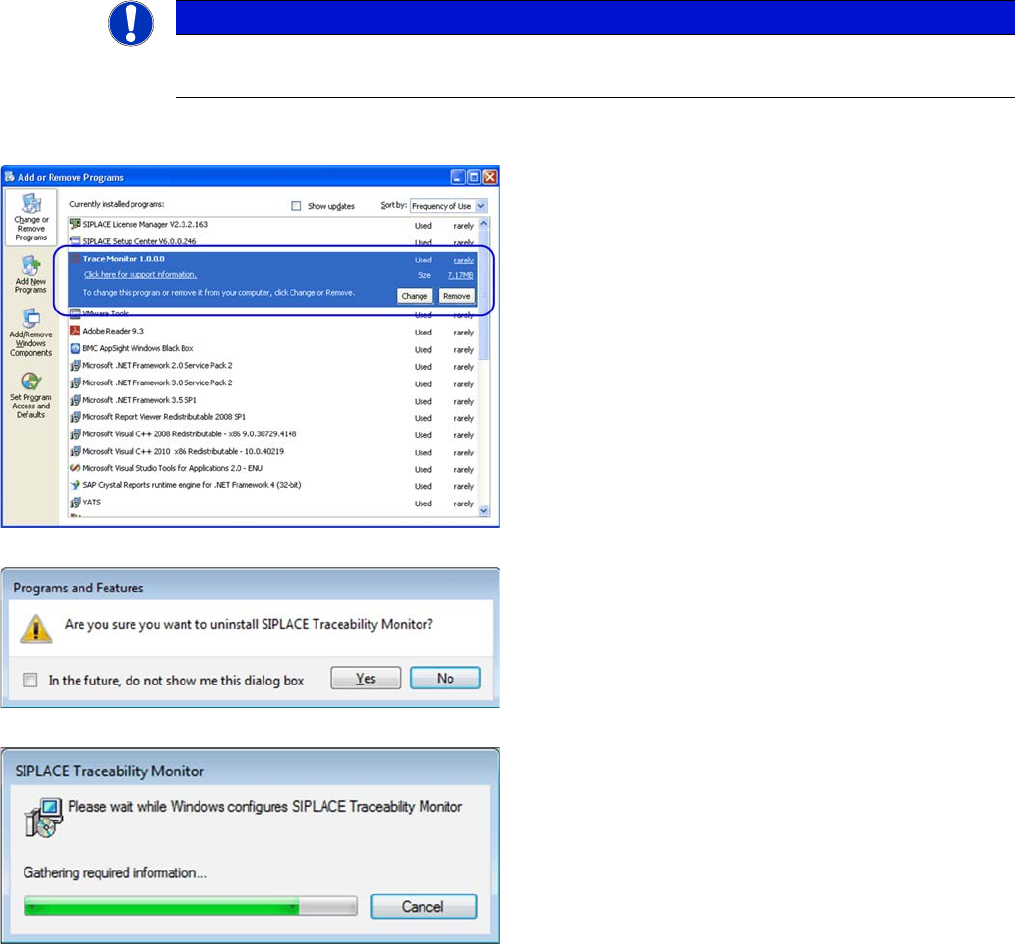
Trace Monitor or Trace Service from Control Panel
NOTICE
Requirement
You need administrator privilege for your operation system in order to perform this steps.
► In the Control Panel -> Programs -> Programs and
Features dialog select the application SIPLACE
Trace Monitor or Trace Service , right-click and select
Remove in the context menu.
You are prompted to confirm uninstalling Trace Monitor.
► Confirm with Yes.
► The Install Shield Wizard will start and uninstalling
Trace Monitor or Trace Service will be prepared. un-
installing Trace Monitor or Trace Service will be unin-
stalled.
► Monitor or Trace Service is no longer available.
Uninstalling
26 Installation Manual SIPLACE Traceability 4.0