LCMS_010.pdf - 第18页
18 ① 点击 E dit I N«fw«r1i tett Edit the by network fMhxM «uch M shared con&gurMion a 0d kmng. ArdwM. O OK Oatd Set Processing Mode X O Data Mode Processing Mode Apply audit trail function when creating results / metho…
17
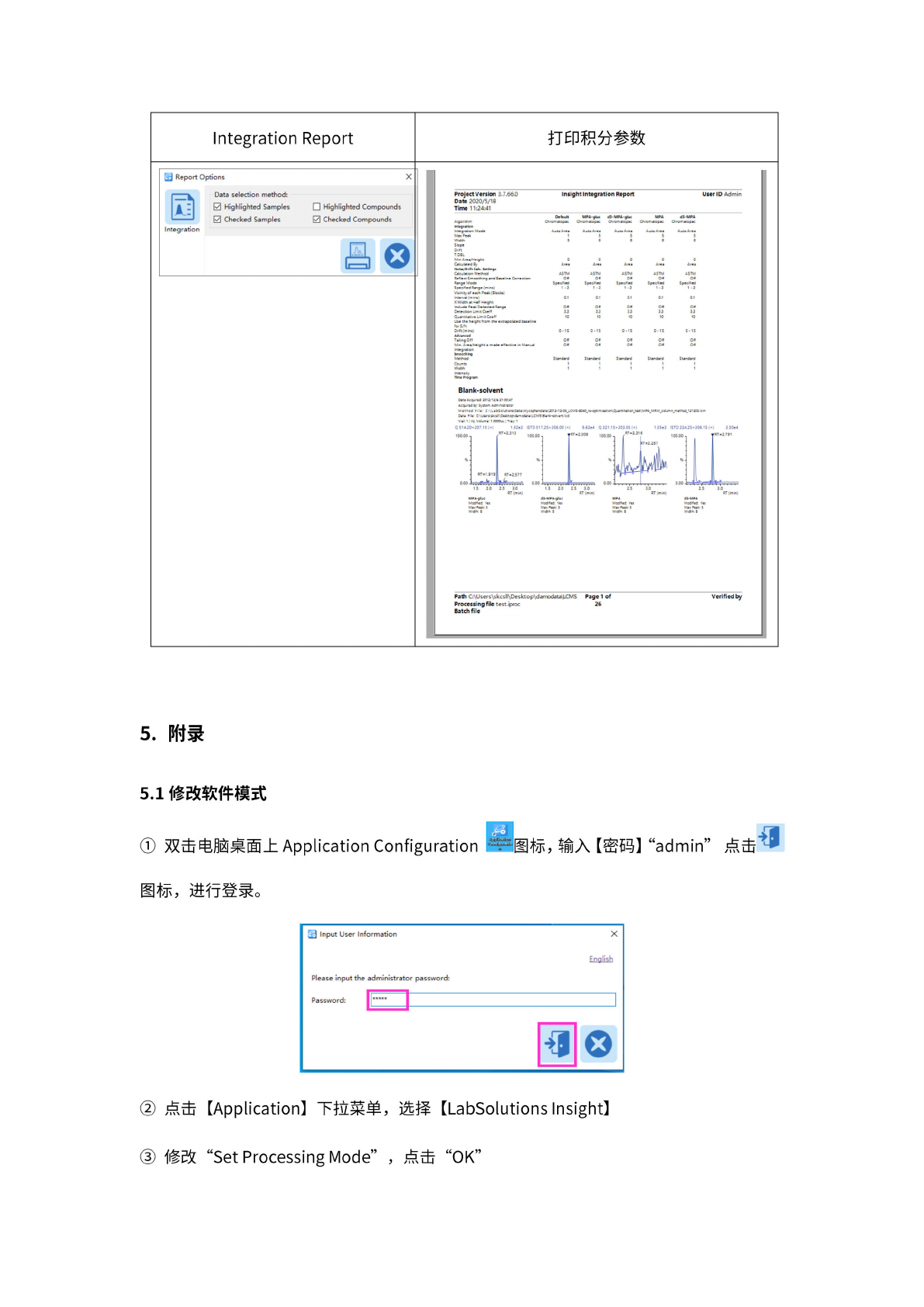
打印积
分参数
Integration
Report
图
Report
Options
X
层
1
Integration
Data
selection
method:
0
Highlighted
Samples
Highlighted
Compounds
旦
Checked
Samples
叼
Checked
Compounds
昌
。
Project
Version
3.7.66O
Insight
Integration
Report
Date
2020/5/18
Time
11:24:41
UserID
Admin
Inte
nifty
nm®
Program
Default
MPA-
glue
d3-MPA-gluc
MPA
d3-MPA
Algorithm
Chromatop*:
Chromatopac
ChroEatopsc
ChroEatopK
Chromatopa:
integration
Integration
Mode
Auto
Area
AjtoArea AjtoArea
Auto
Area
Auto
Area
Max
Pe・k
1
5 5 5
5
W
时
5
a
s
a
8
Stop*
Dnft
T.DBL
Mm
Ar»*/^eQht
0 0 0 0 0
Cateulmed
By
Area Area
Area Area Area
NoiM/Drtft
Cak-
Settings
Calculation
Method
ASIM ASIM ASIM ASIM
ASIM
Reflect
Smoothing
and
Kuehne
Correction
Off Off Off
Off Off
Mode
Specified Specified
Specified Specified
Specrfted
Speeffed
Range
(mins)
1
-2
1
-2
1
-2
1
-2
1
-2
Vicinity
of
each
Peak
(Blocks)
Interval
(mins)
0.1
0.1 0.1
0.1 0.1
X
Width
stH
486t
knebde
Peak
Detected
Off
Off
0H
Off Off
Detection
Limit
CoeW
33 33
33
33 33
Quantrtatg
Um
it
Coe
ff
10 10 10 10 10
Um
th«
h
•中
t
from
the
extrapdted
baseline
forS/N
Dnft(mini)
0-15 0-15 0-15 0-15 0-15
Advanced
Tailing
Off
Off Off Off
Off Off
Me
Area/Mcght
s
rn«de
effectrve
m
Manual
Off Off
Off
Off Off
Mtegrstion
Smoothing
Method
Standard Standard
Standard Standard Standard
Counts
1
1 1 1 1
Width
[
1
1
[ [
Blank-solvent
Ale
Acquired
201军1&专
21847
Acquired
By-
System
Adm
[•^透田
Method
File:
U\babSolgons\OawWycos*ienda:e'<20l272*0S_lCMS"<W0_rfoptimm6Quan:ltat6_:ss:waA_MRM_cd5c
一
E«thod_
12120s
3aia
%lr
C
:\use^Acsii'<OesirtaBM»«odata\LCMSWar*-so»ve*i:.l<d
vak
1
1
“
volume
1
OOOOjI
|
Tray:
1
Y«8
Max
Peat
S
Width
5
Mod*ed
Yes
Max
pmv
S
wa*r
s
Mod*ed
y«s
Ma
Peat
5
Width:
8
MOd*®d
Y«8
Max
seat
S
W&k
S
Path
C:\U5ers\skc5ll\Desktop\damodata\LCMS
Page
1
of
Processing
file
test.iproc
26
Batch
file
Verified
by
5.
附录
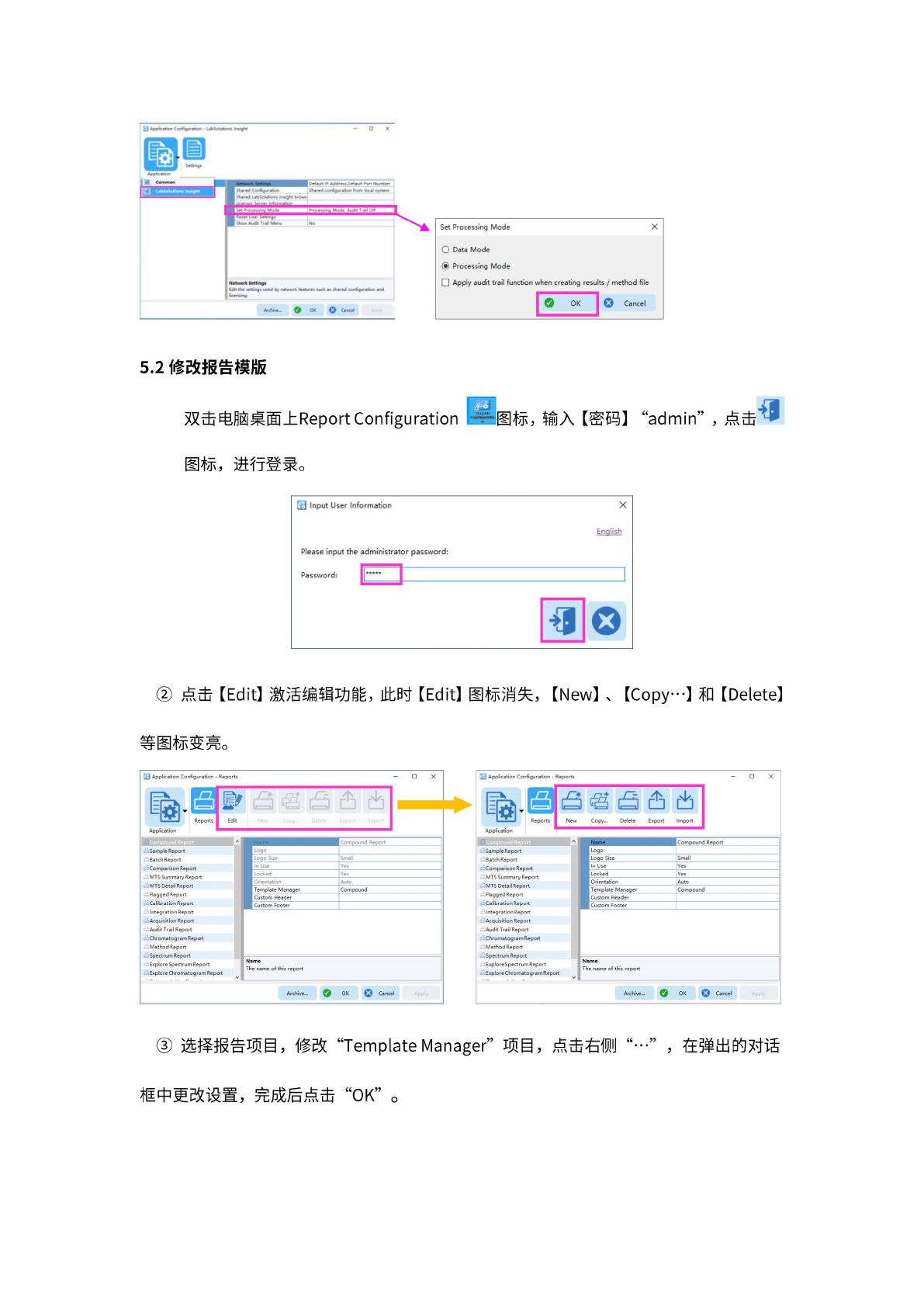
5.1
修改软
件模式
双
击电脑
桌面上
Application
Configuration
图标,
输入
【密
码】
“admin”
图标,
进行
登录。
点击
【
Application】
下拉
菜单,
选择
【
LabSolutions
Insight】
修改
“Set
Processing
Mode”
,点击
“OK”
18
①
点击 Edit
I
N«fw«r1i
tett
Edit
the
by
network
fMhxM
«uch
M
shared
con&gurMion
a
0d
kmng.
ArdwM.
O
OK
Oatd
Set
Processing
Mode
X
O
Data
Mode
Processing
Mode
Apply
audit
trail
function
when
creating
results
/
method
file
O
OK
I
O
Cancel
5.2
修改报
告模版
双
击电脑
桌面上
Report
Configuration
图标,
输入
【密
码】
“admin”
图标,
进行
登录。
j
Input
User
Information
Password:
X
Enolish
点击
[Edit]
激
活编辑
功能,
此时
[Edit]
图标
消失,
[New]
、
【
Copy
…】
和
[Delete]
等图标
变壳。
国
Application
Configuration
-
Reports
Application
Q
Cancel
Archive...
OK
X
Sample
Report
Batch
Report
Name
The
name
of
this
report
Chromatogram
Report
Method
Report
Spectrum
Report
Explore
Spectrum
Report
Explore
Chromatogram
Report
Comparison
Report
MTS
Summary
Report
MTS
Detail
Report
Flagged
Report
Calibration
Report
Integration
Report
Acquisition
Report
Audit
Trail
Report
Log。
Logo
Size
Small
In
Use
Yes
Locked
Yes
Orientation
Auto
Template
Manager
Compound
Custom
Header
Custom
Footer
用
Application
Configuration
-
Reports
-
X
巍
名自合
也
Reports
1
New
Copy...
Delete
Export
Import
Application
Name
Compound
Report
Sample
Report
I
Logo
Batch
Report
1
Logo
Size
Small
Comparison
Report
1
In
Use
Yes
MTS
Summary
Report
Locked
Yes
MTS
Detail
Report
Flagged
Report
.
Orientation
Auto
1
Template
Manager
Compound
1
Custom
Header
Calibration
Report
Custom
Footer
Integration
Report
Acquisition
Report
Audit
Trail
Report
Chromatogram
Report
Method
Report
Spectrum
Report
Explore
Spectrum
Report
Explore
Chromatogram
Report
C
a
1
.
•
—
V
Name
The
name
of
this
report
Archive...
O
OK
Cancel
选择报
告项目
,修改
“Template
Manager”
项目
,点
击右侧
,
在弹出
的对话
框
中更改
设置,
完成
后点击
“0K”
。
19
用
Application
Configuration
-
Reports
合
±
Reports
Application
Compound
Export
Import
阁
吕居后
Reports
New
Copy...
Delete
Sample
Report
Batch
Report
Comparison
Report
.
.
MTS
Summary
Report
MTS
Detail
Report
Flagged
Report
Calibration
Report
Integration
Report
Acquisition
Report
Audit
Trail
Report
Chromatogram
Report
Method
Report
Spectrum
Report
Explore
Spectrum
Report
Explore
Chromatogram
Report
Name
Compound
Report
Logo
Logo
Size
Small
In
Use
Yes
Locked
Yes
Orientation
Auto
Cancel
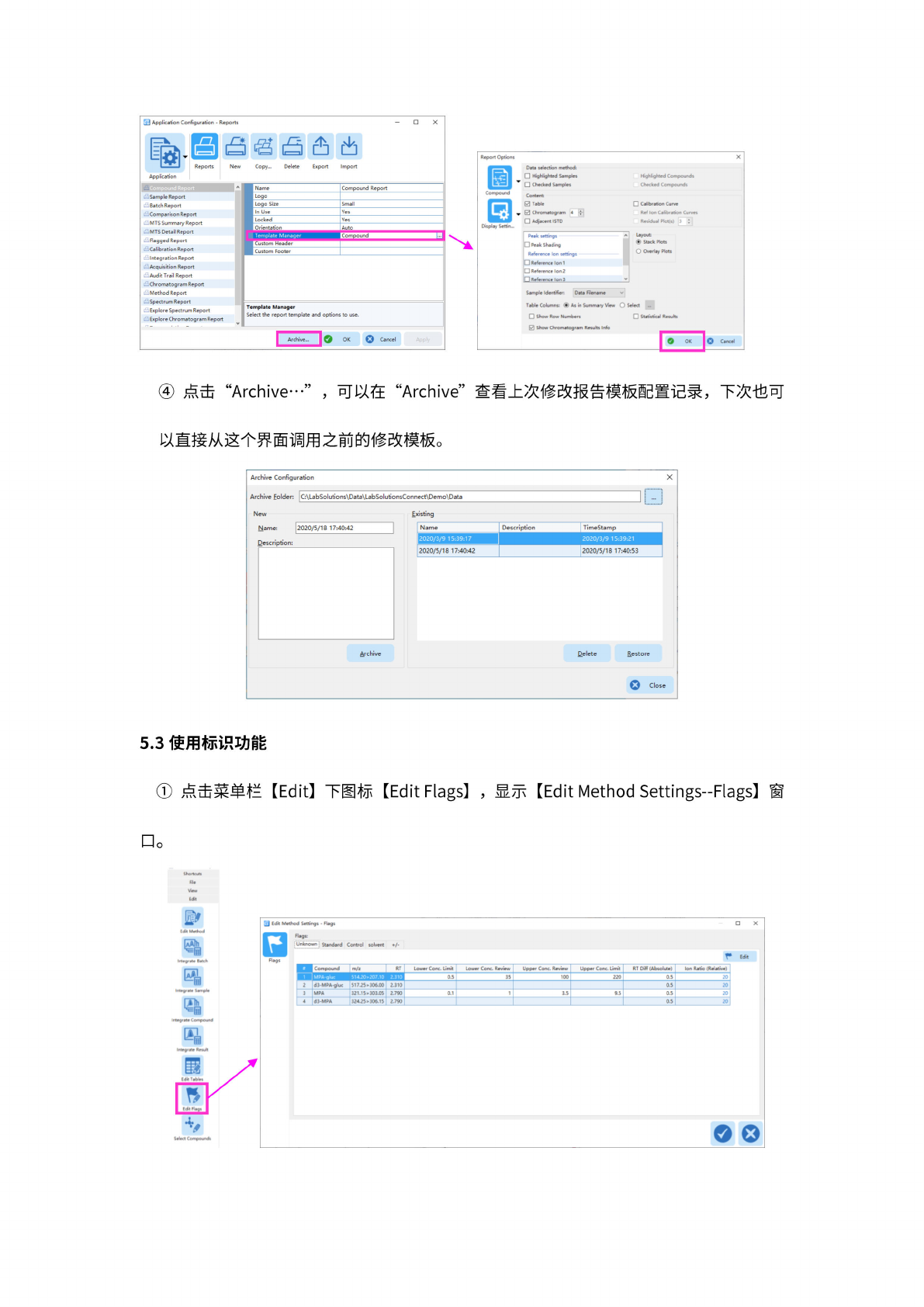
点击
“Archive
…”
可以在
"Archive”
查看上
次修改
报告模
板配置
记录,
下
次也可
以直接
从这个
界面调
用之前
的修改
模板。
Archive
Configuration
X
•・・•・•・・・・・・・・・・,
Archive
Folder:
C:\LabSolutions\Data\LabSolutionsConnect\Demo\Data
Existing
New
Name:
2020/5/18
17:40:42
Description:
Name
Description
TimeStamp
2020/3/9
15:39:17
2020/3/9
15:39:21
2020/5/18
17:40:42
2020/5/18
17:40:53
Archive
Restore
Close
5.3
使用标
识功能
点击
菜单栏
[Edit]
下图标
[Edit
Flags]
,
显示
[Edit
Method
Settings-Flags]
窗
幻
Ed"
Method
Settings
-
Flags
Unloiown
;
Standard
Control
aberrt
♦/-
L
Edit
#
Compound
RT
Lower
Cone.
Limit
Lower
Cone.
Review
Upper
Cone.
Review
Upper
Cone.
Limit
RT
Diff
(Ab*dute)
Ion
Rdtio
(Relative)
MPA-gluc
51<20>207.l0
)
i
[C
I
fc
W
1
W
I
0.5
35
100
220
0.5
20
「
2
d3-MPA-gluc
51
7.25
>306.00
2310
0.5
20
3
MPA
321.15*303.05
2.790
0J
1
3.5
9.5 0.5
20
|
4
d3・MPA
324.25»
306.15
2.790
0.5
20
oo
o
$■•<1
Compound*