00198207-01_VB_BoardGateKeeper2.0_de_en.pdf - 第30页
System Requirements and Software Components Configuration 30 SIPLACE BoardGateKeeper 2.0

System Requirements and Software Components
System Requirements for SIPLACE BoardGateKeeper
SIPLACE BoardGateKeeper 2.0 29
4
4 System Requirements and Software Components
System Requirements and Software Components
4.1
4.1 System Requirements for SIPLACE BoardGateKeeper
System Requirements for SIPLACE BoardGateKeeper
4.2
4.2 Configuration
Configuration
To establish the connection to the line equipment, you need to install SIPLACE BoardGateKeeper in the
SIPLACE LAN. The installation options vary according to your network configuration and are as follows:
1. SIPLACE BoardGateKeeper on one computer
This option requires that all SIPLACE Pro computers are available in the same LAN segment.
2. SIPLACE BoardGateKeeper on each line server
This option needs to be selected if the SIPLACE Pro computers are in different line-specific LAN seg-
ments.
NOTICE
System requirements
The system requirements (supported operating system and database variants) and an over-
view of mutually compatible products can be found in the installation manual for the SIPLACE
Support Media 2.3.
System Requirements and Software Components
Configuration
30 SIPLACE BoardGateKeeper 2.0
System Components and Features
5.1.1 BoardGateKeeper Service System Components
SIPLACE BoardGateKeeper 2.0 31
5
5 System Components and Features
System Components and Features
5.1
5.1 System Components
System Components
SIPLACE BoardGateKeeper is used for further processing of board data. This data is imported from the
barcode and/or transportation systems and transferred to the MES system.
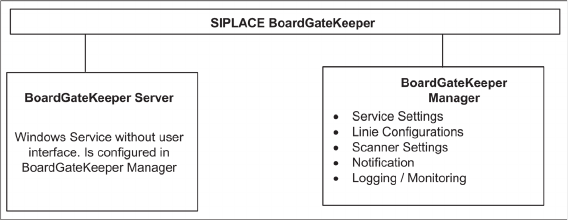
SIPLACE BoardGateKeeper consists of two components:
▪ BoardGateKeeper service:
for connection of the scanner and MES systems
▪ BoardGateKeeper Manager:
for configuration of the BoardGateKeeper server
All SIPLACE BoardGateKeeper components are automatically installed on the same computer during
installation.
5.1.1
5.1.1 BoardGateKeeper Service
BoardGateKeeper Service
Connects to the scanner and transportation systems configured for each line and transfers notification
messages to the MES.
5.1.2
5.1.2 BoardGateKeeper Manager
BoardGateKeeper Manager
The line-specific configuration and other options are set via the user interface of the BoardGateKeeper
Manager.
▪ Configuring the OIB
▪ Configures the lines and their scanner hardware
▪ Scanner Settings
▪ Configures the protocol and monitoring options
5.2
5.2 SIPLACE BoardGateKeeper User Interface
SIPLACE BoardGateKeeper User Interface