TM1858_Time Matching Function.pdf - 第5页
Y A M A H A M o t o r C o . L t d . , I M O p e r a t i o n s E n g i n e e r i n g t e a m M o u n t e r S o f t w a r e D e v e l o p m e n t g r o u p MDOC-SOFT5005 5 5 Fi g 2 .3 Br ows e f o r C o mp ut er d i …
YAMAHA Motor Co. Ltd.,
IM Operations Engineering team
Mounter Software Development group
MDOC-SOFT50055
4
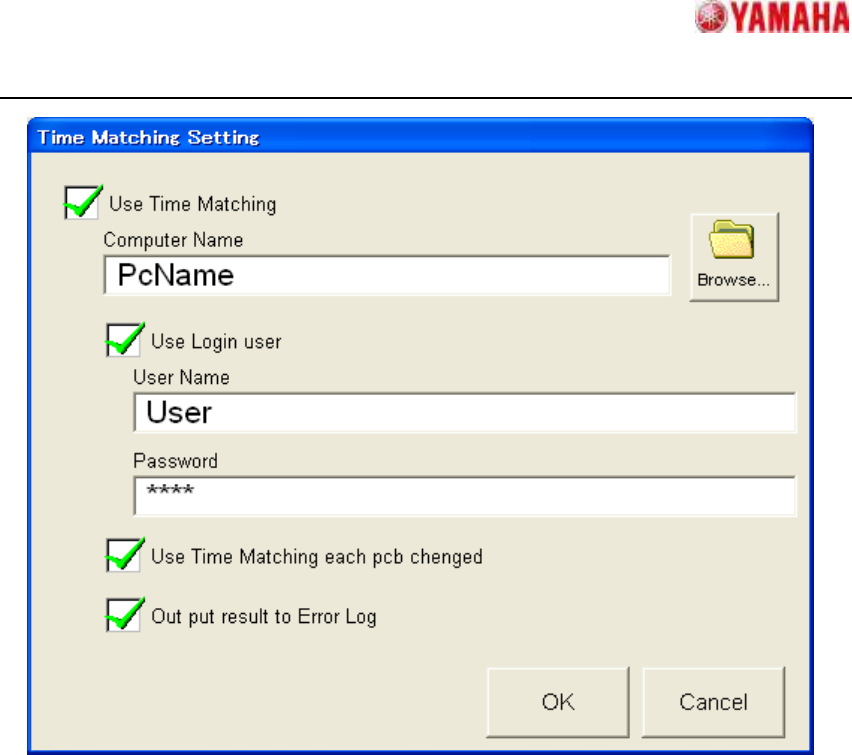
Fig 2.2 Time Matching Setting dialog
・ [Use Time Matching]
If "Checked state" is set, “Time Matching” is executed when the mounter application is
starting up.
Moreover the other items become to be able to edit.
・ [Computer Name]
Set computer name or IP address of the PC which is for the standard time.
Ex.) Domain Server, 192.168.0.1 etc.
CAUTION! If this item is not set, “Time Matching “is not executed.
・ [Browse…]
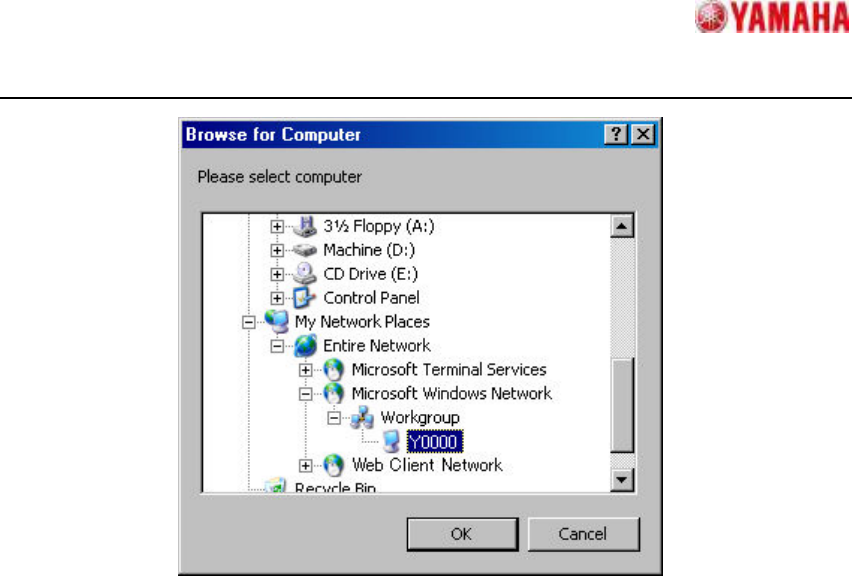
Refer to PC of the standard time. (Fig 2.3) When PC of the standard time is selected and
[OK] button is tapped, [Computer Name] is set.
YAMAHA Motor Co. Ltd.,
IM Operations Engineering team
Mounter Software Development group
MDOC-SOFT50055
5
Fig 2.3 Browse for Computer dialog
・ [Use Login user]
Check this item when the password is necessary for accessing PC of the standard time.
・ [User Name]
Set login user name of PC of the standard time.
When the domain is necessary, please add “domain name¥” before the user name.
Ex.) Domain¥User
・ [Password]
Set login password of PC of the standard time.
All the inputted items are displayed as *.
・ [Use Time Matching each Pcb changed]
If "Checked state" is set, “Time Matching” is executed when board data is changed.
Default is not checked.
・ [Out put result to Error Log]
If "Checked state" is set, the result of “Time Matching” is added to [MIS] - [Error log].
(Refer to “4 Error Message”) Default is not checked.
Please tap [OK] button after the setting ends. The setting is saved and Time Matching Setting
YAMAHA Motor Co. Ltd.,
IM Operations Engineering team
Mounter Software Development group
MDOC-SOFT50055
6
dialog is closed.
When [cancel] button is clicked, Time Matching Setting dialog is closed without saving the
settings.
3 Error Message
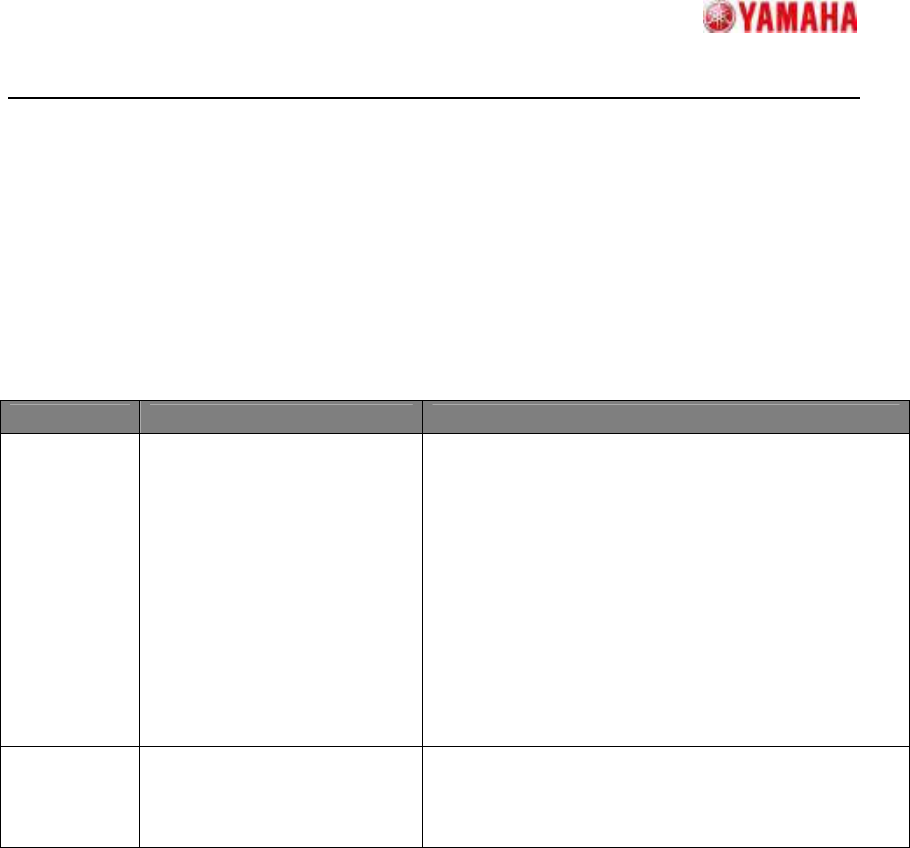
The messages which are used in this function are as following table.
Table 3.1 Error messages
No. Content Cause and Action
Ea12775 Network Connecting Error
Fail the Time Matching.
Please check the followings:
- This machine and PC of the standard time are
connected in the same LAN.
- [Computer name] is correct.
- This machine can refer to PC of the standard time.
- [User Name] is correct.
- [Password] is correct.
When computer name is wrong or is not connected
in the same LAN etc., it takes about ten seconds to
display this message in maximums.
Ea12776 Completed the time matching
The time matching has been completed.
The previous time is recorded in [Details].
Please refer to [Event Date] for the completion time.
4 Limitations
There are the following limitations when this function is used.
- PC of the standard time and Machines have to be connected in the same LAN network.