00194703_Setup Selection Assistant Setup Center RF.pdf - 第6页
SIPLACE Setup Center RF 2.1 - Tools Installation Manual - Setup Selection Assistant 1.3 Starting the Setup Wizard To start the Setup Wizard which will guide you thru th e installation process take the following steps. - …

Installation Manual - Setup Selection Assistant SIPLACE Setup Center RF 2.1 - Tools
1.2
System requirements
The following is required for a successful Setup Selection Assistant installation. 1
Setup Selection Assistant
The same Hardware is recommended as used for Setup Center RF installations.
The following Software is required:
- Windows 2000 Professional with SP4, or Windows XP Professional with SP1a or SP2
or Windows 2003 Server
- Windows Installer (Version 3.1 is recommended)
- Microsoft .NET Framework 1.1
- SIPLACE Pro Interface 2.x or 3.x
- SIPLACE Setup Center Station Package
Note:
A minimum of 24 MB of free space is needed on the hard disk for installation.
5 of 20
-

SIPLACE Setup Center RF 2.1 - Tools Installation Manual - Setup Selection Assistant
1.3 Starting the Setup Wizard
To start the Setup Wizard which will guide you thru the installation process take the following steps.
- Find the Installation Package on the Product CD
The Setup Selection Assistant installations can be found in the tools subdirectory of the SIPLACE
Setup Center RF 2.1 Product CD.
There are two versions of the Setup Selection Assistant available: one for Version 2 of SIPLACE Pro
and the other for Version 3 of SIPLACE Pro.
You have to choose the corresponding version depending on the version of the installed SIPLACE Pro
Interface.
Example
: If you are using SIPLACE Pro 2.1 (SIPLACE Pro Interface 2.1 is installed) you are going to
use “Setup Selection Assistant for SIPLACE Pro 2.x”, if you are using SIPLACE Pro 3.1 (SIPLACE Pro
Interface 3.1 is installed) you are going to use “Setup Selection Assistant for SIPLACE Pro 3.x”.
- Start the Installation Package
To start the installation process simply start the chosen installation package by double-clicking it or select
“Install” from the context menu appearing after right-clicking the package.
This will open the Setup Wizard which will guide you thru the installation process (see Chapter 3).
6 of 20
Installation Manual - Setup Selection Assistant SIPLACE Setup Center RF 2.1 - Tools
2 Installation Steps
This chapter describes the steps of the Setup Wizard needed to install the Setup Selection Assistant.
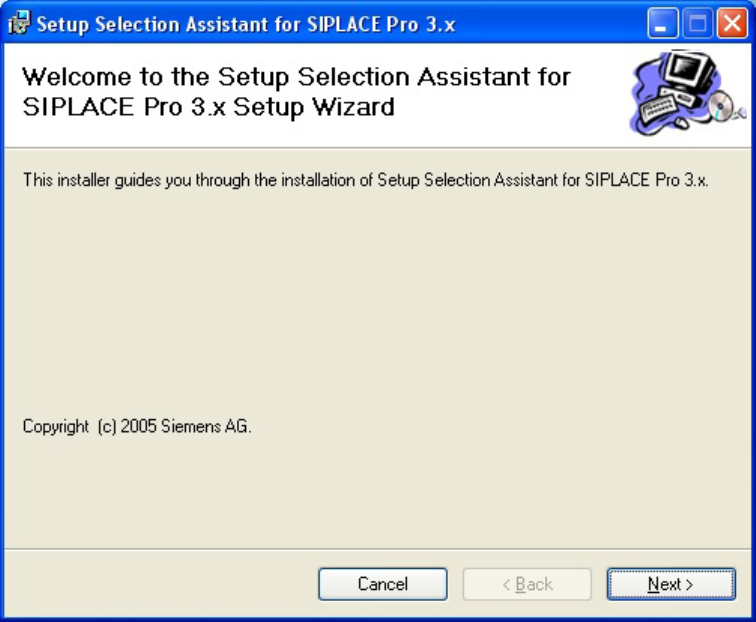
2.1 Step 1: Welcome
The first step of the Setup Wizard is a page with the welcome message:
Figure 1 "Welcome" page
→ Click Next.
7 of 20
-