TM6211.SmartRecognition.pdf - 第17页
S M T S o f t w a r e E n g i n e e r i n g G r o u p I M O p e r a t i o n s Y A M A H A M O T O R C O . , L T D . MDOC-SOFT50185 Ea12820 Smart Recognition Error [Cause] No part s image for Smart Recognition. [Counterme…

SMT Software Engineering Group
IM Operations YAMAHA MOTOR CO., LTD.
MDOC-SOFT50185
4.3. Error Message
Error Message
Number Title Cause and Countermeasure
Ea2755
SMART RECOGNITION
DATA READ ERROR
Failed to read Smart Recognition Data.
[Cause]
Model data is invalid.
No model doesn’t exist.
[Countermeasure]
Check if you have finished to create model data
for Smart Recognition.
Ea7712 INITIALIZATION ERROR
It failed to initialize vision system.
[Cause]
The machine doesn’t have valid system
board.(With 1GB or more size RAM)
[Countermeasure]
1. Change [Setting] - [Installation] -
[Smart Recognition] to [Not Use].
2. Change to valid system board.
Ea12815 Smart Recognition Error
Result from checking detected edges,
this parts is not applicable for Smart
Recognition.
Check the following items, and get image
again.
[Cause]
The number of detected edges is too small.
[Countermeasure]
1. Select detected area to enclose whole parts.
2. Change the light setting.
- Light type
- Light level

SMT Software Engineering Group
IM Operations YAMAHA MOTOR CO., LTD.
MDOC-SOFT50185
Ea12816 Smart Recognition Error
Result from checking detected edges,
no edges can be detected.
Check the following items, and get image
again.
[Cause]
The number of detected edges is 0.
[Countermeasure]
1. Pick up the parts at center of the nozzle.
2. Change the light setting.
- Kind of light
- Light level
Ea12817 Smart Recognition Error
Result from checking detected edges,
the work area for detecting edges is over flow.
Check the following items, and get image
again.
[Cause]
The area for detecting edges is too large.
[Countermeasure]
If the area for detecting edges is too large,
select minimum area for enclosing whole parts.
Ea12818 Smart Recognition Error
The number of edges is illegal.
Check the following items.
[Cause]
The number of edges is as below.
0 - 99
1000 -
[Countermeasure]
Adjust the number of edges to 100 – 999 as
follows.
In case of 0 - 99
1. Undo to erased edges.
2. Down edge threshold.
3. Down compress level.
In case of 1000 -
1. Erase the unnecessary edges.
2. Up edge threshold.
3. Up compress level.
SMT Software Engineering Group
IM Operations YAMAHA MOTOR CO., LTD.
MDOC-SOFT50185
Ea12820 Smart Recognition Error
[Cause]
No parts image for Smart Recognition.
[Countermeasure]
Pick up the parts and get image.
Ea12821 Smart Recognition Error
[Cause]
Failed to detected the edges.
[Countermeasure]
Check parts data.
5. Setting
5.1. Setting method
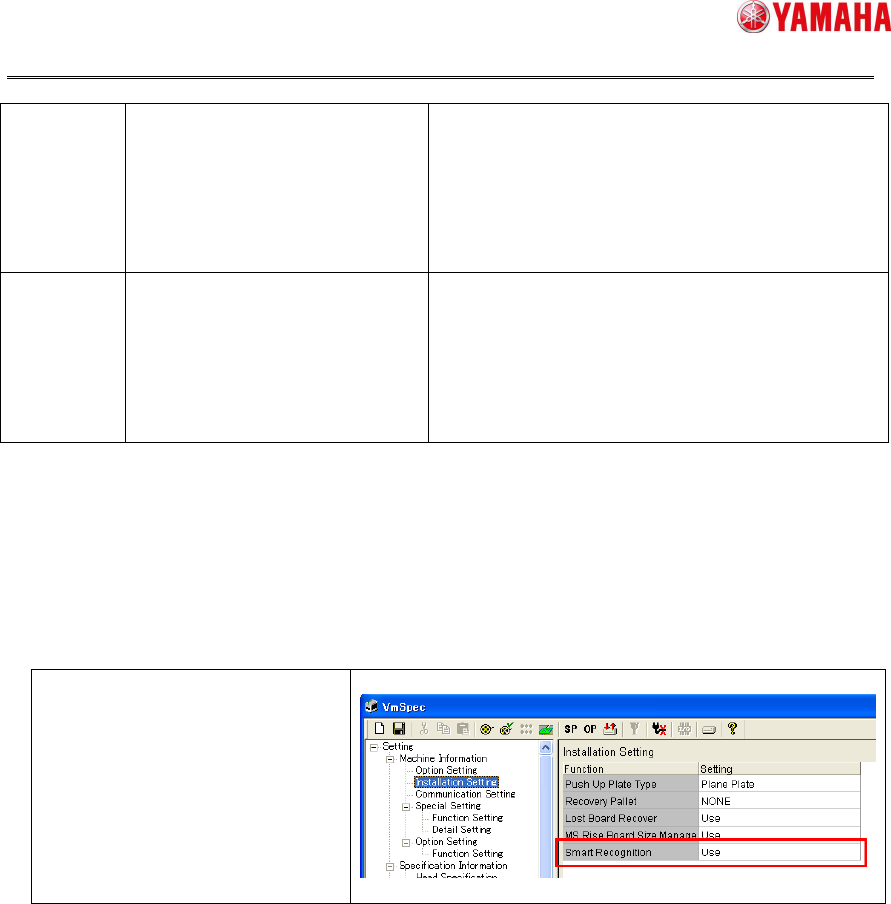
This function is enabled with the following setting.
Set [Machine] –
[Installation Setting] –
[Smart Recognition] to “Use”
* Be sure to reboot the machine
after modification of this setting.
Fig 4.1