TM2965.Functional Specification of Module Stop.pdf - 第3页
SMT Software En gineering Group IMOperations YAMAHAMOTORCO.,LTD. MD OC-SOFT50118 3/7 4. Setting meth od 4.1 Setting at “Machine” Set [Machine] – [ Machi ne Inf ormation] – [O ption Setti…

SMT Software Engineering Group
IMOperationsYAMAHAMOTORCO.,LTD.
MDOC-SOFT50118
2/7
1. Introduction
Thetargetmodelandversionareasfollows.
Table1.1Targetmodelandversion
Itemname Object Remarks
Targetmodel YS24(DL),YS24X(DL)
Targetversion V3.26STDR1.000orlater(Mounter)
2. Outline of functions
Fromthisversion,“ModuleStopFunction”hasbeenadded.
Beforethisfunctionadded,whenanerrorlikePickupErrorhadoccurred,thewholemachinehad
stopped.Fromthisversion,whenanerroroccursatonesidelane,thelanestopsastheother
lanecontinuesautorunning.Theoperationratioofthemachineimproveswiththisfunction.
Inaddition,thisfunctionbecomesactivewhenthemountmodeis“ParallelLanes”.
3. Limitation
• ItisnecessaryforLaneSelectSwitchtobeattached.
TheretrofitkittoattachLaneSelectSwitch
KKEM86B0000“SEL,RETROFITKIT”…forfeedercartmachines
KKEM86B1000“SEL,RETROFITKIT”…forfixedfeederbankmachines
• ThisfunctionisavailableonlywhenDualLaneSystem“Type1”or“Type2”isinstalled.
SMT Software Engineering Group
IMOperationsYAMAHAMOTORCO.,LTD.
MDOC-SOFT50118
3/7
4. Setting method
4.1 Setting at “Machine”
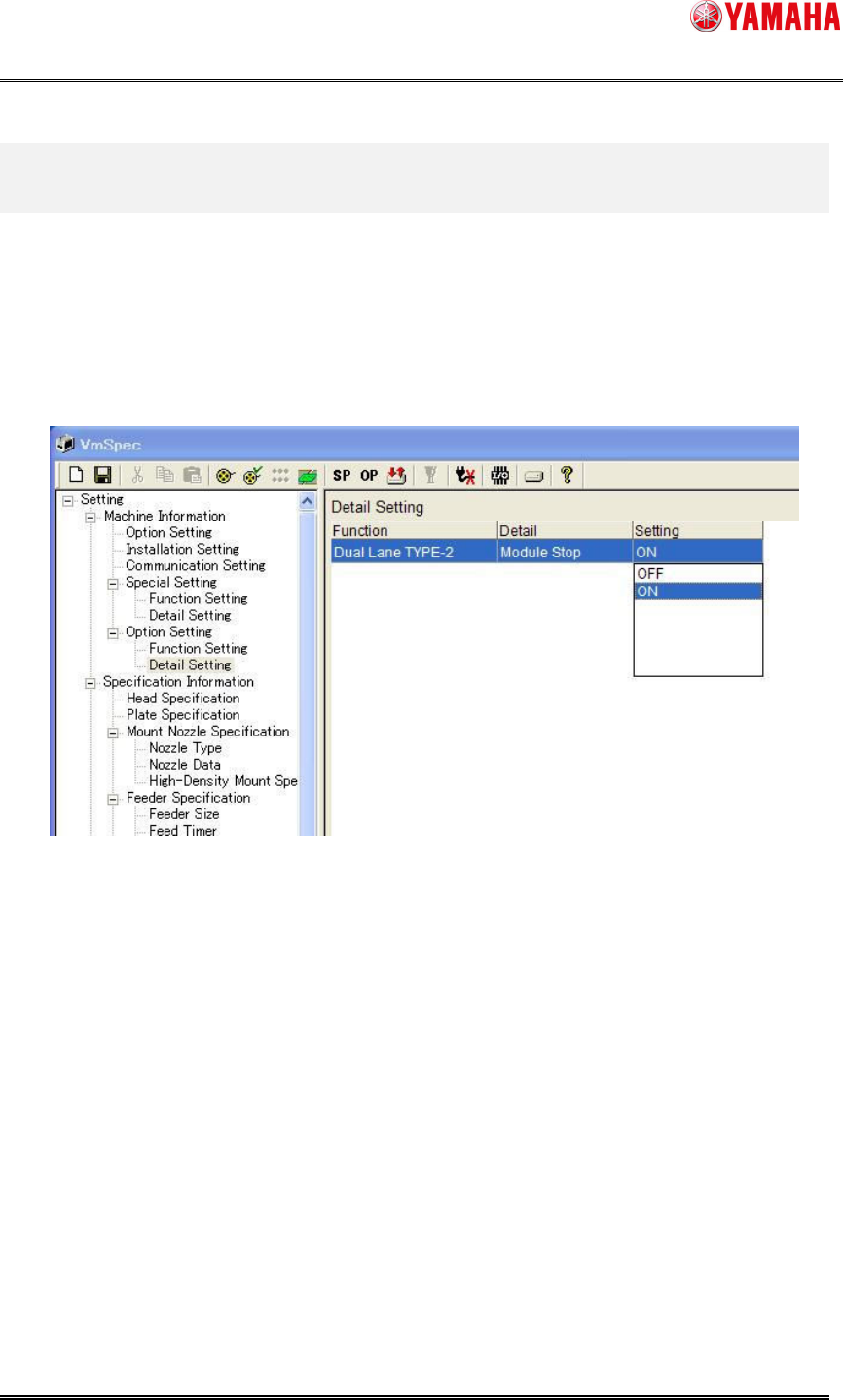
Set [Machine] – [Machine Information] – [Option Setting] – [Detail Setting] – [Module Stop] to
“ON”(seeFig4.1).
ThissettingiscommonforDualLaneSystemType1andType2.
Fig4.1[DetailSetting]screen
SMT Software Engineering Group
IMOperationsYAMAHAMOTORCO.,LTD.
MDOC-SOFT50118
4/7
^
5. Operation Method of Lane Select Switch
5.1 Lane Select Switch
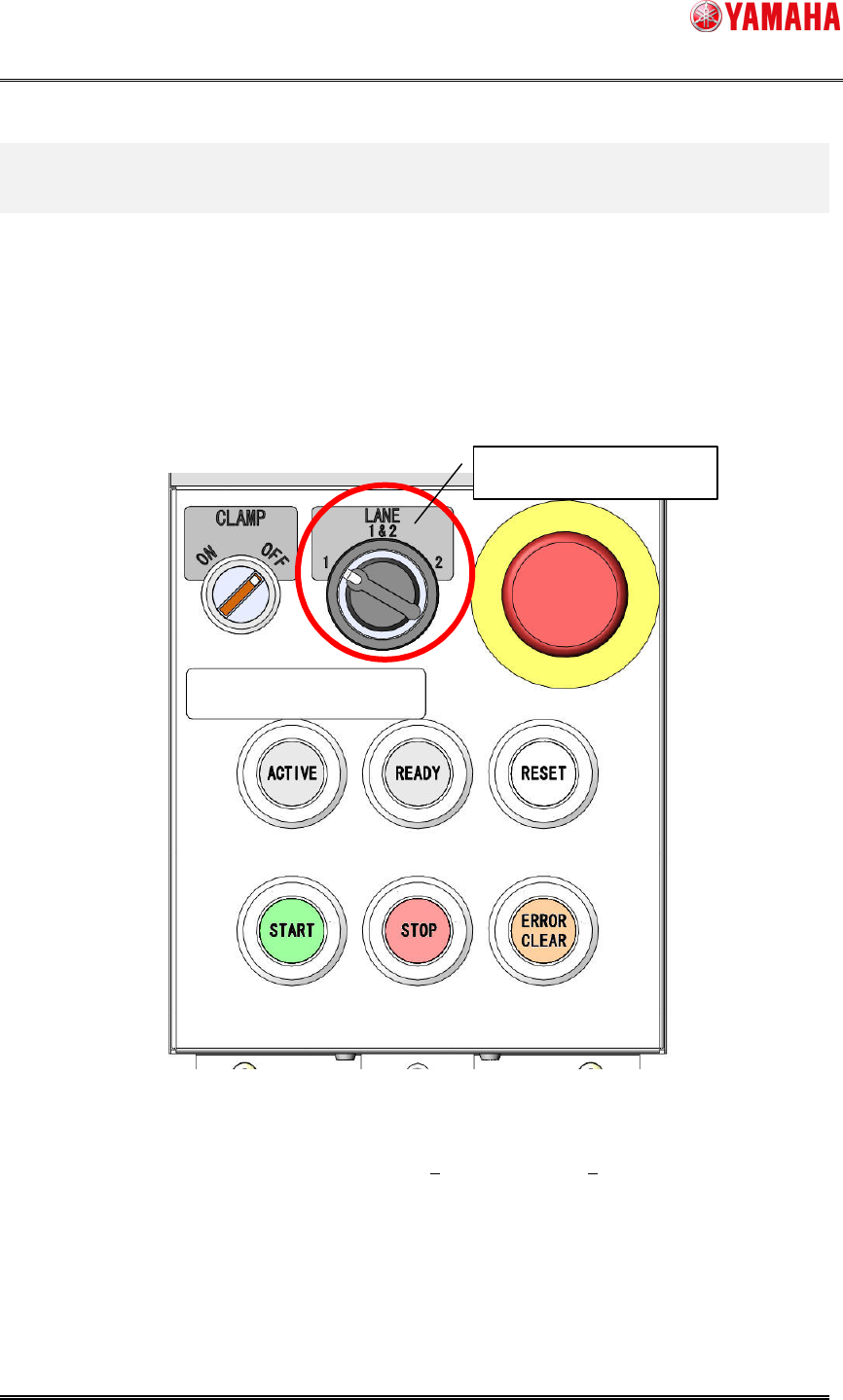
Lane Select Switch is added, which switches the operating range of [START] and [STOP]
buttons.
For example, when the both lanes are in a stopped state, press “START” button with Lane
SelectSwitchturnedto“Lane2”,andautorunningisstartedon“Lane2”only.
Fig5.1Theappearanceoftheoperationpanel
Themovementundereachoperatingconditionsandeachbuttonsisshownonthefollowing
table(Table5.1).
LaneSelectSwitch