46230811.pdf - 第27页
Page 25 DH P ositioning System Assembly , Non P/T T46230811 Rev . J This Document Supports Assembly 46230811 Rev J S p eci al T o o ls : Torque W renc h (i n. / lb s . ) Torque Gauge (in. / oz . ) ( 46808001) ( W at ers …
Page 24
T46230811 Rev. J DH Positioning System Assembly, Non P/T
This Document Supports Assembly 46230811 Rev J
10. Move the frame over the full range of motion for the axis noting any
changes in drag on the ball screw unit. Frame movement should be
smooth for the entire range of motion.
11. Perform steps 2 through 9 for the ball screw unit on the other axis.
12. Install the drive pulleys and their protective covers for each axis then
perform the belt tension adjustment for each axis.
Rotary Disc Alignment
The rotary disc alignment procedure aligns the rotary disc to the X axis table.
Several associated assemblies rely on one another. If one assembly is
adjusted, the rest are affected. It may be necessary to alternate between one
step of the procedure and another several times until the rotary disc is
aligned.
NOTE
Read the entire rotary disc alignment procedure before attempting the
adjustment.
Rotary disc alignment is correct when, with the rotary disc locked in the
FRONT position, the dowel pins can be inserted and removed by hand
through the rotary disc and into the X axis table.
NOTE
Due to the tolerance build up, interference may be felt when inserting and
removing the pins. This is normal and in no way means the table is not
properly aligned. If the pins can not be inserted into the holes with force,
the disc is not properly aligned.
After the rotary disc is aligned, the two locator pin assemblies drop into
their corresponding locator holes. The additional pressure exerted by
the lock assembly may cause the rotary disc to shift. This shift prevents
the insertion or extraction of the guide pins and additional adjustment of
the lock assembly is required.
If the locator pins slide into the holes after the lock and drive assemblies
are in position, alignment is correct. Proceed to the X-Y axes encoder
adjustments.
Machines with Board Handling System have two low profile guide wheels
which require a special wrench and procedures. These differences are
noted as applies in the following procedure.
Page 25
DH Positioning System Assembly, Non P/T T46230811 Rev. J
This Document Supports Assembly 46230811 Rev J
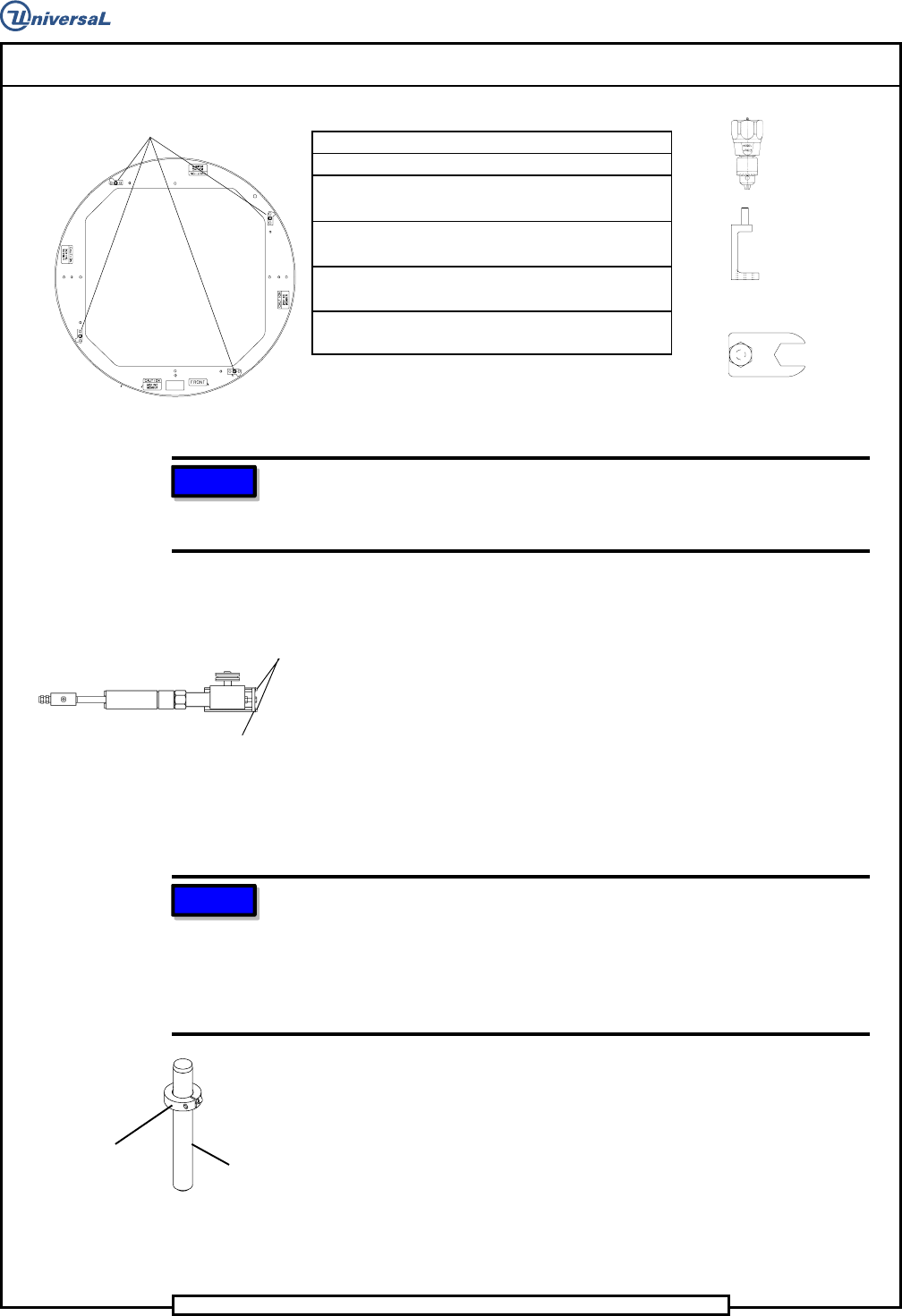
Special Tools:
Torque Wrench (in./lbs.)
Torque Gauge (in./oz.) (46808001)
(Waters Mfg. Model 651C-30)
Torque Adapter (45081601)
(High profile guide wheels)
Dowel pins (1/4 x 2) (80010109) with
collars (18333000)
Wrench (46758401)
(Low profile guide wheels)
NOTE
Depending on the machine configuration, covers and/or assembly
components will have to be removed to allow access to the guide wheels
and drive assembly.
1. Remove the four stop blocks from the rotary disc.
2. Remove the two socket head cap screws from the stop plate on the
drive assembly.
3. Remove the stop plate from the drive assembly to remove the drive
wheel pressure on the rotary disc.
4. Assemble the locator pins using dowel pins and collar clamps.
5. Insert the locator pin assemblies through the locator holes in the rotary
table and into the locator holes in the X axis table as shown.
NOTE
Due to the tolerance build up, interference may be felt when inserting and
removing the pins. This is normal and in no way means the table is not
square. If the pins can not be inserted into the holes, the disc is not
square. Some resistance may be encountered when fitting the pins into
the holes, but the resistance should never require the assistance of a
tool to remove the pins from the X axis frame.
6. If the pins can be inserted into the locator holes, proceed to step 20 to
adjust the lock assembly. If the pins can not be inserted into the
locator holes, proceed as follows.
Locator Pin Assembly
DOWEL PIN
COLLAR
CLAMP
Rotary Disk Assembly
STOP BLOCKS
Rotary Disk Drive Assembly
SOCKET
STOP
Page 26
T46230811 Rev. J DH Positioning System Assembly, Non P/T
This Document Supports Assembly 46230811 Rev J
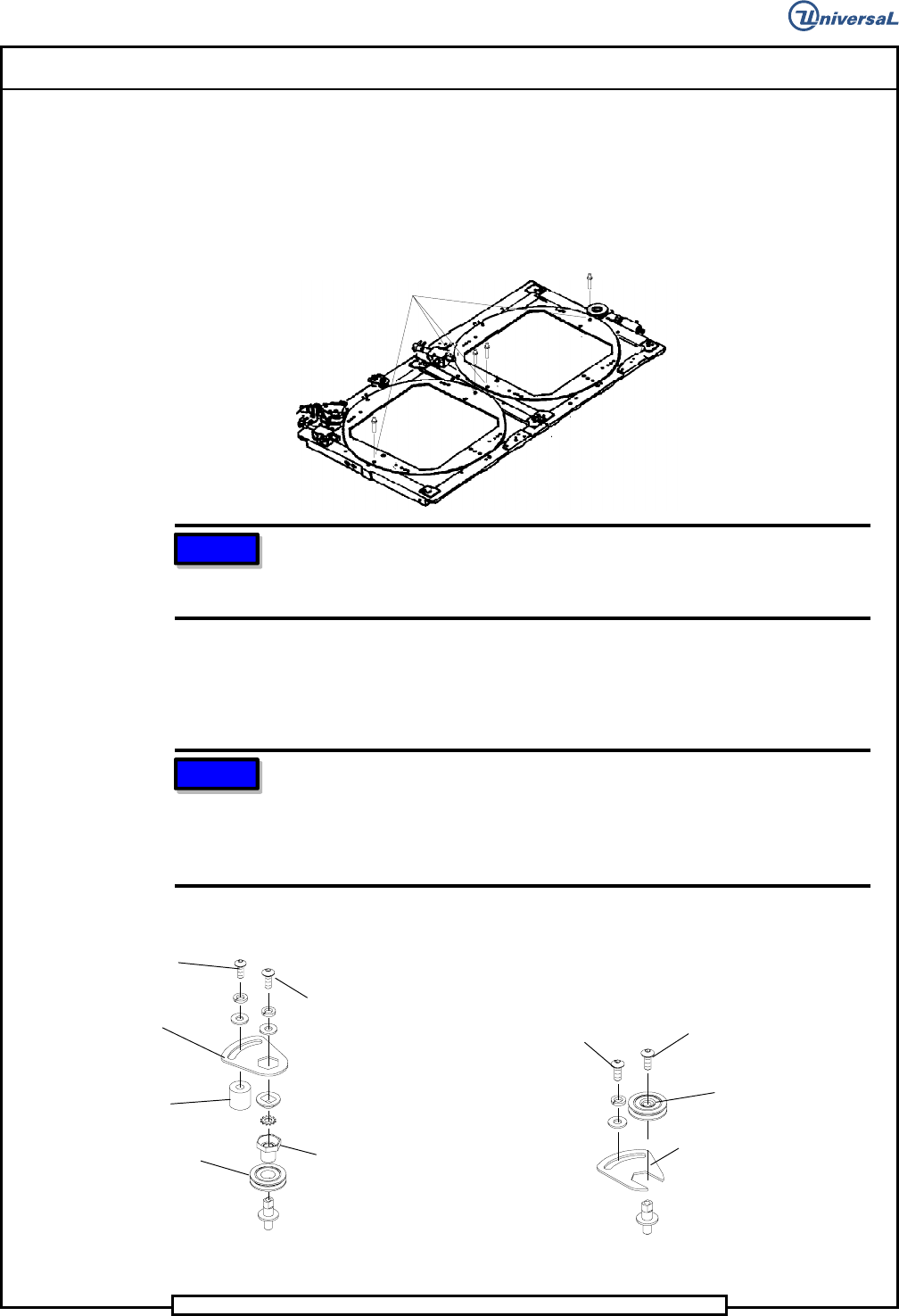
GUIDE WHEEL
BUSHING
ADAPTER
GUIDE
WHEEL
LOCKING
BRACKET
SPACER
HIGH PROFILE
BUTTON HEAD
CAP SCREW
LOW PROFILE
BUTTON HEAD
CAP SCREW
LOCKING
BRACKET
GUIDE WHEEL
WITH BUSHING
BUTTON HEAD
CAP SCREW
BUTTON HEAD
CAP SCREW
NOTE
Machines with Board Handling System have two styles of rotary disc
guide wheels. Two are high profile as used on machines without board
handling and two are low profile. Refer to the illustration below.
8. At each of the four guide wheel assemblies, loosen the button head cap
screw that secures the guide wheel bushing adapter and/or guide wheel
with bushing enough to allow them to turn.
NOTE
The guide wheel bushing adapter/guide wheel with bushing is an
eccentric. Turning them in a counterclockwise direction increases the
amount of resistance between the rotary disc and the guide wheel.
Turning them in a clockwise direction decreases the amount of
resistance between the guide wheel and the rotary disc.
LOCATOR
HOLES
7. Loosen the button head cap screw securing the locking bracket at each
of the four guide wheel assemblies.