manual-phne-nano-preheater-0026172_ID-202812_EN.pdf - 第9页
PHXLE PHXL -SA PHB -SA PHS -SA PHN-SA PHBE DESPIECE PHB PHSE PHNE OK 14:15 20 º C Power 45% TC1 45 º C Selected 120 º C TC2 P 100 º C 20 º C TC3 P 100 º C 20 º C TC4 P 100 º C 14:15 20 º C Power 45% Selected power 45 % T…
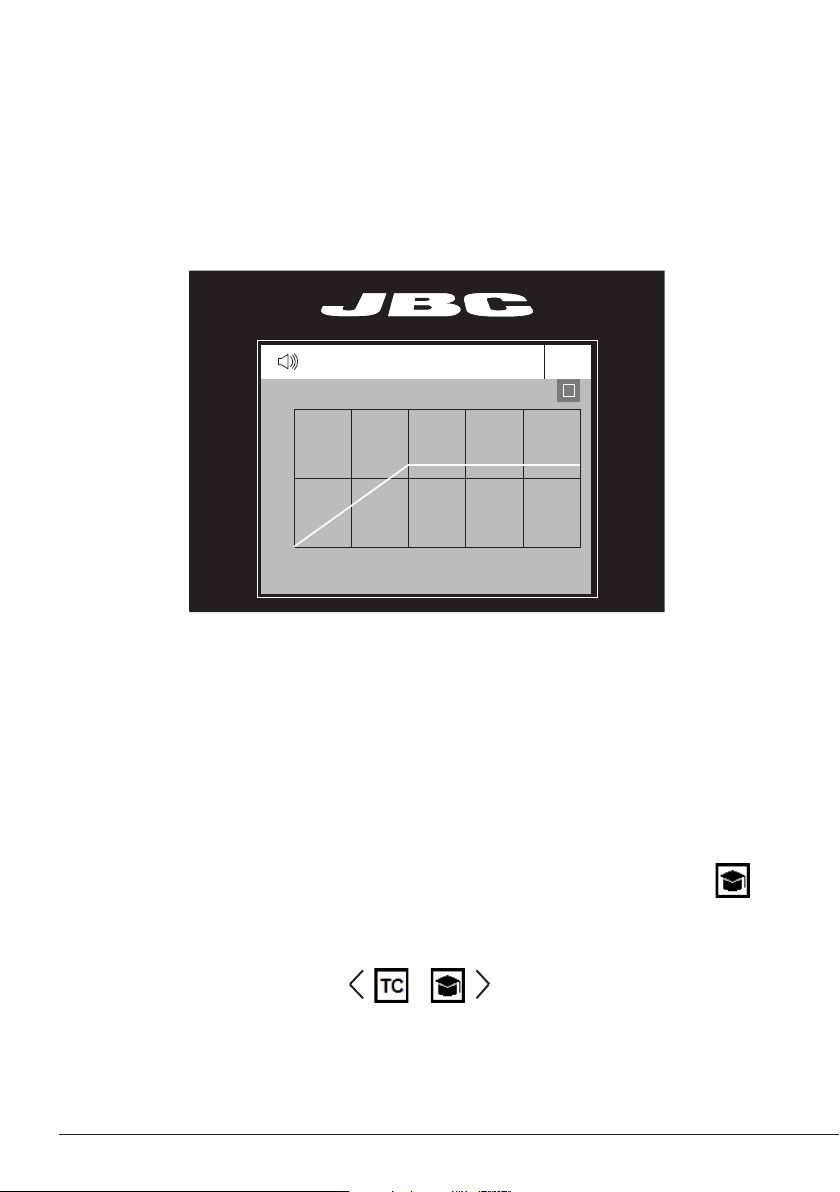
For repetitive jobs it is also possible to run customized profiles without the thermocouple (TC). In order
to do so, the Teach profile mode has to be executed before running any profile. It can be executed
from the Work mode menu if the Profiles mode is selected. The first time, the thermocouple must be
connected. Once the profile has been run to the end, the system has all the process data which you
can save.
Once it is saved, you can run this profile without connecting the thermocouple (TC). The heating
process will be the same as long as the same working conditions are respected.
The profiles which already have the data from the Teach profile are marked with this symbol
These profiles can be run either with or without the Thermocouples. It can be chosen from the
Profiles mode work screen:
Teach Profile
Select Profile Mode from the Work Mode Menu. In this mode the heater unit regulates the temperature
of the TC1 thermocouple according to the selected profile as long as the other TCs do not reach the
control/protection temperature limit.
Profile Modes
PHXLE
PHXL-SA
PHB-SA
PHS-SA
PHN-SA
PHBE DESPIECE PHB
PHSE
PHNE
OK
14:15
20
º
C
Power
45%
TC1
45
º
C
Selected 120
º
C
TC2
P
100
º
C
20
º
C
TC3
P
100
º
C
20
º
C
TC4
P
100
º
C
14:15
20
º
C
Power
45%
Selected power
45
%
TC1
P
100
º
C
20
º
C
TC3
P
100
º
C
20
º
C
TC4
P
100
º
C
20
º
C
TC2
P
100
º
C
14:15
20
º
C
T1
23
º
C
20
5’ 8’
º
C
120
º
C
T3
24
º
C
T7
StopPROFILE1
200
100
14:15
31
º
C
27
º
C
TC1
TC2
StopPROFILE1
200
100
14:15
200
150
100
50
300
250
14:15
5m 00s
120
º
C
PROFILE1
200
100
14:15
30
º
C
Power
45%
Selected power
45
%
TC1
C
100
º
C
---
º
C
TC2
P
100
º
C
0 60 120 180 240 300
Point
2/3
Temp Time
2m 00s
14:15
20
º
C
20
º
C
TC1
TC2
20
º
C
TC3
20
º
C
TC4
StopPROFILE1
200
100
Ext. Temp [ºC]Power [%]
14:15
20
º
C
Power
45%
TC1
45
º
C
Selected 120
º
C
TC2
P
100
º
C
20
º
C
TC3
P
100
º
C
20
º
C
TC4
P
100
º
C
14:15
20
º
C
Power
45%
TC1
45
º
C
Selected 120
º
C
Max. Rate
1.6ºC/s
Max. Rate
1.6ºC/s
TC2
C
100
º
C
20
º
C
TC3
P
100
º
C
20
º
C
TC4
P
100
º
C
14:15
20
º
C
Power
45%
Selected power
45
%
14:15
TC5
P
100
º
C
20
º
C
TC7
P
100
º
C
20
º
C
TC8
P
100
º
C
20
º
C
TC6
P
100
º
C
20
º
C
TC5
P
100
º
C
14:15
20
º
C
Power
45%
TC1
25
º
C
Selected 120
º
C
TC2
P
100
º
C
14:15
20
º
C
Power
45%
TC1
25
º
C
Selected 120
º
C
TC2
P
100
º
C
14:15
20
º
C
Power
45%
TC1
45
º
C
Selected 120
º
C
TC2
C
100
º
C
20
º
C
TC3
P
100
º
C
20
º
C
TC4
P
100
º
C
20
º
C
TC5
P
100
º
C
20
5’ 8’
º
C
120
º
C
80
º
C
100
º
C
5’ 8’5’30”3’30” 8’
20
º
C
120
º
C
80
º
C
TC1
TC2
TC3
TC4
ROBOT
AUX.
PEDAL
Hot
Zone B
Zone A
Zone A
Zone B
Hot
Hot
Zone B
Zone A
Zone A
Zone B
Hot
TC1
TC2
TC3
TC4
ROBOT
AUX.
PEDAL
detalle parte trasera
TC1
TC2
TC3
TC4
ROBOT
AUX.
PEDAL
TC1
TC2
TC3
TC4
ROBOT
AUX.
PEDAL
Hot
Zone B
Zone A
Zone A
Zone B
Hot
Hot
Zone B
Hot
Zone B
Zone A
Zone A
Max. Rate
1.6ºC/s
Max. Rate
1.6ºC/s
Max. Rate
1.6ºC/s
Max. Rate
1.6ºC/s
Work mode
Mode
Time to stop
Thermocouples
Max Rate
Back
None
2min
Temp.
14:15
Work mode
Mode
Time to stop
Thermocouples
Max Rate
Back
None
2min
Temp.
1.6ºC/s
Max Rate
Min 0.1ºC/s Max 2.0ºC/s
8
PHXLE
PHXL-SA
PHB-SA
PHS-SA
PHN-SA
PHBE DESPIECE PHB
PHSE
PHNE
OK
14:15
20
º
C
Power
45%
TC1
45
º
C
Selected 120
º
C
TC2
P
100
º
C
20
º
C
TC3
P
100
º
C
20
º
C
TC4
P
100
º
C
14:15
20
º
C
Power
45%
Selected power
45
%
TC1
P
100
º
C
20
º
C
TC3
P
100
º
C
20
º
C
TC4
P
100
º
C
20
º
C
TC2
P
100
º
C
14:15
20
º
C
T1
23
º
C
20
5’ 8’
º
C
120
º
C
T3
24
º
C
T7
StopPROFILE1
200
100
14:15
31
º
C
27
º
C
TC1
TC2
StopPROFILE1
200
100
14:15
200
150
100
50
300
250
14:15
5m 00s
120
º
C
PROFILE1
200
100
14:15
30
º
C
Power
45%
Selected power
45
%
TC1
C
100
º
C
---
º
C
TC2
P
100
º
C
0 60 120 180 240 300
Point
2/3
Temp Time
2m 00s
14:15
20
º
C
20
º
C
TC1
TC2
20
º
C
TC3
20
º
C
TC4
StopPROFILE1
200
100
Ext. Temp [ºC]Power [%]
14:15
20
º
C
Power
45%
TC1
45
º
C
Selected 120
º
C
TC2
P
100
º
C
20
º
C
TC3
P
100
º
C
20
º
C
TC4
P
100
º
C
14:15
20
º
C
Power
45%
TC1
45
º
C
Selected 120
º
C
Max. Rate
1.6ºC/s
Max. Rate
1.6ºC/s
TC2
C
100
º
C
20
º
C
TC3
P
100
º
C
20
º
C
TC4
P
100
º
C
14:15
20
º
C
Power
45%
Selected power
45
%
14:15
TC5
P
100
º
C
20
º
C
TC7
P
100
º
C
20
º
C
TC8
P
100
º
C
20
º
C
TC6
P
100
º
C
20
º
C
TC5
P
100
º
C
14:15
20
º
C
Power
45%
TC1
25
º
C
Selected 120
º
C
TC2
P
100
º
C
14:15
20
º
C
Power
45%
TC1
25
º
C
Selected 120
º
C
TC2
P
100
º
C
14:15
20
º
C
Power
45%
TC1
45
º
C
Selected 120
º
C
TC2
C
100
º
C
20
º
C
TC3
P
100
º
C
20
º
C
TC4
P
100
º
C
20
º
C
TC5
P
100
º
C
20
5’ 8’
º
C
120
º
C
80
º
C
100
º
C
5’ 8’5’30”3’30” 8’
20
º
C
120
º
C
80
º
C
TC1
TC2
TC3
TC4
ROBOT
AUX.
PEDAL
Hot
Zone B
Zone A
Zone A
Zone B
Hot
Hot
Zone B
Zone A
Zone A
Zone B
Hot
TC1
TC2
TC3
TC4
ROBOT
AUX.
PEDAL
detalle parte trasera
TC1
TC2
TC3
TC4
ROBOT
AUX.
PEDAL
TC1
TC2
TC3
TC4
ROBOT
AUX.
PEDAL
Hot
Zone B
Zone A
Zone A
Zone B
Hot
Hot
Zone B
Hot
Zone B
Zone A
Zone A
Max. Rate
1.6ºC/s
Max. Rate
1.6ºC/s
Max. Rate
1.6ºC/s
Max. Rate
1.6ºC/s
Work mode
Mode
Time to stop
Thermocouples
Max Rate
Back
None
2min
Temp.
14:15
Work mode
Mode
Time to stop
Thermocouples
Max Rate
Back
None
2min
Temp.
1.6ºC/s
Max Rate
Min 0.1ºC/s Max 2.0ºC/s
PHXLE
PHXL-SA
PHB-SA
PHS-SA
PHN-SA
PHBE DESPIECE PHB
PHSE
PHNE
OK
14:15
20
º
C
Power
45%
TC1
45
º
C
Selected 120
º
C
TC2
P
100
º
C
20
º
C
TC3
P
100
º
C
20
º
C
TC4
P
100
º
C
14:15
20
º
C
Power
45%
Selected power
45
%
TC1
P
100
º
C
20
º
C
TC3
P
100
º
C
20
º
C
TC4
P
100
º
C
20
º
C
TC2
P
100
º
C
14:15
20
º
C
T1
23
º
C
20
5’ 8’
º
C
120
º
C
T3
24
º
C
T7
StopPROFILE1
200
100
14:15
31
º
C
27
º
C
TC1
TC2
StopPROFILE1
200
100
14:15
200
150
100
50
300
250
14:15
5m 00s
120
º
C
PROFILE1
200
100
14:15
30
º
C
Power
45%
Selected power
45
%
TC1
C
100
º
C
---
º
C
TC2
P
100
º
C
0 60 120 180 240 300
Point
2/3
Temp Time
2m 00s
14:15
20
º
C
20
º
C
TC1
TC2
20
º
C
TC3
20
º
C
TC4
StopPROFILE1
200
100
Ext. Temp [ºC]Power [%]
14:15
20
º
C
Power
45%
TC1
45
º
C
Selected 120
º
C
TC2
P
100
º
C
20
º
C
TC3
P
100
º
C
20
º
C
TC4
P
100
º
C
14:15
20
º
C
Power
45%
TC1
45
º
C
Selected 120
º
C
Max. Rate
1.6ºC/s
Max. Rate
1.6ºC/s
TC2
C
100
º
C
20
º
C
TC3
P
100
º
C
20
º
C
TC4
P
100
º
C
14:15
20
º
C
Power
45%
Selected power
45
%
14:15
TC5
P
100
º
C
20
º
C
TC7
P
100
º
C
20
º
C
TC8
P
100
º
C
20
º
C
TC6
P
100
º
C
20
º
C
TC5
P
100
º
C
14:15
20
º
C
Power
45%
TC1
25
º
C
Selected 120
º
C
TC2
P
100
º
C
14:15
20
º
C
Power
45%
TC1
25
º
C
Selected 120
º
C
TC2
P
100
º
C
14:15
20
º
C
Power
45%
TC1
45
º
C
Selected 120
º
C
TC2
C
100
º
C
20
º
C
TC3
P
100
º
C
20
º
C
TC4
P
100
º
C
20
º
C
TC5
P
100
º
C
20
5’ 8’
º
C
120
º
C
80
º
C
100
º
C
5’ 8’5’30”3’30” 8’
20
º
C
120
º
C
80
º
C
TC1
TC2
TC3
TC4
ROBOT
AUX.
PEDAL
Hot
Zone B
Zone A
Zone A
Zone B
Hot
Hot
Zone B
Zone A
Zone A
Zone B
Hot
TC1
TC2
TC3
TC4
ROBOT
AUX.
PEDAL
detalle parte trasera
TC1
TC2
TC3
TC4
ROBOT
AUX.
PEDAL
TC1
TC2
TC3
TC4
ROBOT
AUX.
PEDAL
Hot
Zone B
Zone A
Zone A
Zone B
Hot
Hot
Zone B
Hot
Zone B
Zone A
Zone A
Max. Rate
1.6ºC/s
Max. Rate
1.6ºC/s
Max. Rate
1.6ºC/s
Max. Rate
1.6ºC/s
Work mode
Mode
Time to stop
Thermocouples
Max Rate
Back
None
2min
Temp.
14:15
Work mode
Mode
Time to stop
Thermocouples
Max Rate
Back
None
2min
Temp.
1.6ºC/s
Max Rate
Min 0.1ºC/s Max 2.0ºC/s
· Add Point
· Delete Point
· Load Profile
· Save Profile
· Exit
Data for
these Points
Profile Name
Profile Editor
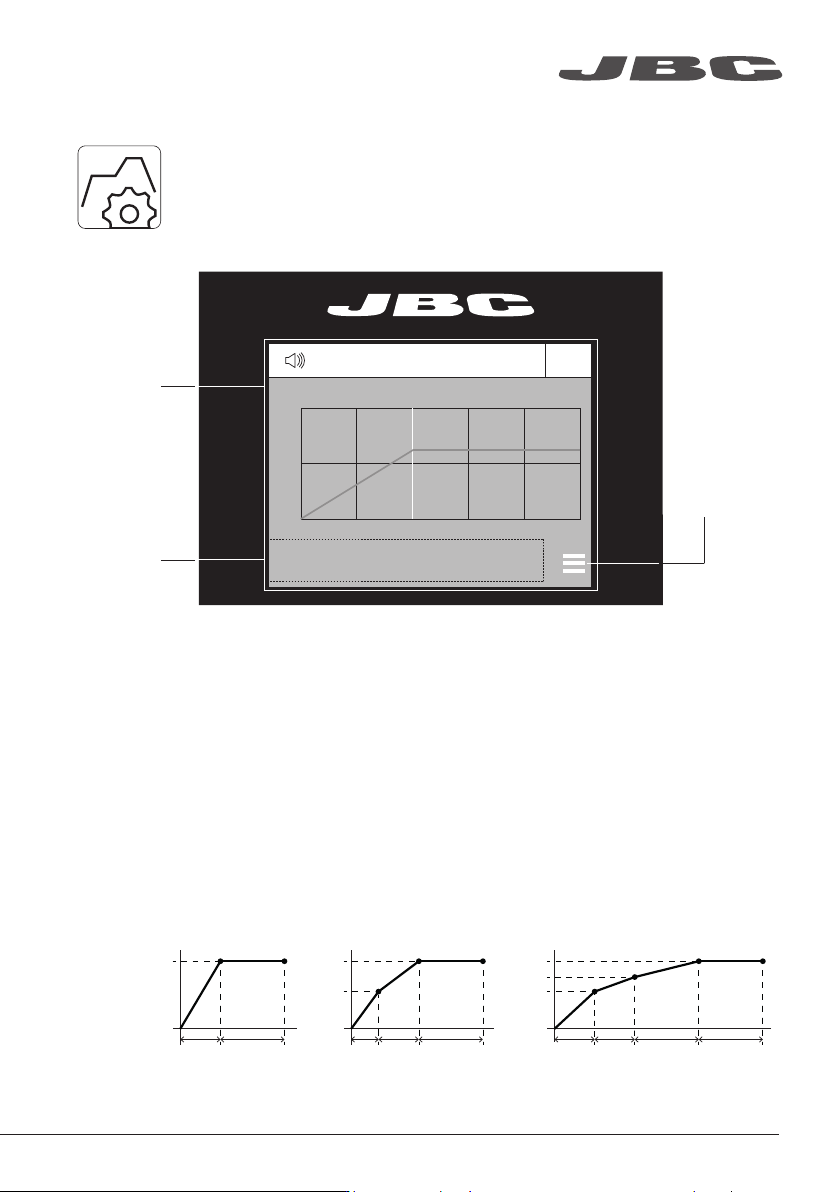
The Profile editor can be opened from the main menu or from the Profiles mode work
screen by pressing the ‘OK’ button.
In this mode, you can edit as many as 25 profiles of temperature.
Menu
Options
JBC Predefined Profiles
There are 3 profiles predefined by JBC: A, B and C. The difference between them is the number of
steps: 2, 3 or 4. The thicker your PCB is and the more layers it contains, the more steps are needed
to obtain gradual warming.
Predefined profiles use the low position of the Support.
These profiles are not modifiable but they can be used as templates to create your own profiles.
JBC-A
2 steps
JBC-B
3 steps
JBC-C
4 steps
Reference-PCB
specifications:
FR4 1,6mm thick
and 2 layers.
FR4 2,2mm thick
and 6 layers.
FR4 1,6mm thick
and 6 layers.
Profi le Editor
www.jbctools.com
9
PHXLE
PHXL-SA
PHB-SA
PHS-SA
PHN-SA
PHBE DESPIECE PHB
PHSE
PHNE
OK
14:15
20
º
C
Power
45%
TC1
45
º
C
Selected 120
º
C
TC2
P
100
º
C
20
º
C
TC3
P
100
º
C
20
º
C
TC4
P
100
º
C
14:15
20
º
C
Power
45%
Selected power
45
%
TC1
P
100
º
C
20
º
C
TC3
P
100
º
C
20
º
C
TC4
P
100
º
C
20
º
C
TC2
P
100
º
C
14:15
20
º
C
T1
23
º
C
20
5’ 8’
º
C
120
º
C
T3
24
º
C
T7
StopPROFILE1
200
100
14:15
31
º
C
27
º
C
TC1
TC2
StopPROFILE1
200
100
14:15
200
150
100
50
300
250
14:15
5m 00s
120
º
C
PROFILE1
200
100
14:15
30
º
C
Power
45%
Selected power
45
%
TC1
C
100
º
C
---
º
C
TC2
P
100
º
C
0 60 120 180 240 300
Point
2/3
Temp Time
2m 00s
14:15
20
º
C
20
º
C
TC1
TC2
20
º
C
TC3
20
º
C
TC4
StopPROFILE1
200
100
Ext. Temp [ºC]Power [%]
14:15
20
º
C
Power
45%
TC1
45
º
C
Selected 120
º
C
TC2
P
100
º
C
20
º
C
TC3
P
100
º
C
20
º
C
TC4
P
100
º
C
14:15
20
º
C
Power
45%
TC1
45
º
C
Selected 120
º
C
Max. Rate
1.6ºC/s
Max. Rate
1.6ºC/s
TC2
C
100
º
C
20
º
C
TC3
P
100
º
C
20
º
C
TC4
P
100
º
C
14:15
20
º
C
Power
45%
Selected power
45
%
14:15
TC5
P
100
º
C
20
º
C
TC7
P
100
º
C
20
º
C
TC8
P
100
º
C
20
º
C
TC6
P
100
º
C
20
º
C
TC5
P
100
º
C
14:15
20
º
C
Power
45%
TC1
25
º
C
Selected 120
º
C
TC2
P
100
º
C
14:15
20
º
C
Power
45%
TC1
25
º
C
Selected 120
º
C
TC2
P
100
º
C
14:15
20
º
C
Power
45%
TC1
45
º
C
Selected 120
º
C
TC2
C
100
º
C
20
º
C
TC3
P
100
º
C
20
º
C
TC4
P
100
º
C
20
º
C
TC5
P
100
º
C
20
5’ 8’
º
C
120
º
C
80
º
C
100
º
C
5’ 8’5’30”3’30” 8’
20
º
C
120
º
C
80
º
C
TC1
TC2
TC3
TC4
ROBOT
AUX.
PEDAL
Hot
Zone B
Zone A
Zone A
Zone B
Hot
Hot
Zone B
Zone A
Zone A
Zone B
Hot
TC1
TC2
TC3
TC4
ROBOT
AUX.
PEDAL
detalle parte trasera
TC1
TC2
TC3
TC4
ROBOT
AUX.
PEDAL
TC1
TC2
TC3
TC4
ROBOT
AUX.
PEDAL
Hot
Zone B
Zone A
Zone A
Zone B
Hot
Hot
Zone B
Hot
Zone B
Zone A
Zone A
Max. Rate
1.6ºC/s
Max. Rate
1.6ºC/s
Max. Rate
1.6ºC/s
Max. Rate
1.6ºC/s
Work mode
Mode
Time to stop
Thermocouples
Max Rate
Back
None
2min
Temp.
14:15
Work mode
Mode
Time to stop
Thermocouples
Max Rate
Back
None
2min
Temp.
1.6ºC/s
Max Rate
Min 0.1ºC/s Max 2.0ºC/s
Process Analysis
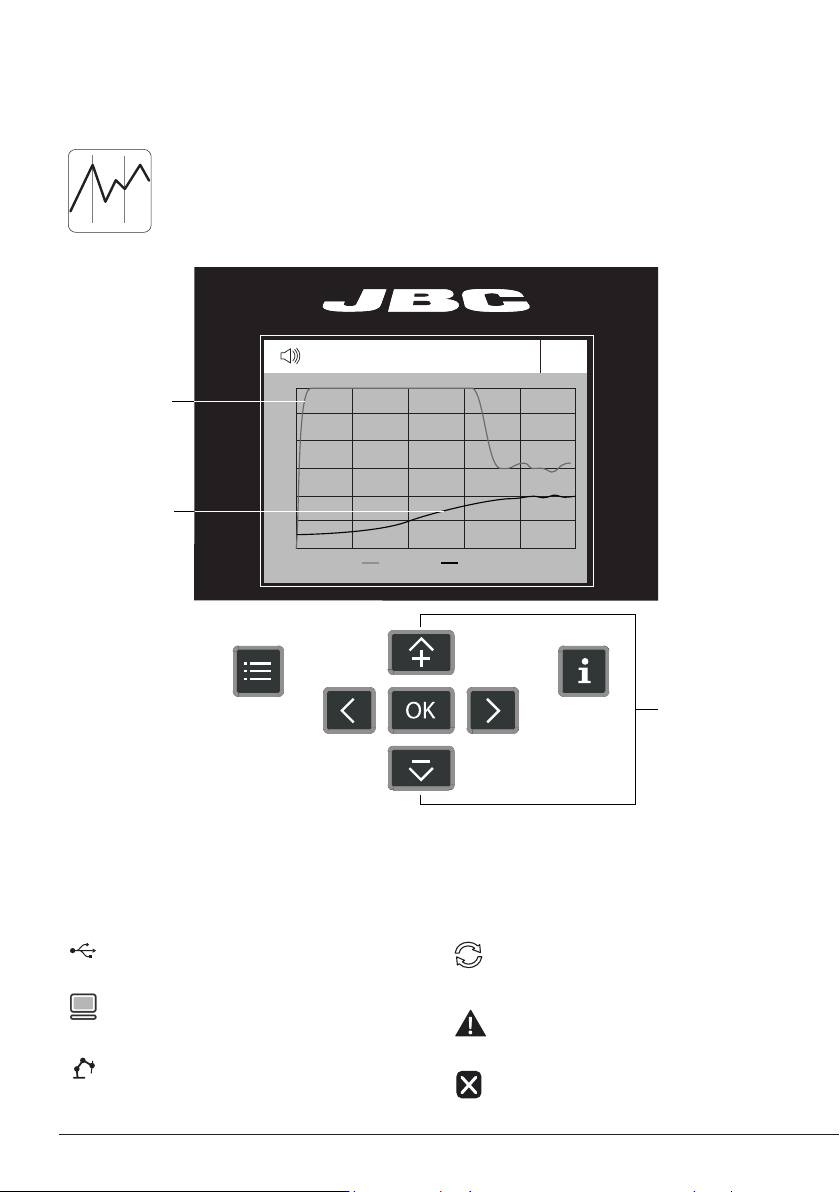
By pressing Graphics in the main MENU, the temperature of TC1 thermocouple and
power fi gures in real time are displayed.
Temperature (ºC)
Power (%)
Switch Y Axis
Between Power
and Temperature
USB fl ash drive is connected.
Device is controlled by a PC.
Device is controlled by a robot.
System Notifications
Device software update.
Press INFO to start the process.
Warning.
Press INFO for failure description.
Error.
Press INFO for failure description,
the type of error and how to proceed.
The following icons will be displayed on the screen’s status bar.
Graphics
10