00194675-02.pdf - 第29页
Installation manual SIPLACE Pro 4 Installati on of SIPLACE Pro and possible Setup Types Edition 10/2005 US 29 The figure you enter in the MB text box defines the size of the SIPLACE P ro database files ( SIPLACE Pro Data…
4 Installation of SIPLACE Pro and possible Setup Types Installation manual SIPLACE Pro
Edition 10/2005 US
28
4
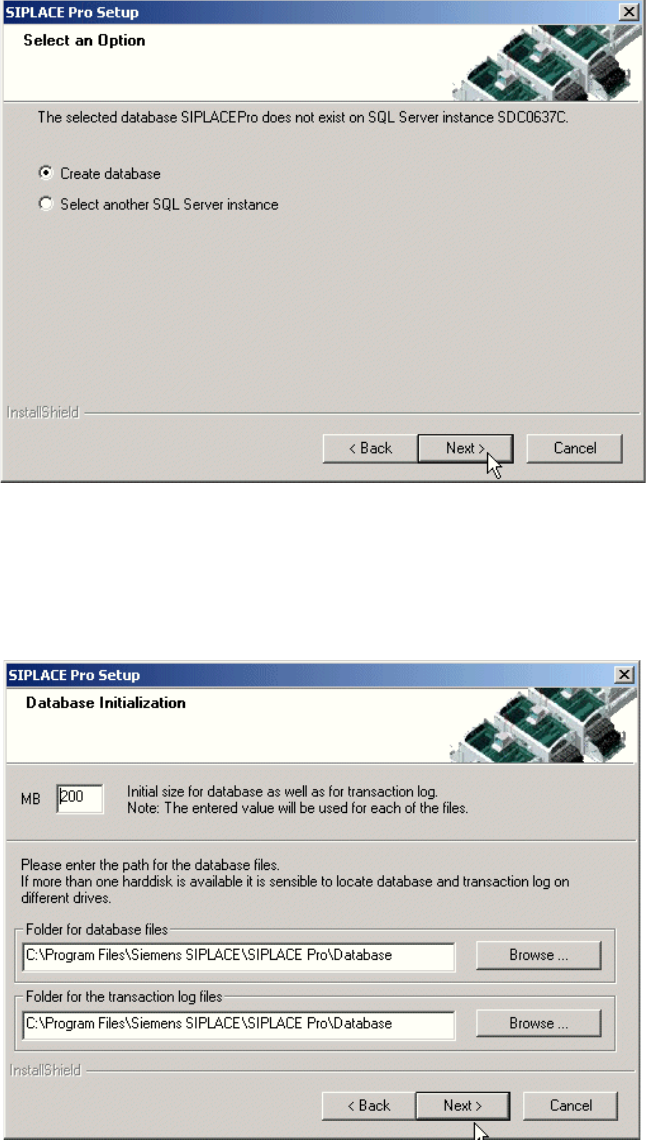
Fig. 4 - 13 "Create database" dialog box - in case no database exists
Æ If you choose Select another SQL Server instance you will be returned to the previous
dialog.
Æ Click Next to create a new database.
Fig. 4 - 14 "Database initialization" dialog box

Installation manual SIPLACE Pro 4 Installation of SIPLACE Pro and possible Setup Types
Edition 10/2005 US
29
The figure you enter in the MB text box defines the size of the SIPLACE Pro database files
(SIPLACE Pro Data.dat and SIPLACE Pro Log.dat) which are to be created during the
installation. 4
Æ Confirm the default value or
Æ enter the size you want in the MB text box.
Note
The specified size is only an initial value. The database will grow automatically as required.
However, only intervention by the database administrator is capable of freeing up unused disk
space. 4
Æ In the "database files" edit field, enter the directory in which the SIPLACE Pro Data.dat file is
to be created.
Æ In the transaction log files edit field, enter the name of the directory in which the
SIPLACE Pro Log.dat database file is to be created.
Note
You can specify a different folder for each of the database files. Indeed, having the files on different
hard disks can improve disk access performance. 4
Step 6
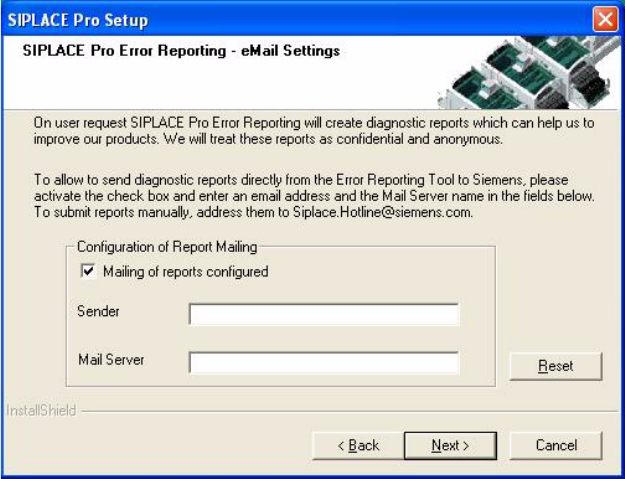
Æ If you choose Next the following dialog will appear if a mail server has been detected
Æ If you wish for Error Reports to be sent automatically to Siemens, fill in your email address and
Mail Server name. The mail server field is preset to a valid name as found in your domain.
4 Installation of SIPLACE Pro and possible Setup Types Installation manual SIPLACE Pro
Edition 10/2005 US
30
4
Fig. 4 - 15 Error Reporting
On user request the SIPLACE Pro Error Reporting Tool will create diagnostic reports and will mail
these reports to Siemens, if mailing is configured. 4
The settings are used to configure the SIPLACE Pro Error Reporting Tool. Depending on your set-
tings these reports are automatically mailed to Siemens support personnel or are available for you
to be sent later on. 4