00196086-01_IM_Siplace_Pro_5.2_EN.pdf - 第6页
1 Introduction Installation manual SIPLACE Pro Edition 07/2008 US 4 1.2 Scope of Delivery The SIPLACE Pro 5.2 software p ackage contains the following software and document ation: 1 1 CD-ROM “SIPLACE Pro” , which contain…
Installation manual SIPLACE Pro 1 Introduction
Edition 07/2008 US
3
1 Introduction
Please read chapters 1 through 3 before you install SIPLACE Pro 5.2. 1
Chapter 4 describes the installation sequence for SIPLACE Pro 5.2, as well as the related server
types, and important information regarding the installation. 1
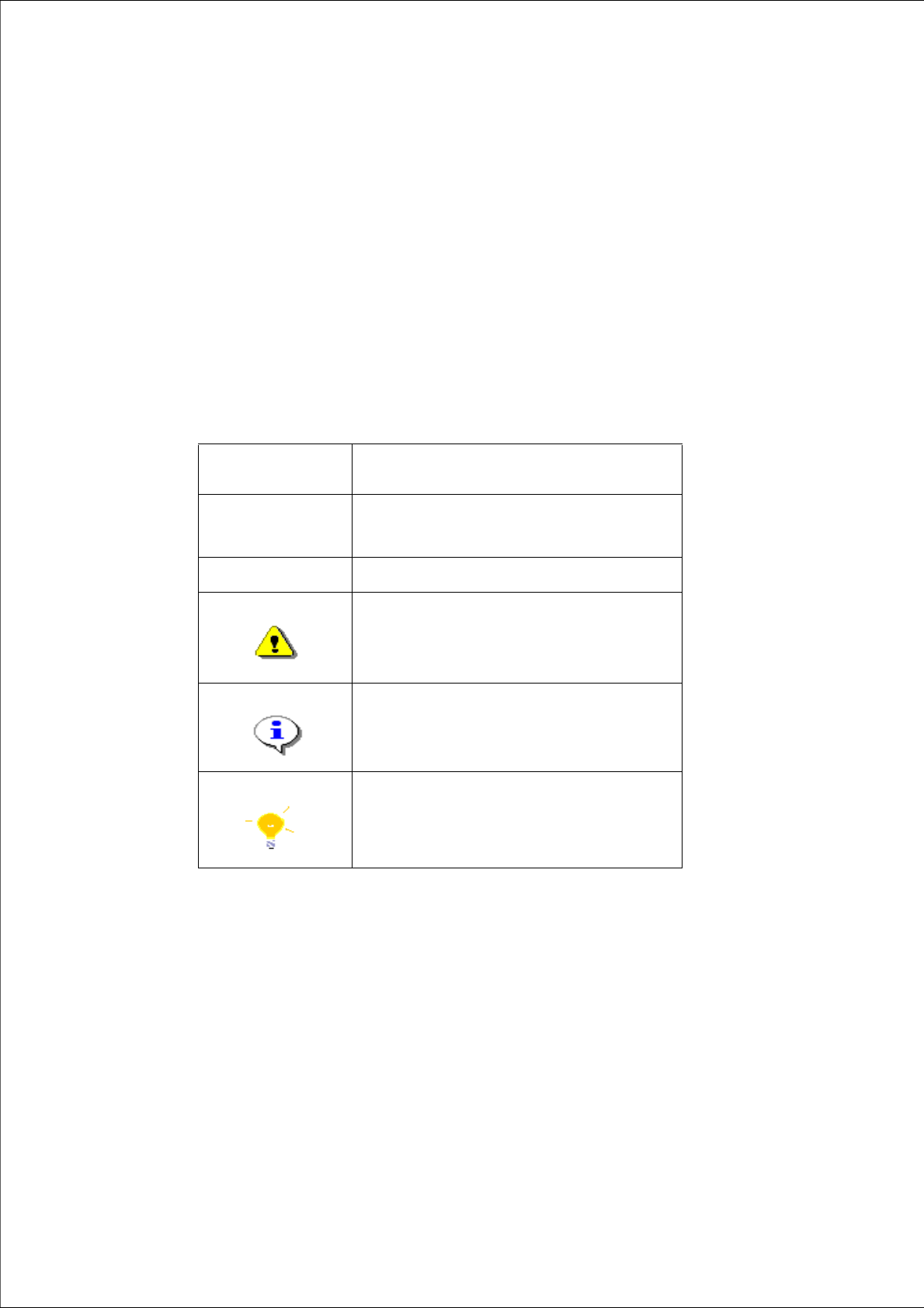
1.1 Explanation of symbols
Various symbols and notes are used for making this document easier to read. 1
1
1
Words in bold/
italics
These are dialog boxes and menu commands.
Step ...
An installation step includes all the actions relating
to a specific dialog box. An installation step may be
composed of several actions.
Æ
Requires an action (e.g. mouse click, open file)
Corresponds to a warning. The information is critical
to the success of the installation process. The
installation will be cancelled if you do not comply
with the warning.
Explanatory information about the installation
sequence.
Hint to facilitate your working with SIPLACE Pro
installation.
Tab. 1 - 1 Explanation of symbols

1 Introduction Installation manual SIPLACE Pro
Edition 07/2008 US
4
1.2 Scope of Delivery
The SIPLACE Pro 5.2 software package contains the following software and
documentation: 1
1 CD-ROM “SIPLACE Pro”, which contains: 1
– SIPLACE Pro 5.2 Setup
1 SIPLACE Pro Factory License (without licence for the connection to SIPLACE stations) 1
1 CD-ROM with OIS 5.2 Server and Client 1
1 DVD Support Media 1
1
Documentation: 1
Basic documents: 1
– Software Version Description SIPLACE Pro 5.2
(German 00196082-01; English 00196083-01)
– Getting Started with SIPLACE Pro 5.2
(English: Item No 00196084-01, German: Item 00196085-01)
– Installation of SIPLACE Pro 5.2 (Item No 00196086-01)
Detailed installation manuals: 1
– Configurations for SIPLACE Pro (English Item No. 00193760-xx)
– Guideline for XML Import / Export (English Item No. 00193789-xx)
– Standard Component Shape Library Handling (English: Item No. 00194625-xx)
– Software Version Description SIPLACE CAD V4.1 SP2 (English: Item No. 00194678-xx)
– Software Guide OIB Licence Manager (Engllish/German: Item no.: 00195385-xx)
Note:
Please use the document "Navigation Guide for the Installation Procedure of SIPLACE Soft-
ware Systems" (Item No. 00195050-xx) to navigate through the documentation. The navigation
guide and all related documents are available on the Support Media DVD (Art. No. 00383100-xx)
that is added to any software product. 1
Installation manual SIPLACE Pro 1 Introduction
Edition 07/2008 US
5
1.3 System requirements
The following hardware is required for a successful SIPLACE Pro 5.2 installation. 1
1.3.1 SIPLACE Pro Server
The following Hardware is recommended for the SIPLACE Pro Server: 1
– Pentium 4 with 3.0GHz or higher
– 2 x 160 GB hard disk
– 2048 MB memory (1024 MB min.)
– Backup drive (e.g. DAT, DVD)
– 21” screen (19’’ min.)
– optional SR-UPS
1
The following Software is required: 1
– Windows 2003 Server Standard Edition (optional with SP2) and SQL 2000 with SP4, or
– Windows XP Professional with SP3 and MSDE 2000 with SP4 /SQL 2005 Express SP1 or SQL
2005 SP1
Note:
A hard disk with 500 MB or more free space should be used for installation (without the operating
system installed there should be at least 1 GB free space). 1
Note:
- Windows 2003 Server SP2 is supported, but not required for the SIPLACE Pro installation.
- Windows Server 2000/Windows 2000 Professional is no longer supported.
- SIPLACE Pro 5.2 is compatible with Windows Vista. 1
Note:
If Microsoft .NET Framwork 2.0 is installed prior to SIPLACE Pro and then the programming sys-
tem SIPLACE Pro, Microsoft Windows Installer 3.0 could be required. The Microsoft Windows In-
staller 3.0 (instmsi30.exe) is available in the root folder of the product CD. 1