00196804-01_IM_SIPLACEPro_9.2_EN.pdf - 第6页
Installation Manual 1 Introduction SIPLACE Pro 9.2 Edition 01/2011 4 1.2 Scope of Delivery The Basic Sof tware Package SIPLACE Pro 9.x (Item No. 001 16512-xx) includes: – 1 SIPLACE Pro Factory L icense (witho ut the conn…
1 Introduction Installation Manual
Edition 01/2011 SIPLACE Pro 9.2
3
1 Introduction
Please read chapters 1 through 3 before you install SIPLACE Pro.
Chapter 4 describes the installation sequence for SIPLACE Pro, as well as the related server
types, and important information regarding the installation.
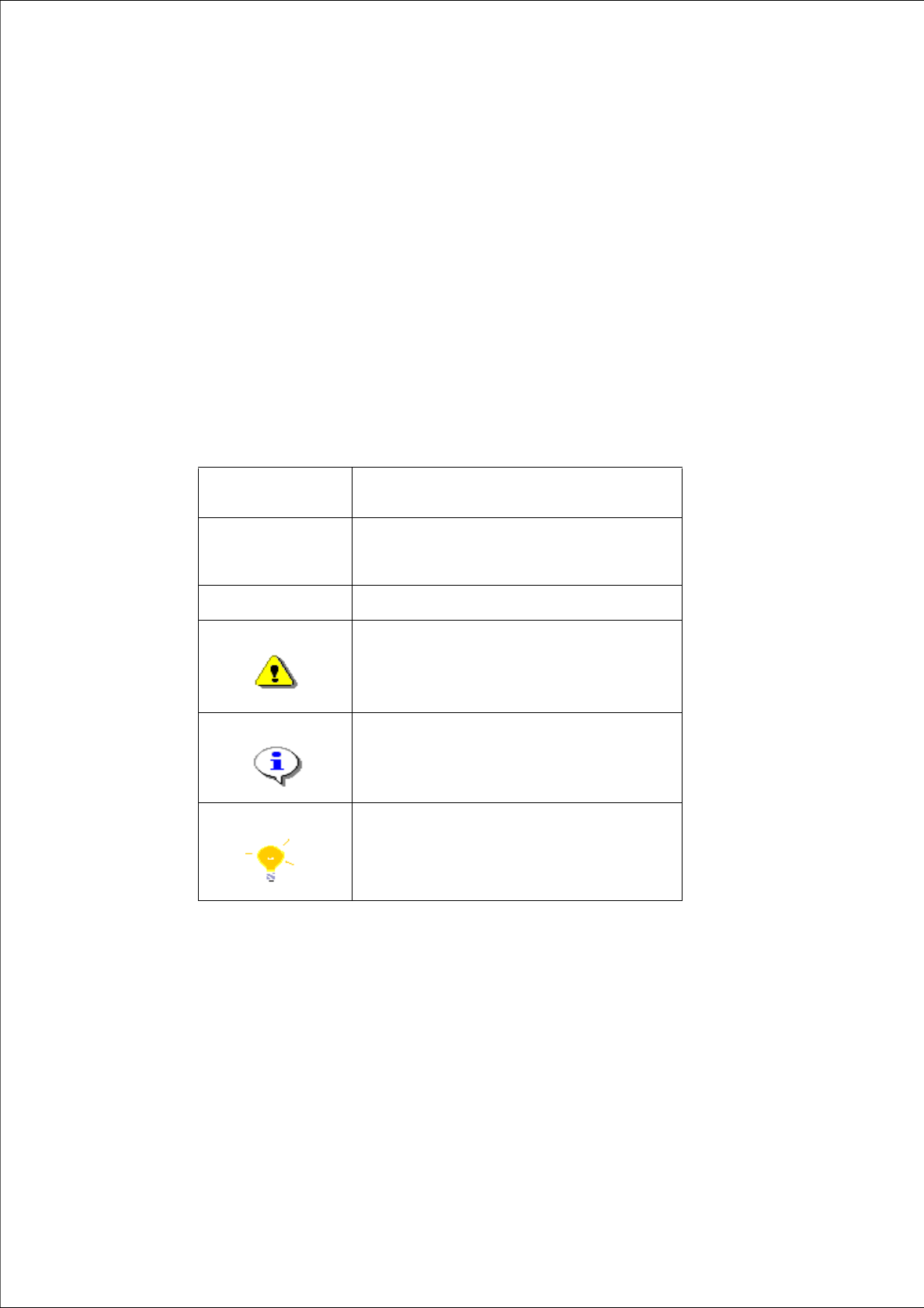
1.1 Explanation of symbols
Various symbols and notes are used for making this document easier to read.
Words in bold/ital-
ics
These are dialog boxes and menu commands.
Step ... An installation step includes all the actions
relating to a specific dialog box. An installation
step may be composed of several actions.
Requires an action (e.g. mouse click, open file)
Corresponds to a warning. The information is
critical to the success of the installation pro-
cess. The installation will be cancelled if you
do not comply with the warning.
Explanatory information about the installation
sequence.
Hint to facilitate your working with SIPLACE
Pro installation.
Tab. 1.1 - 1 Explanation of symbols

Installation Manual 1 Introduction
SIPLACE Pro 9.2 Edition 01/2011
4
1.2 Scope of Delivery
The Basic Software Package SIPLACE Pro 9.x (Item No. 00116512-xx) includes:
– 1 SIPLACE Pro Factory License (without the connection to SIPLACE stations)
– Media Package 9.x
The Media Package 9.x (Item No. 00116511-xx) consists of the following data storage media:
– 1 CD-ROM "SIPLACE Pro 9.2
– 1 CD-ROM with OIS application version 9.1 (Item No. 0038867-xx)
– Support Media version 1.11, which contains 1x DVD 1 and 1x DVD 2
The Upgrade Software Package SIPLACE Pro 9.x (Item No. 00116513-01) consists:
– 1 Upgrade License (without the connection to SIPLACE stations). To install the upgrade suc-
cessfully, a valid license of the previous version 8.x is mandatory.
Note:
On the first Support Media DVD you will find the programs necessary for installing SIPLACE Pro,
such as ErrorReporting, License Manager. 1
Basic Documents 1
– Software Version Description SIPLACE Pro 9.2 (German/English: Item-no. 00196803-01)
– Getting Started with SIPLACE Pro 9.2 (German: Item-no. 00196802-01, English: Item-no.
00196801-01)
– This Installation Manual of SIPLACE Pro 9.2 (in English only: Item-no. 00196804-01)
– User Manual "Random Setup" (German/English: Item-no.00196838-01)
– User Manual "Alternative Components" (German/English: Item-no. 00196839-01)
Detailed Installation Manuals 1
– Guideline for XML Import / Export (in English only: Item-no. 00193789-xx)
– Standard Component Shape Library Handling (in English only: Item-no. 00194625-xx)
– Recipe Analyzer API Manual (in English only: Item-no. 00196138-xx)
– Software Version Description SIPLACE CAD V4.1 SP2 (in English only: Item-no.
00194678-xx)
1 Introduction Installation Manual
Edition 01/2011 SIPLACE Pro 9.2
5
Note:
Further instructions on installing operating systems, databases, networks and on backing up data
can be found in the ".\SIPLACE NET\NAVIGATION GUIDE" directory on the Support Media DVD
no.1. 1
1.3 System requirements
Notes:
– SIPLACE Pro requires an NTFS partition to be installed on. FAT or FAT32 file systems
are not supported.
– SIPLACE Pro 9.2 requires the license manager 2.2 SP1 for its operation.
– SIPLACE Pro 9.2 requires new licenses for its operation.
– The Microsoft .NET Framework 3.5 SP1 is required.
– With the installation of SIPLACE Pro it is not possible to use operating systems or data-
base versions that are no longer supported:
Windows 2000 Server/ Windows 2000 Professional and former versions,
Microsoft SQL Server 2000 SP4/ MSDE SP4 and former versions.
– A mixed operation of different SQL server versions (2005 / 2008) is not supported.
– SQL Server 64 Bit versions are only supported on Windows 64 Bit operating systems.
– The Support Media DVD included in the installation package checks the necessary sys-
tem requirements of your system and installs these. Amongst others e.g. Microsoft .NET
Framework, the License Manager and the Error Reporting tool.
– It is recommended to use the Support Media V1.11.