00197625-04_VersionDescription_SR708.1SP2_LPCD_DE_EN.pdf - 第17页
Software Versi on Description Language Pack 708 .1 SP2 11 /201 5 Edition 17 Choose OK f or the regis tration sc reen to be disp layed. WELC OME Choose N ext to open the C omponent S electio n.
Software Version Description Language Pack 708.1 SP2 11/2015 Edition
16
3 Interfaces
4 Restrictions
5 Prerequisites
5.1 Installation of the SIPLACE Station Language Pack
5.1.1 Interfaces
5.1.2 Prerequisites
To be able to install the language files, the following SW package is prerequisite:
Station Computer
Version
SIPLACE Vision Version
708.1 SP2
522
If this SW package is not available or if an incorrect version is installed, an error message occurs and the
installation is aborted.
5.1.3 Installation of the Language CD
5.1.3.1 Installation Program
• Turn on the station computer.
• Log in as an administrator.
• Insert the CD into the CD-ROM drive.
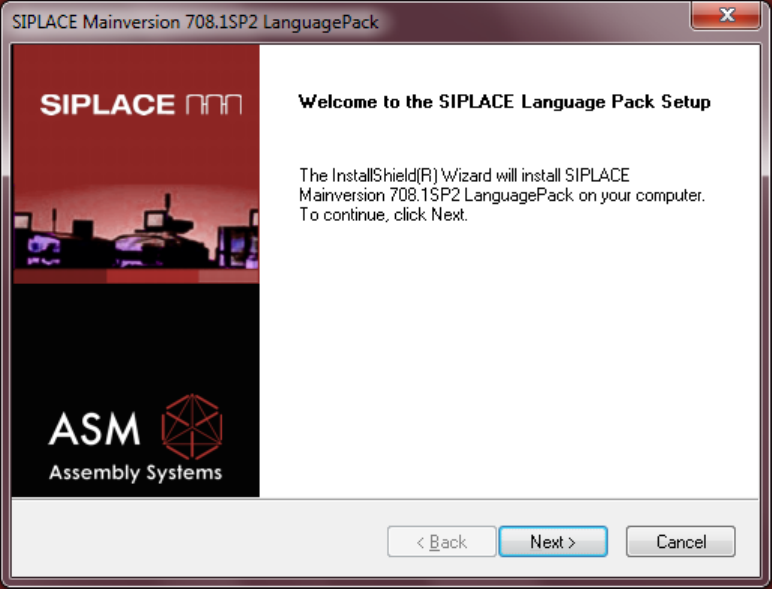
LANGUAGE SELECTION
In the first screen a query is displayed asking you in which language the installation program is to
communicate with you. You can select between German and English.
Software Version Description Language Pack 708.1 SP2 11/2015 Edition
17
Choose OK for the registration screen to be displayed.
WELCOME
Choose Next to open the Component Selection.
Software Version Description Language Pack 708.1 SP2 11/2015 Edition
18
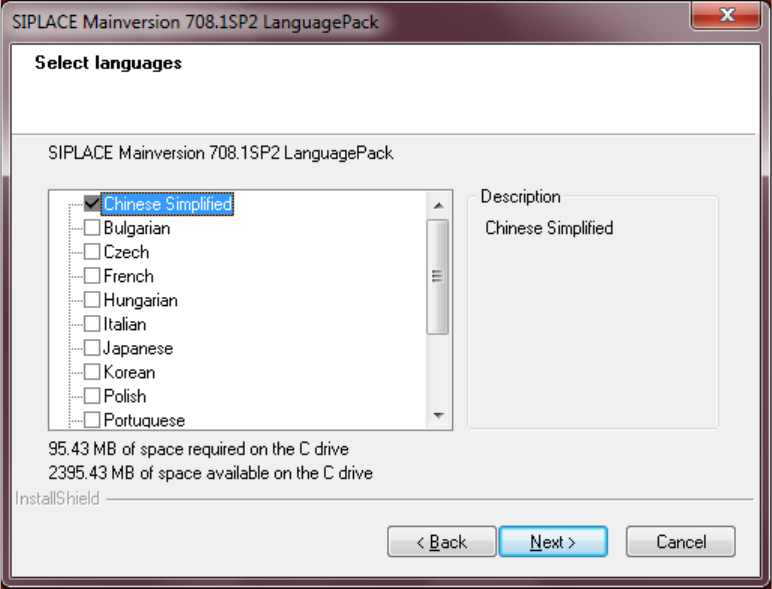
Component Selection
The screen below allows you to select the languages you wish to install.
• Default: Chinese Simplified is selected and will be installed.
• If you wish to install different languages, you must select those.
Actuate the Next button to start the installation.