Printer 710_810 v8 Air Ionizer Module.pdf - 第3页
AIR IO NIZER MODULE ELECTRIC AL SCHE MATIC Chapter Issue 2 Oct 06 Technical Reference Manual 25.3 ELECTRICAL SCHEMA TIC M37 Power Supply Enclosure Air Ionizer M37PL1 1 24V SW OV 8PL100 24V SW OV

AIR IONIZER MODULE
OVERVIEW
25.2 Technical Reference Manual Chapter Issue 2 Oct 06
The air ionizer reduces the amount of static electricity that may be generated
by the pump print process to <200 volts making it safe for most static sensitive
components mounted on the next board entering the machine.
An array of eight electrodes ionizes the air with a continuous stream of positive
and negative ions at the rate of 33Hz. An air supply is connected to the air
ionizer and routed through the eight electrodes ensuring a wide dispersal of
ionized air and increasing the speed of static reduction.
The air ionizer is connected to the 24V switched supply and is disabled when
the printhead cover/shutter is open or the E Stop is pressed.
NOTE
Although the air ionizer is electrically disabled, air pressure continues to flow
through the electrodes.

AIR IONIZER MODULE
ELECTRICAL SCHEMATIC
Chapter Issue 2 Oct 06 Technical Reference Manual 25.3
ELECTRICAL SCHEMATIC
M37 Power
Supply Enclosure
Air Ionizer
M37PL11
24V SW
OV
8PL100
24V SW
OV
AIR IONIZER MODULE
ADJUSTMENTS AND SETTINGS
25.4 Technical Reference Manual Chapter Issue 2 Oct 06
ADJUSTMENTS AND SETTINGS
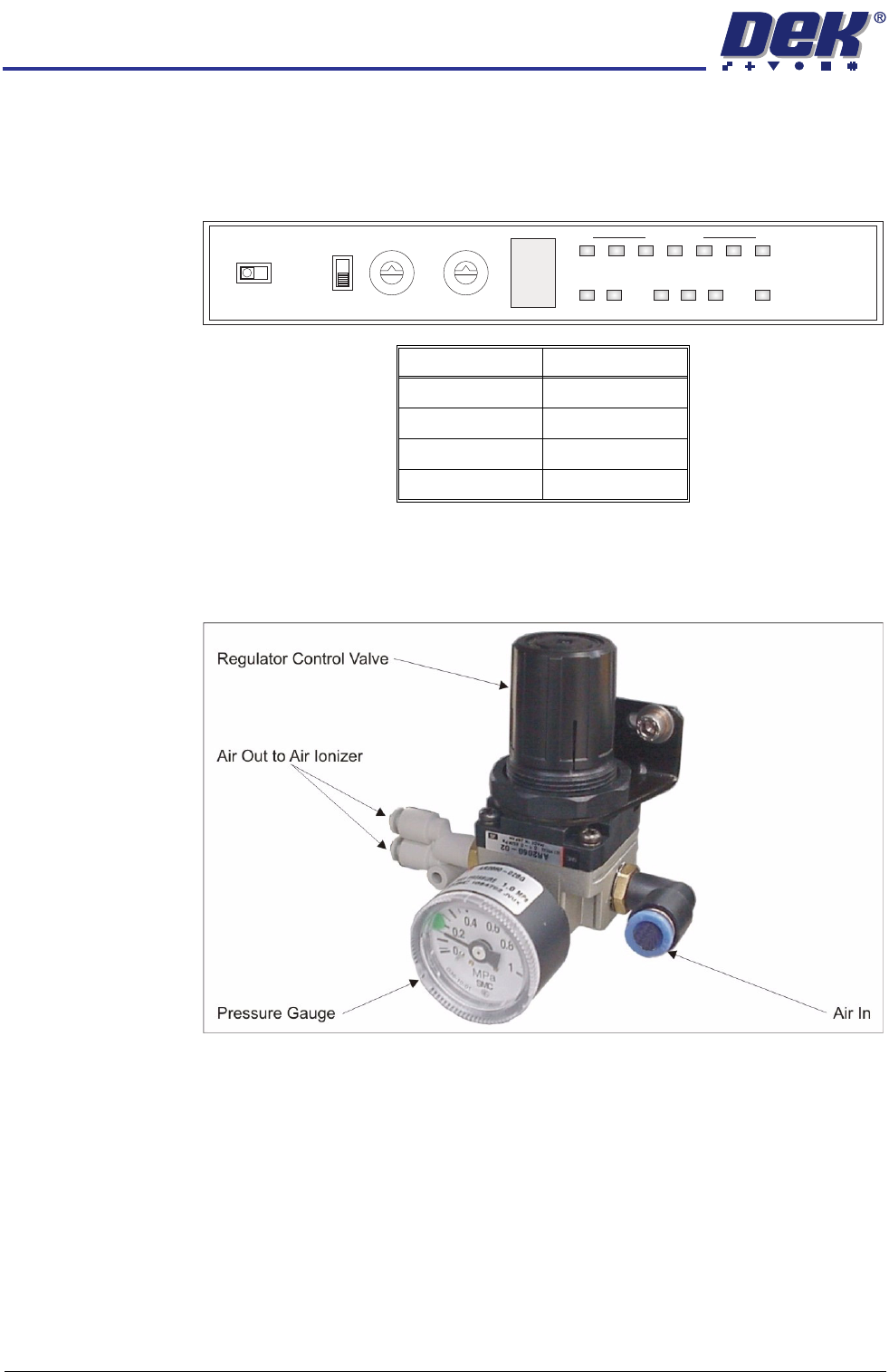
Air Ionizer The air ionizer has no adjustments and the settings are factory set. Use the
following graphic and table to ensure that the switches on the control panel of
the air ionizer are set correctly:
Air Regulator The air regulator sets the air pressure to the air ionizer and must be set between
0.15MPa and 0.20MPa (1.5 bar and 2.0 bar). To adjust the air pressure, use
the following procedure:
1. Pull the regulator control valve upwards to unlock it.
2. Turning the regulator control valve clockwise to increase the pressure or
anti-clockwise to decrease the pressure, set the pressure between 0.15MPa
and 0.20MPa (1.5 bar and 2.0 bar).
3. With the pressure set, push the regulator control valve downwards to lock it.
Switch Setting
I/O Monitor I/O
Term Off
ID 0
Freq 0
0
1
2
3
4
5
6
7
8
9
A
B
C
D
E
F
0
1
2
3
4
5
6
7
8
9
ZERO
FREQIDI/O MONITOR
OFF
TERM
ON
I.C.C. COND LEVEL
ION MONITOR
ION
ALM RC
+
-