Infinity High Throughput Conveyor Module.pdf - 第48页
INFINITY +,*+7+5 28*+387&21 9(<2502' 8/( $'-8670 (176$1 '6(77,1 *6 15.48 Technical Reference Manual Chapter Issue 1 May 03 mounting b racket. 5. Remove the two b olts securing the sensor mounti…
INFINITY
+,*+7+528*+387&219(<2502'8/(
$'-8670(176$1'6(77,1*6
Chapter Issue 1 May 03 Technical Reference Manual 15.47
& B and route the pipes to the left hand auxiliary conveyor.
24.Loom the new pneumatic pipes to the upline conveyor board stop fitted to
the inboard end of the left hand auxiliary conveyor. The board stop now is
configured as the print station board stop.
25.Gain access to the M27 HTC Controller enclosure.
26.Remove the four M27 enclosure securing screws.
27.Pull the M27 enclosure from its chassis mount and lower on the chassis
hinge to access the rear panel socket array.
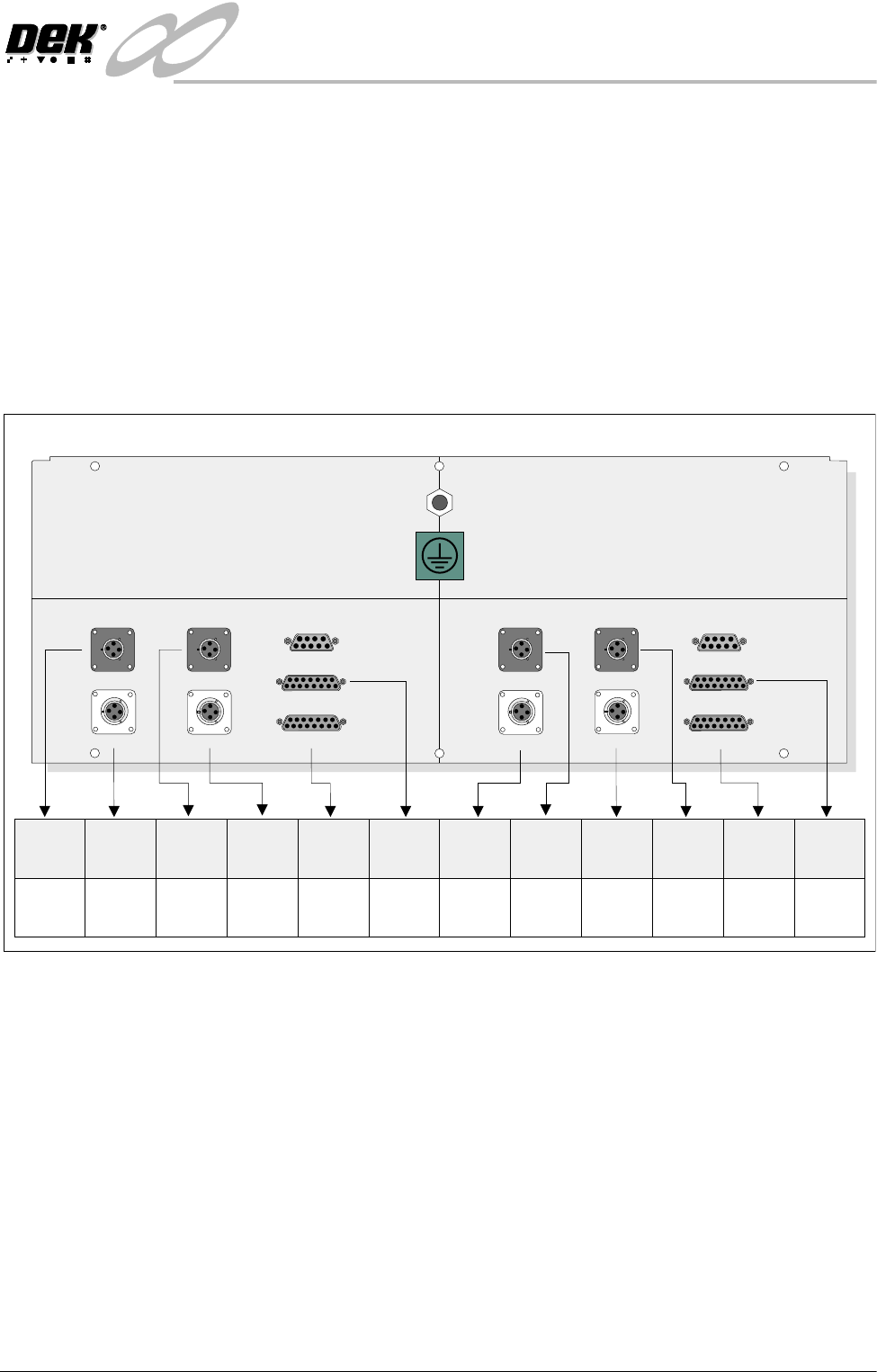
28.To configure the M27 enclosure for right to left throughput direction, connect
the enclosure as shown in the graphic below:
29.On completion, refit the M27 enclosure.
30.Refit the external pneumatic connection to the external services panel.
31.Power up and initialize the machine. If required, remove the head prop and
lower the head.
32.In Set Prefs menu, ensure the Transport Mode option is selected to Right to
Left.
Left to Right
Configuration
To change the configuration of the machine from Right to Left to Left to Right
throughput carry out the following:
1. If required, raise the head and insert the head prop
2. Power down the machine and disconnect the quick release pneumatic
connection at the machine’s external services panel.
3. Gain access to the left hand auxiliary conveyor sensor.
4. Remove the two sensor securing screws and remove the sensor from the
M27SK04 M27SK12M27SK18 M27SK19
M27SK08 (L/H)M27SK20 (L/H) M27SK08 (R/H)M27SK21 (R/H)
LANE A (LEFT) LANE A (RIGHT)
M27SK01 (L/H) M27SK01 (R/H)
M27SK02 (L/H) M27SK02 (R/H)
M27SK03 M27SK11
Inverted View on Rear of 3-Stage Conveyor Controller M27
M27SK20
(L/H)
M27PL20
(SOL 02)
N/C
N/C
N/C
M27PL08
(SOL 01)
M27PL21
(SOL 03)
M27PL04/
M27PL18
M27PL12/
M27PL19
M27PL01
(Loom
160622)
M27PL02
(Loom
160622)
M27PL02
(Loom
160645 or
160631)
M27PL01
(Loom
160643 or
160631)
M27SK04
M27SK08
(L/H)
M27SK18
M27SK01
(L/H)
M27SK02
(L/H)
M27SK12
M27SK21
(R/H)
M27SK19
M27SK08
(R/H)
M27SK01
(R/H)
M27SK02
(R/H)
INFINITY
+,*+7+528*+387&219(<2502'8/(
$'-8670(176$1'6(77,1*6
15.48 Technical Reference Manual Chapter Issue 1 May 03
mounting bracket.
5. Remove the two bolts securing the sensor mounting bracket to the front
conveyor rail.
6. Refit the mounting bracket to left hand conveyor front rail using the inner-
most bracket mounting holes and refit the sensor removed in Step 4 to the
mounting bracket.
7. Identify the right hand auxiliary conveyor sensor, remove the two sensor
securing screws and remove the sensor.
8. Remove the two bolts securing the sensor mounting bracket to the front
conveyor rail.
9. Refit the mounting bracket to right hand conveyor front rail using the
outermost bracket mounting holes and refit the sensor removed in Step 7 to
the mounting bracket.
10.Identify the downline conveyor board stop fitted to the left hand auxiliary
conveyor.
11. Disconnect the two 4mm pneumatic pipes feeding the conveyor board stop.
12.Remove the pneumatic elbow connectors to gain access to the two 3mm
allen screws securing the board stop bracket to the conveyor rail.
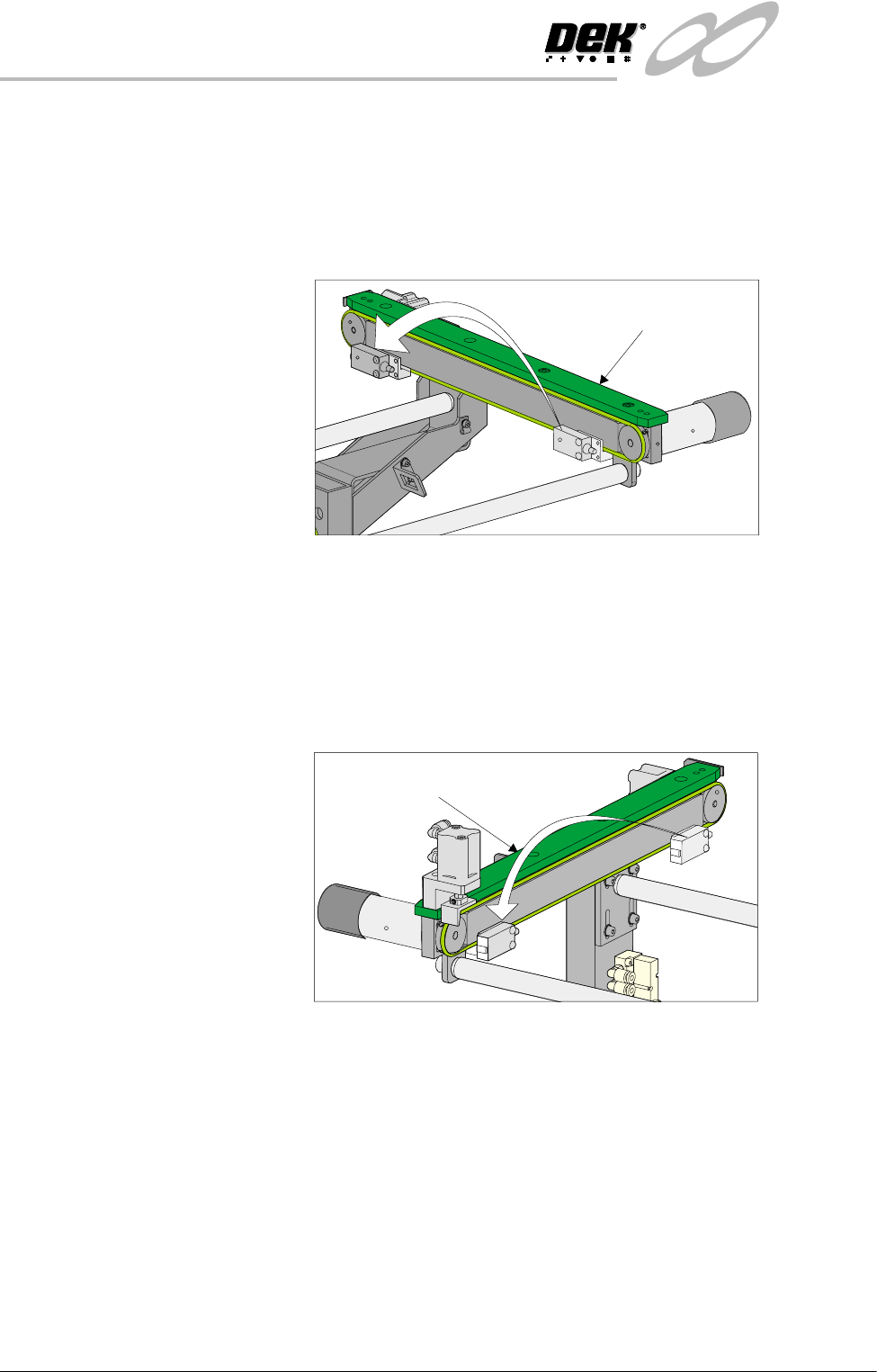
Left Hand
Auxiliary Conveyor
Right Hand
Auxiliary Conveyor
INFINITY
+,*+7+528*+387&219(<2502'8/(
$'-8670(176$1'6(77,1*6
Chapter Issue 1 May 03 Technical Reference Manual 15.49
13.Withdraw the allen screws and remove the board stop bracket from the rail.
14.To orientate the downline conveyor board stop for fitment to the right hand
auxiliary conveyor, remove the small pan head screw securing the board
stop bracket to the actuator rod.
15.Loosen the grubscrew on the board stop bracket and rotate the bracket
180°; re-tighten the grubscrew.
NOTE
Ensure the grubscrew is located onto the flat side of the actuator rod.
16.Secure the board stop bracket to the actuator rod by refitting the pan head
screw.
17.Fit the downline board stop to the right hand auxiliary conveyor front rail
utilizing the existing securing points and the 3mm allen screws.
NOTE
Ensure the board stop bracket is orientated in the correct direction, ie angled
face of bracket towards the machine.
18.Disconnect the two pneumatic pipes supplying the conveyor board stop
fitted to the inboard end of the right hand auxiliary conveyor from solenoid
(SOL 03).
19.Re-route the two pneumatic pipes to the downline conveyor board stop fitted
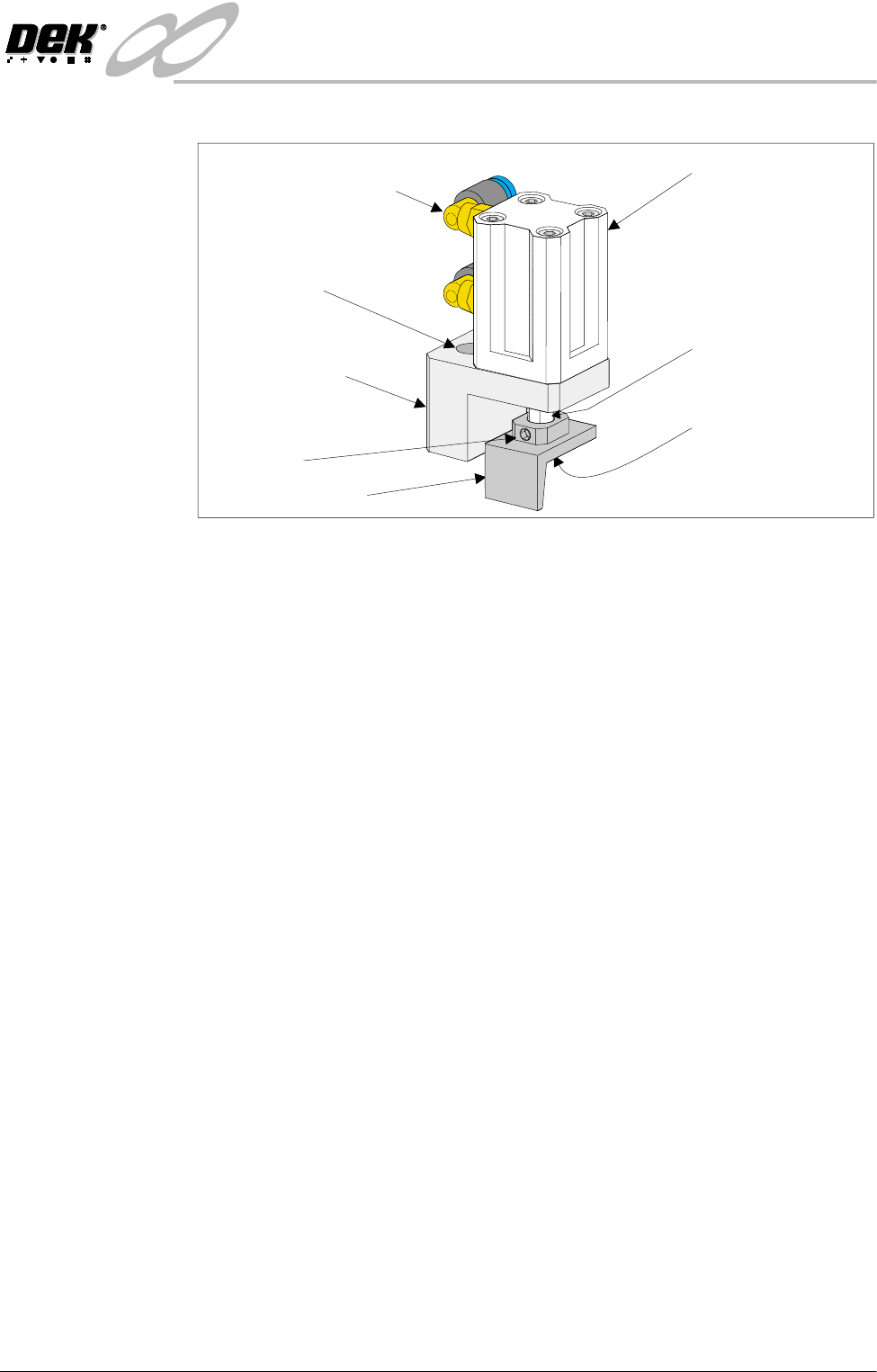
Pneumatic Elbow Joints
(2 Positions)
3mm Allen Screw
(2 Positions)
Securing Bracket
Board Stop Actuator
(Double Acting Cylinder)
Actuator Rod
Pan Head Securing
Screw (Underside of
Bracket)
Board Stop Bracket
Grubscrew