DECAN_S1_Maintenance(Eng_Ver1.1)_Print.pdf - 第10页
chapt er 1 This Chapter describes the work environment and working tools for the maintenance of the machine. Conditions fo r Main t e nanc e Nex t Generation, Multi- Functi onal Placer DE CAN S1 M ain ten anc e Ha nd boo…

DECAN S1 Maintenance Handbook
chapter 6
Appendix
Consumable Parts List ............................................... 6-1
EC Declaration of Conformity ................................... 6-3
chapter 5
Monthly Inspection
Cleaning Head Spindle ............................................. 5-1
Checking and Cleaning Conveyor Sensor /
Fiducial Mark ...........................................................5-3
Checking and Cleaning Right Cover Cooling Fan ...5-6
Checking and Cleaning the cooling fan of the front
and rear covers ........................................................5-7
Cleaning Linear Motor and Magnet of Y Frame ...... 5-8
Checking and Cleaning Control Rack Cooling Fan ..5-9
Cleaning and Lubricating Head Spindle,
Mirror CAM ............................................................5-11
Checking and Cleaning Head Beam Splitter .......... 5-13
Cleaning and Lubricating X Frame LM Guide,
Ball Screw ...............................................................5-14
Cleaning and Lubricating Y Frame LM Guide ........5-20
Cleaning and apply grease and lubricating the
conveyor lead screw, LM guide .............................5-22
Precautions When Cleaning the Cover ..................5-27
chapter 1
This Chapter describes the work environment and working tools for the maintenance of
the machine.
Conditions for Maintenance
Next Generation, Multi-Functional Placer
DECAN S1 Maintenance Handbook
1-1
Common Working Procedure before Maintenance
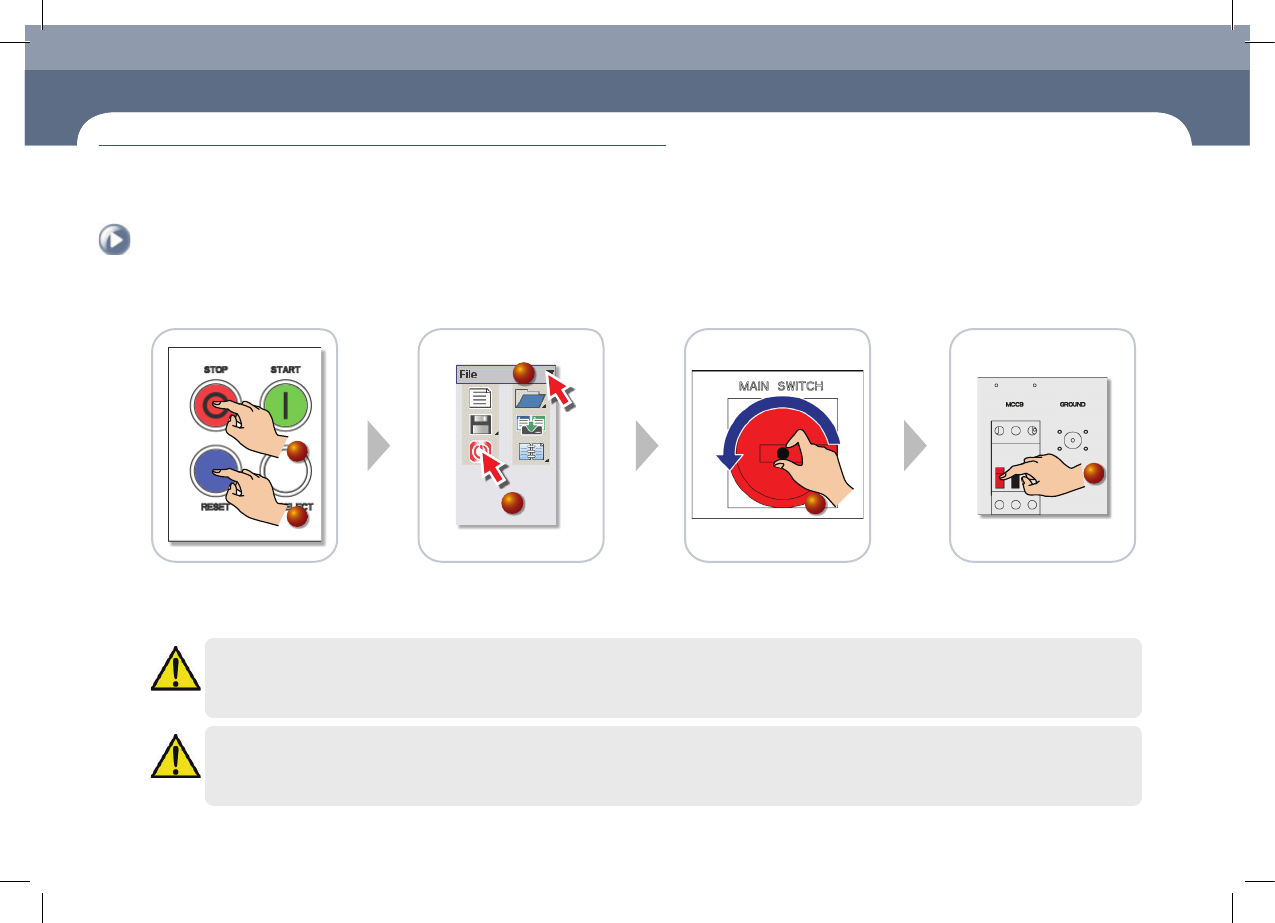
1. How to turn off the power supply
Turn off the main switch
①Press the 'STOP' button
②Press the 'RESET' button
③Select the File Menu
④Click the MMI 'EXIT' icon
⑤If a message reading “You can
turn off the system power supply
now” appears on the monitor,
turn off the main switch.
⑥Main Circuit Breaker OFF
1
2
4
3
5
6
Warning
System needs to be shut down after normally ending the MMI, otherwise, the machine might be damaged and injury could occur due to system error caused by
irregular shut down. Be sure to shut down the system after normally ending the MMI
Warning
If you do not turn off the main circuit breaker in the left lower cover of rear side before the maintenance, serious injury could happen. Must turn off the Main
Circuit Breaker before servicing. (Press the red switch.)
chapter 1
Conditions for Maintenance
This Chapter describes the work environment and working tools for the maintenance of the machine.
Common Working Procedure before Maintenance
chapter 1
This Chapter describes the work environment and working tools for the maintenance of
the machine.
Conditions for Maintenance
Next Generation, Multi-Functional Placer
DECAN S1 Maintenance Handbook
1-2
Common Working Procedure before Maintenance
Conditions for Maintenance
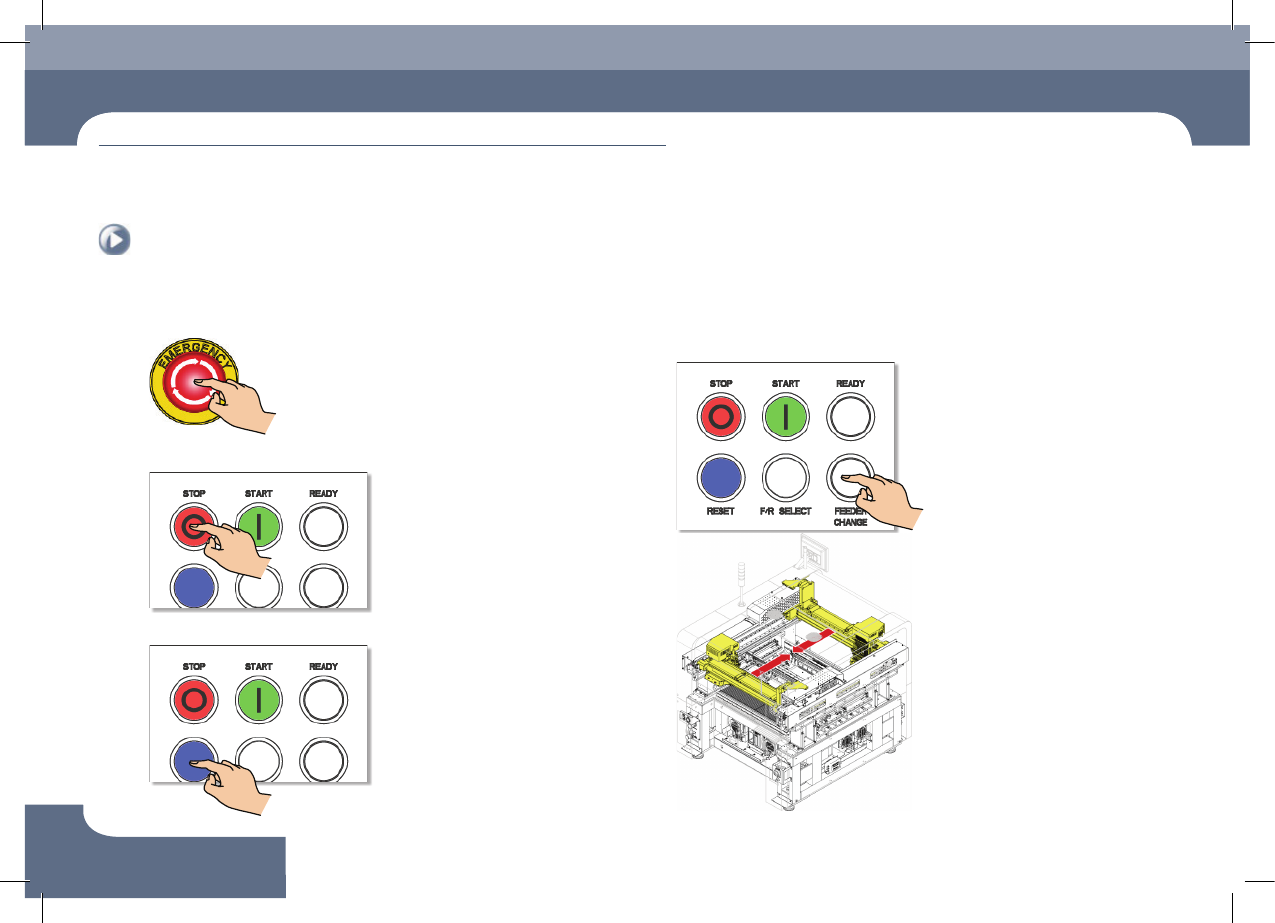
2. How to perform emergency stop
Step 1.
Press the 'EMG' switch
Step 2.
Press the 'STOP' button
Step 3.
Press the 'RESET' button
3. Move the front and rear X frames to the center
of the machine
Step 1.
Press the 'FEEDER CHANGE' switch