SiplaceProInstall_eng.pdf - 第48页
Ins t a lla tion Manua l 5 I nst alla tio n of S IPLACE Pro Lang uage P ack SIPLACE Pro 7 .0 Ed ition 05 /200 9 US 46 Case B: 5 During an SIPL ACE Pro upgrade - the newly up graded SIPL ACE Pro b asic ve rsion is n ot co…
5 Installation of SIPLACE Pro Language Pack IInstallation Manual
Edition 05/2009 US SIPLACE Pro 7.0
45
Case A: 5
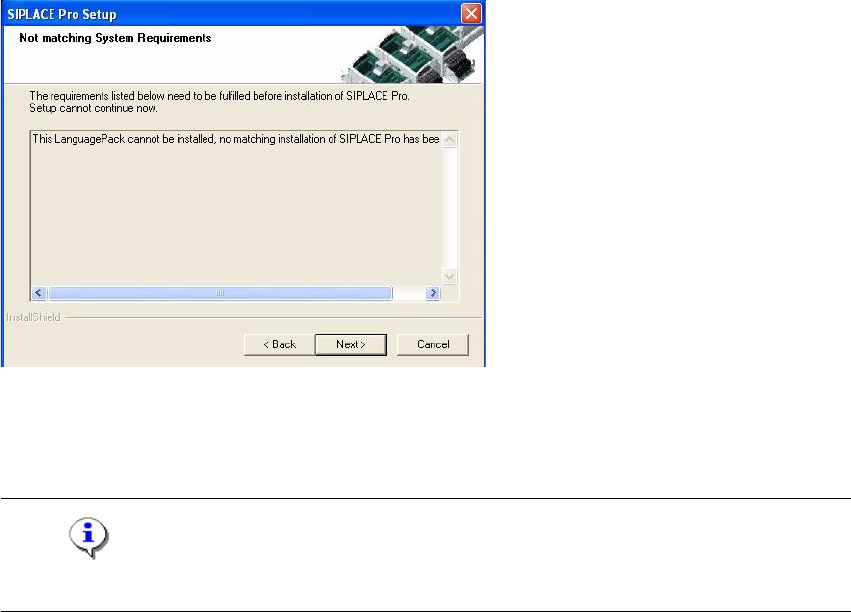
Language Pack version is not compatible to the basic SIPLACE Pro installation. 5
5
Fig. 5 - 7 Non compatible Language Pack
Solution: Make sure that you have installed the compatible basic SIPLACE Pro version or that
you install the language pack version that is compatible to the basic product version. 5
Note
This dialog is displayed also if you have no SIPLACE Pro installed at all. 5
Installation Manual 5 Installation of SIPLACE Pro Language Pack
SIPLACE Pro 7.0 Edition 05/2009 US
46
Case B: 5
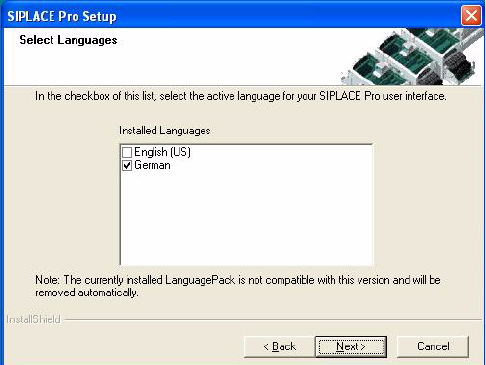
During an SIPLACE Pro upgrade - the newly upgraded SIPLACE Pro basic version is not
compatible with the already installed Language Pack version 5
5
Fig. 5 - 8 Not compatible language pack.
Solution: 5
The SIPLACE Pro upgrade can be carried out as usual. The incompatible language pack will be
automatically deinstalled. After having carried out the upgrade only the standard languages En-
glish and German are available. Finally, the language pack that is compatible to the new SIPLACE
Pro version can be installed (if available). 5
5 Installation of SIPLACE Pro Language Pack IInstallation Manual
Edition 05/2009 US SIPLACE Pro 7.0
47
Case C: 5
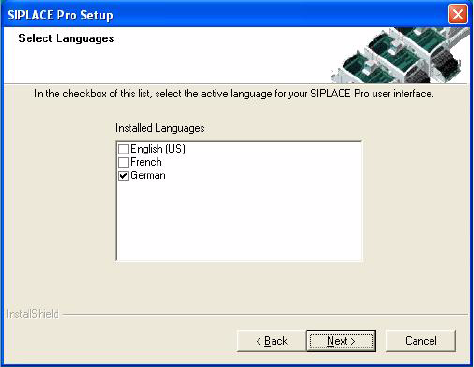
SIPLACE Pro Upgrade is compatible with the installed language pack. 5
5
Fig. 5 - 9 Compatible Language Pack
Solution: 5
The SIPLACE Pro version that has been currently installed is compatible with the already installed
language pack. This means the SIPLACE Pro upgrade can be carried out as usual without chang-
ing the language pack. After having done the upgrade all languages installed with the language
pack are available. 5
5