SiplaceProInstall_eng.pdf - 第56页
In stal lat io n Ma nual 7 Tr oubl eshoo tin g SIPLACE Pro 7 .0 Ed ition 05 /200 9 US 54 Cause: 7 The serv ice Lin eControlServer could not be stoppe d. 7 Solu tion: 7 Please proceed as f ol lows: 7 Æ (1) Press the Next …
7 Troubleshooting IInstallation Manual
Edition 05/2009 US SIPLACE Pro 7.0
53
The new SIPLACE Pro installation conflicts with old SIPLACE Pro installations. 7
Solution: 7
The SIPLACE Pro setup may not be installed in parallel with SIPLACE Pro V1.4 or earlier ver-
sions. This check is performed by looking in the registry. 7
If SIPLACE Pro setup detects old installations and if you are absolutely sure you have uninstalled
the old version of SIPLACE Pro and SIPLACE C Pro, please proceed as follows: 7
Æ Make sure that you have manually removed any remnants of this old installation from the pro-
gram folder except for the database!
Æ Delete the registry entries under HKEY_LOCAL_MACHINE\SOFTWARE\Siemens
SIPLACE which relate to the error message of the current setup (like that shown above).
7.1.4 Remote installation with Windows XP clients
Error description: 7
If you are logged on to the server via remote desktop connection and start the installation following
message will be shown. 7
1607: Installation of Install Shield Scripting not possible 7
Solution: 7
Æ Copy the complete content from the Setup CD to the server to be able to start the installation.
7.1.5 Conflicting applications
Error description: 7
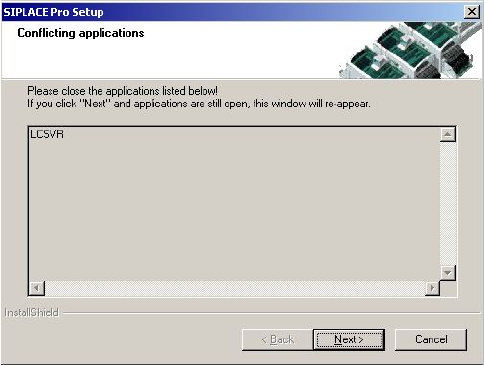
The installation displays in the dialog "Conflicting applications" the file LCSVR.exe which does not
dissapear even after pressing the Next button 7
. 7
Fig. 7 - 3 Conflicting applications
Installation Manual 7 Troubleshooting
SIPLACE Pro 7.0 Edition 05/2009 US
54
Cause: 7
The service LineControlServer could not be stopped. 7
Solution: 7
Please proceed as follows: 7
Æ (1) Press the Next button several times. Sometimes the applications simply need time to close.
As soon as the application is terminated, the installation will continue.
Æ (2) Check if the LCGUI is running on another client. If yes, please stop it and try to continue
the installation by pressing the Next button again.
Æ (3) Open Services from the start menu (Start/Settings/System Control/Administration/Services.
Locate the line for the "LineControlServer". If the status is "started", try to stop the service by
context menu. After that try to continue the installation by pressing the button Next.
Æ (4) If the Service cannot be "stopped", the service could not be stopped as requested. Please
restart your computer.
7.1.6 Cannot add Logins
Error description: 7
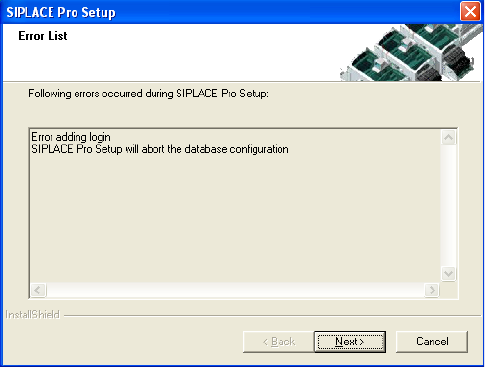
The installation displays in the dialog "Cannot add Logins, need to run Repair Security". 7
7
Fig. 7 - 4 Conflicting Logins
Cause: 7
When a database is restored but the repair security script hasn’t completed successfully. 7

7 Troubleshooting IInstallation Manual
Edition 05/2009 US SIPLACE Pro 7.0
55
Solution: 7
Click on Next. Setup will return the database to its state at the beginning of the Installation. The
database administrator should start the Query Analyser (or equivalent) and run the script
RepairSecurity.tsq, which can be found in the SIPLACE Pro Installation directory in the folder
DBSkripts. Now restart Setup.exe. The database should now be processed correctly. 7
7.1.7 Error - 16xx...
Error description: 7
Message with unspecific error message "Error -16xx ..." is displayed during setup. 7
Cause: 7
SIPLACE Pro's installation program is made up of several programs running simultaneously, and
in this case, the runtime system of the installation may detect errors, which cannot be caught or
handled by the installation program. Therefore the native error messages as provided by the
runtime system are displayed. Examples for such errors are: 7
– Error -1601 The Windows InstallerService could not be accessed.
– Error -1603: Fatal Error During Installation
– Error -1607: Unable to Install InstallShield Scripting Runtime
– Error -1608: Unable to create InstallDriver instance
– Error -1628: Failed to complete script based install
– Solution:
If these or other generic error messages are displayed during installation of SIPLACE Pro, please
refer to the InstallShield Customer Central (http://consumer.installshield.com/common.asp
) for in-
formation on how to handle this case. 7
7.1.8 Access problems of SIPLACE Pro share after client installation
Error Description: 7
After the first client installation of SIPLACE Pro you can not access the SIPLACE Pro share ...
share on a remote server (may be true for either a SIPLACE Pro server or a Line Control Server
or a pure database server) and following error message is displayed. 7