ConneX_Help.pdf - 第5页
Soft w ar e Applica t ion V er sion N otes Wi nd o w s 1 0 op e rati ng system Pro Ei the r 3 2- b i t or 64 -bi t Conne X Mac hi ne Manag e r Latest S up p orts x 86 an d x 64 Auto ma ted Hand l e r (AH 70 0/CH70 0) 3.3…
Introduction
ConneX 3.0 Introduction
In addition to the job auditing and manufacturing traceability capabilities (delivering device programming results through customizable XML
templates) provided in prior releases, the latest ConneX version introduces an Event Model that you can access through the new ConneX API
(application programming interface) to expand the accessibility and scale of your programming operations data.
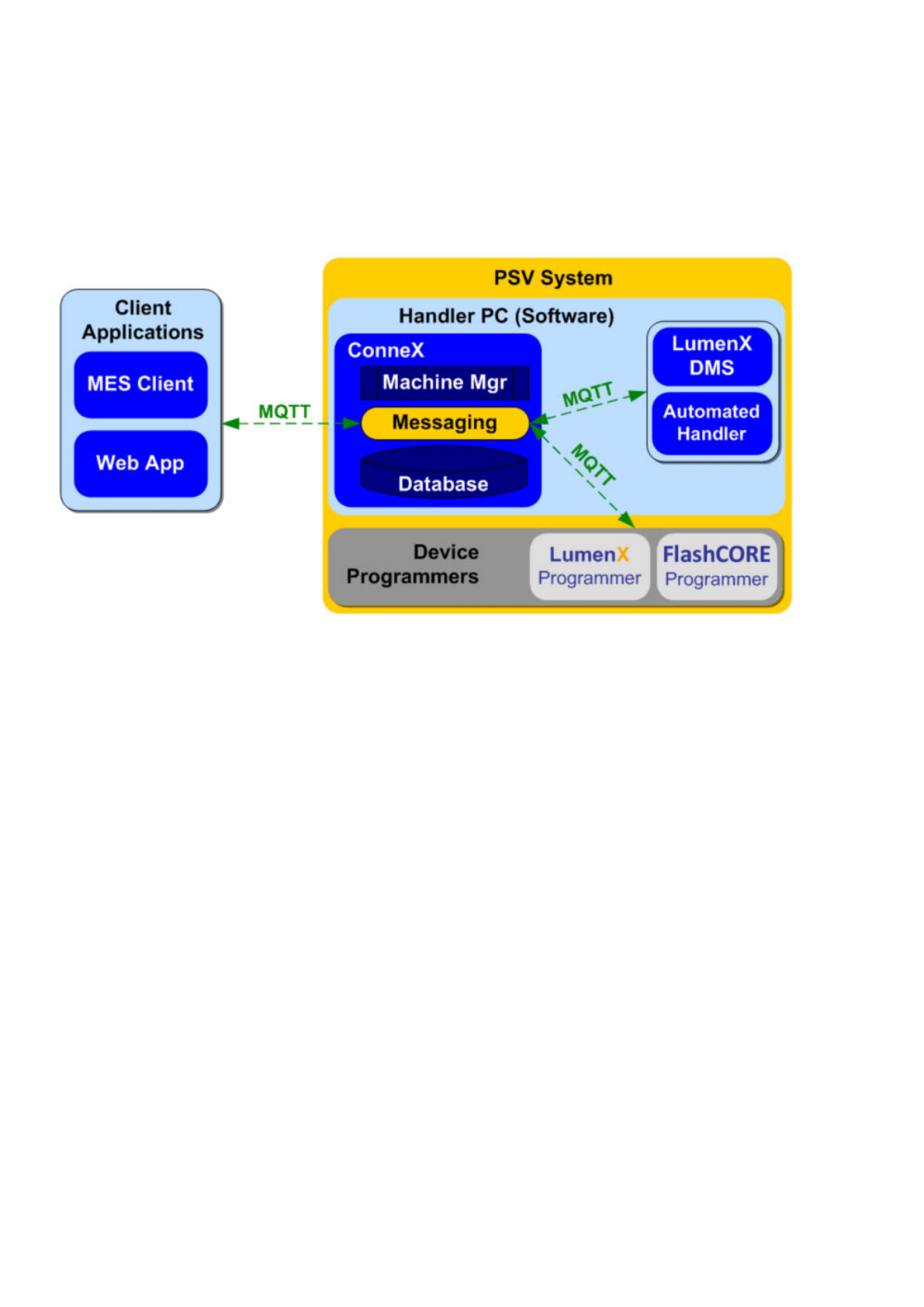
The latest ConneX leverages the Message Queuing Telemetry Transport (MQTT) protocol to exchange event messages between both internal
PSV system components and external client applications.
Internally, ConneX handles all of the data collection and event retrieval from underlying system components (ex. Automated Handler,
Programmers, and LumenX Data Management Software) and exposes them through an external API with a Publisher-Subscriber model:
consumers (ex. a custom dashboard/Web or MES application) call a specific ConneX API to register a callback URL that essentially subscribes
them to the desired event--each time the event occurs, ConneX notifies each consumer who registered/subscribed for event notification.
The ConneX API operates asynchronously to essentially detach internal system functions and events from external applications and
consumers, which in turn simplifies the development skills required to integrate your programming operations data with your MES or custom
Web application because developers need not know or learn the intricacies of how PSV Systems operate. API Consumers simply need to
create an HTTP URL (with some query string parameters to fetch and filter desired event fields).
Template Records/Manager is the component in ConneX that transforms ConneX data and delivers it through standard templates (such as
.XML and .JSON), making it easier for customers to view and export raw records using a template for storage on disk.
From custom real-time dashboards for programming operations to data integration with MES applications, the latest ConneX provides
increased visibility and control over your programming operations to reduce the burden and cost of managing your programming systems.
The latest ConneX maintains backwards-compatibility for existing ConneX users who are now collecting and analyzing their programming
data but also makes it easier for all users to access more data because it features a commonplace yet flexible Web service over standard
HTTPS as the API Provider.
The ConneX API conforms with the MQTT Version 5.0 OASIS Standard, which you can reference at https://docs.oasis-
open.org/mqtt/mqtt/v5.0/mqtt-v5.0.html.
Note
The ConneX API returns MQTT data as a real-time feed of Automated Handler, LumenX/FlashCORE Software, and Programmer events (which
are all persisted by Machine Manager in the Audits database for ConneX). Therefore, if any disruption occurs (ex. ConneX service goes offline
during a job) then events may be lost and retry functions must be implemented for MQTT (and/or any missed events must be retrieved from
the GraphQL API, which provides historical data).
Requirements
This section describes the software requirements for running Machine Manager and ConneX Server.
Machine Manager Requirements
To use the latest ConneX version, each Machine Manager computer must meet the following minimum requirements.
*
PSV
System
Device
Programmers
'
1r
1
1
FlashCORE
Programmer
Programmer
-
A
」
LumenX

Software Application
Version Notes
Windows 10 operating system Pro Either 32-bit or 64-bit
ConneX Machine Manager Latest Supports x86 and x64
Automated Handler (AH700/CH700) 3.3.x keep IP address as 127.0.0.1; default Port is TCP 9002
For more information about Automated Handler software, see Automated Handling software.
ConneX Server Requirements
To use the latest ConneX version, the ConneX Server must meet the following minimum requirements.
Software
Application Version Notes
Windows 10
operating system
Pro x64 only
or Windows Server
2016/2019/2022
x64 only
ConneX Server Latest x64 only
Data I/O License
Manager
1.0.0.61 requires .NET Framework 4.7.2
Chrome browser 100.0.x browser cookies required for user login/authentication (supports either Allow all cookies or Block third-
party cookies; does not support Block all cookies); Internet Explorer NOT supported
Installation
This page provides step-by-step instructions on installing the latest ConneX version and establishing proper communication between each
Machine Manager instance and the ConneX Server.
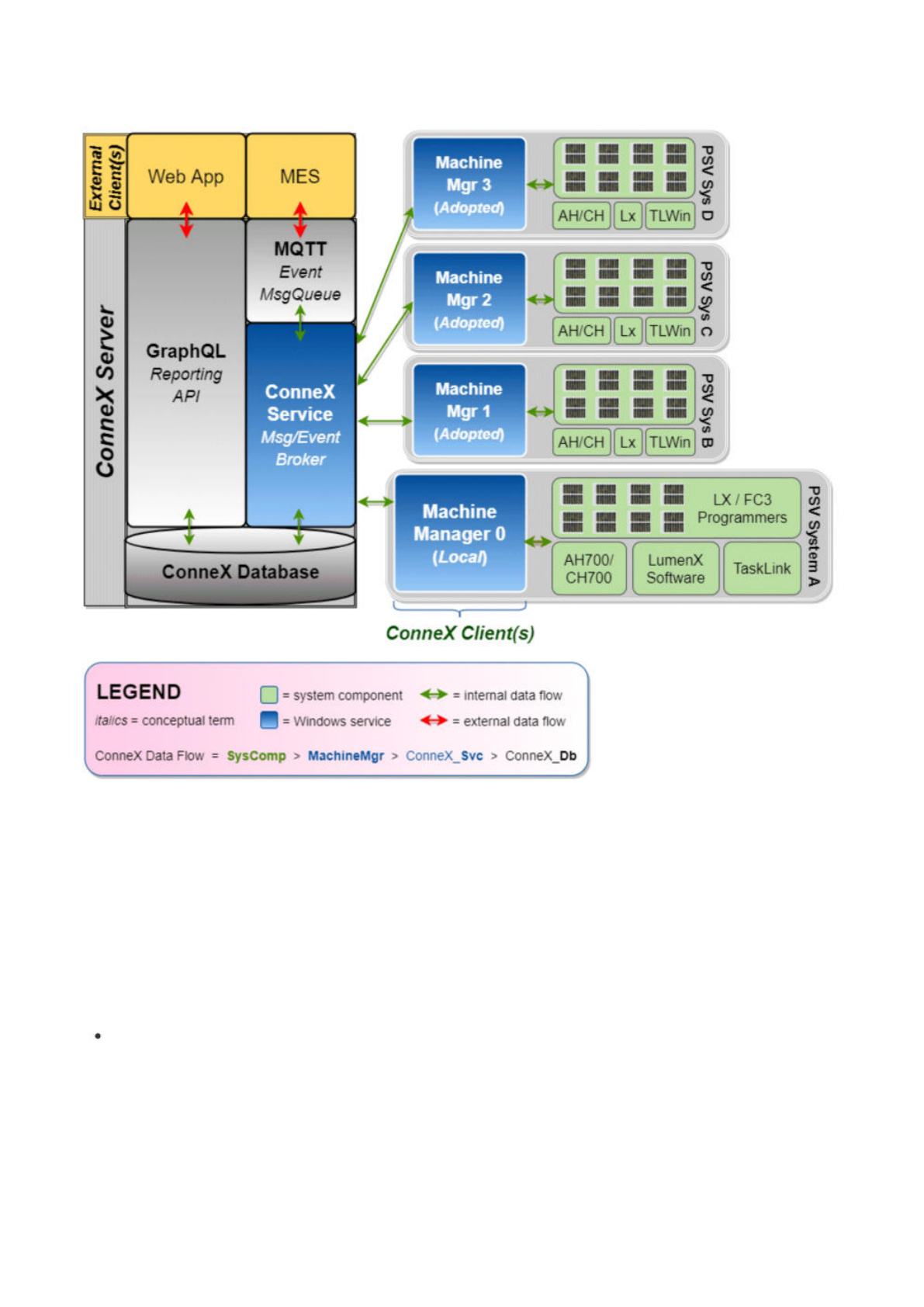
The latest ConneX version provides separate installers for ConneX Server and Machine Manager: install ConneX Server on a centralized
'data reporting' computer, then install Machine Manager on each 'client' computer (essentially, the Handler/Host PC in a PSV System). This
separation is designed to optimize the management and handling of data and event collection from system components. By running
ConneX Server on a separate PC, data can be aggregated and analyzed in a central location while the Machine Manager(s) focuses on data
aggregation and event messaging between ConneX and various PSV system components.
Before proceeding with installation, ensure the computer(s) meet the ConneX requirements as described at the bottom of the Introduction
page.
Machine Manager Installation
Run the setup wizard for Machine Manager to install the Machine Manager Service:
ConneX Machine Manager Service, for handling data aggregation and event messaging between multiple PSV Systems.
Machine Manager requires specific network ports to be open for proper communication with ConneX Server; the setup wizard for Machine
Manager automatically opens the following ports in Windows Defender Firewall:
Service/Inbound Rule Required Port
Machine Manager gRPC port TCP 5000
Machine Manager LumenX Discovery Port ReceiveUDP 9081
Machine Manager LumenX WCF port TCP 9000
Machine Manager MQTT port TCP 9002
Machine Manager SSDP port UDP 1900
Note
If you change the MQTT port(s), then also restart the ConneX Machine Manager Service (see below).
GraphQL
Reporting
API
Web
App
MES
MQTT
Event
MsgQueue
Machine
Mgr1
(Adopted}
ConneX
Service
Msg/Event
Broker
Machine
Mgr
2
(Adopted}
Machine
Mgr
3
(Adopted)
TaskLink
LumenX
Software
AH700/
CH700
ConneX
Database
ConneX
Client(s)
LX/FC3
Programmers
Machine
Manager
0
(Loca/)
LEGEND
system
component
O
=
internal
data
flow
italics
=
conceptual
term
包
=
Windows
service
<-►
=
external
data
flow
ConneX
Data
Flow
SysComp
>
MachineMgr
>
ConneX_Svc
>
ConneX_Db
X
Q
C
U
PSV
Sysf
em
A