80S-20用户手册.pdf - 第474页
11 Station extensions /Hardware SIPLACE 80S-20 /F4 User Manual 11.2 Component bar code Software version SR.407.xx 01/ 2001 US Edition 474 1 1.2.4 T e chnica l dat a Connectio n Station computer Data entry Via barcode sca…

SIPLACE 80S-20/F4 User Manual 11 Station extensions /Hardware
Software version SR.407.xx 01/2001 US Edition 11.2 Component barcode
473
PLEASE NOTE: 11
If one of the barcode digits is assigned a wild card (star *), this digit will not be evaluated. This filter
is used to suppress certain data in the barcode, such as the date or company name. 11
– Once you have activated the component barcode on the line computer, and selected “Set-up
check with barcode” from the machine options at the station, “Refill location” and “Refill track
with barcode” functions can no longer be used manually.
– A manual “Refill” can still be used on tracks with components without barcodes, even if the refill
check is switched on.
Procedure if the barcode cannot be read: 11
Å Switch off the refill check in the machine options.
Å Enter the barcode manually.
11
11
11.2.3 Operation
Å Select the “Empty tracks” view from the Set-up menu.
Å Use the barcode reader to read the desired track barcode.
If the track is present in the set-up, and the component has a barcode, the “Set-up check with
barcode” dialog will appear, specifying the track concerned.
PLEASE NOTE 11
You can open the dialog by clicking on the desired track or by clicking on the “Set-up check
with barcode” button. 11
Once the return barcode has been compared and read successfully, the track can be refilled. 11
11 Station extensions /Hardware SIPLACE 80S-20/F4 User Manual
11.2 Component barcode Software version SR.407.xx 01/2001 US Edition
474
11.2.4 Technical data
Connection Station computer
Data entry Via barcode scanner or keyboard
Number of characters Up to 40
Not permissible
Barcode starts with number 1 or 2, and is less than
5 characters long
Number of barcodes Up to 6 per component
Filter for suppressing data Up to 1 per barcode
Preset code types
Code 39 (standard or ASCII)
Code 2 of 5, interleaved and normal
Code 128, UPC/EAN/JAN codes
(others available upon request)
SIPLACE 80S-20/F4 User Manual 11 Station extensions /Hardware
Software version SR.407.xx 01/2001 US Edition 11.3 Dual conveyor
475
11.3 Dual conveyor
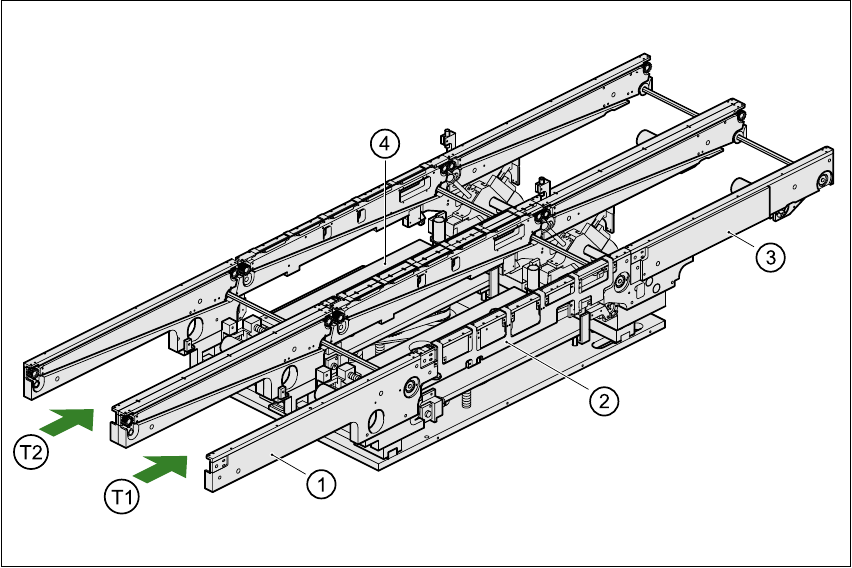
11.3.1 Structure of the dual conveyor
The conveyor belts are driven by DC motors. Each center conveyor has a lifting table for clamping
the PCBs. The width of the PCB conveyor can be adjusted, either using the menu or from the line
computer. 11
11
Fig. 11.3 - 1 Structure of the dual conveyor
11.3.2 General
As the name suggests, the dual conveyor has two tracks. These are independent of one another,
both electrically and mechanically. As standard, the fixed transport side is on the right, although
there is another variant in which the fixed transport side is on the left. 11
(1) Input conveyor (2) Center conveyor
(3) Output conveyor (4) Lifting table
T1 Transport track 1 11 T2 Transport track 2 11