TS7000-user-guide.pdf - 第8页
8 7. CHANGING THE CARTRIDGE ASSEMBLY The Cartridge assembly can be removed and r e-installed whil e the valve is on the machine. Following instructions and Ref er to Figure 5.0 below to chang e the cartridge assembl y. F…
6
5.3 Air connection:
Filtered air supply must be precisely regulated and should be set between
1-30 psi, depending on material viscosity. The air supply is not used as
the main dispensing force. It is only required to move the material to the
feed screw chamber.
The valve is supplied with sample of 10 and 30cc air powered syringe
assembly. The syringe of material can be mounted directly onto the
valve inlet fitting. Material can also be supplied from a remotely located
container, such as cartridge systems.
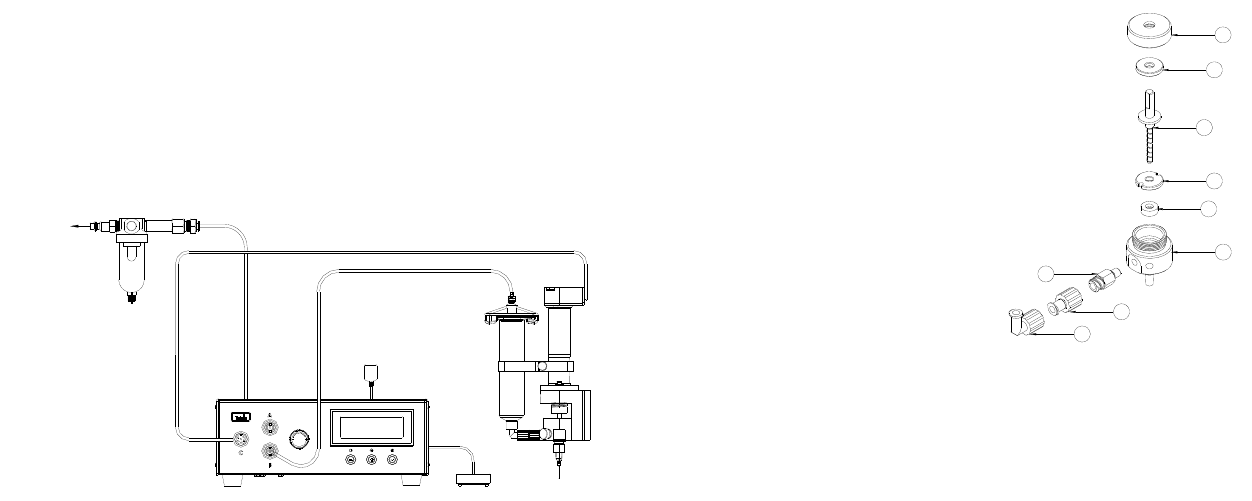
Figure 4.0 Typical Setup Systems
6. DISPENSING APPLICATIONS
6.1 DC Motor Voltage Level:
Voltage controls motor speed (RPM). High voltage produces high motor
speed and low voltage reduces motor speed. Maximum Voltage input is
24 VDC
6.2 Feed screw pitch:
Rate of material dispensed is determined by the pitch of the feed screw. A
high pitch number will produce a low dispense rate and a low pitch
number will produce a higher dispense rate.
6.3 Dispense tip:
The size of the dot diameter or bead width is determined by the dispense
tip. A low gauge number (larger I.D.) will dispense a large diameter dot
or a wide bead. A high gauge number (smaller I.D.) will dispense a
smaller diameter dot or a narrower bead.
Dispense tip sizes smaller than 25-gauge and longer than 1/2" are not
recommended to use with solder paste. A normal rule of thumb to choose
the dispense tip size is that the dot size equal 1.5 times the internal
diameter of the dispense tip.
TS500R CONTROLLER
TS7000 VALVE
TO AIR SOURCE
AIR MUST BE
FILTER AND DRY
11
Figure 7.0
1. Follow steps 1-6 in Section 10.1 “Valve Purging”
2. Follow steps 1- 5 in Section 7.1 “Removing the Cartridge assembly”
3. Remove the Material Inlet Fitting (7) along with the Luer Lock
adapter (8) and Luer Lock Elbow fitting (9) from the Cartridge
4. Remove the Cartridge Cap (1) by turning it counter clockwise
5. Pull the Feed Screw (3) straight out of the Cartridge; Make sure not
to lose the upper bearing washer (2)
6. Using the tweezers (provided in the cleaning kit) to remove the lower
bearing washer (4)
7. Using a cotton swap, carefully remove the seal (5) from the cartridge.
8. Clean all parts using the cleaning brush with any suitable solvent
9. Inspect parts for wear or damage and replace if necessary
10. Re-install the seal (5) into the Cartridge body, make sure the spring
side is facing down
11. Fully press the lower bearing (4) washer into the Cartridge body
12. Insert the Feed Screw (3) into the Cartridge body, make sure not to
damage the seal
13. Install the upper bearing washer (2) on the Feed Screw flange
14. Tighten the Cartridge Cap (1)
15. Install the Material Inlet Fitting (7)
16. Install the Cartridge assembly into valve housing
17. Purge Valve per Section 10.1
1
2
3
4
5
6
8
9
7
10
2. Remove the two bracket mounting screws (5) and pull the valve
housing (7) away from the main housing (6)
3. Install a square drive adapter (include in the 7000-DMPBKIT) to the
flexible coupling (4) and tighten the set screw
4. Install the DMP bracket (include in the 7000-DMPBKIT)into the
main housing (6)
5. Install the DMP valve housing to the valve bracket
10. MAINTENANCE AND CLEANING:
10.1 Valve Purging:
Purging the valve with dispensing conditioner (7105XCON) between
shifts or after every eight hours of dispensing is recommended. The
conditioner cleans any material residue from the material path and
conditions the valve for future use.
1. Release material pressure.
2. Remove barrel of material from the valve.
3. Remove dispense tip
4. Install a barrel of dispensing conditioner (Part number 7105XCON)
to the valve inlet and set air pressure at 8.0 psi.
5. Turn on the valve and let it run until the conditioner is the only
material being dispensed at the valve outlet. If the conditioner is
unable to force the dispense material out the valve outlet then
proceed to the “Thorough Cleaning” section.
6. Turn off valve and release air pressure.
10.2 Thorough Cleaning:
Through cleaning procedures should be done whenever the following occur:
• Dispense material is changed to different type
• Dispense material started to cure in the valve
• Valve has been dispensing for one month.
• Dispense tip clogged frequently
7
6.4 Material feed pressure:
The material feed pressure does affect the amount of material dispensed
through the valve. Optimum feed pressure is dependent upon viscosity of
material dispensed. Only in unusual circumstances should the feed
pressure exceed 30 psi.
6.5 Dispense Material:
The viscosity of the dispense material along with the particulate additives
to the dispense material will also determine the dispense rate. Ability to
dispense may be directly related to the material formulation.
6.6 Dispense cut off:
The best method of stopping material flow at the end of the cycle is to
short the motor (grounding the DC voltage signal through a current
limiting resistor). This method provides a complete rotational brake of the
motor at the shut off point. Another method of stopping material flow is
to reverse the motor rotation by reversing the DC voltage signal. This can
be described as suck-back action. In both cases, a no-drip dispensing
action can be achieved. Turning off the material feed pressure when the
valve is not dispensing will prevent dripping and oozing.
6.7 Dispense tip height:
The distance between the dispense tip and substrate surface is extremely
important. To obtain accurate dot size, the dispense tip height should
remain constant for each dot/bead. If the dispense tip height fluctuates
during dispense process, the dot/bead size will vary. If the dispense tip
touches the dispense surface, clogging will occur.
6.8 Material condition:
The physical condition of the dispense material is very important to
successful dispensing. There are a number of conditions that can prevent
continuous and consistent dispensing such as:
• Freshness: Old material (most materials have a recommended shelf
life) leads to erratic dispensing and frequent clogging, especially with
solder paste. Make sure to check the material shelf life before
starting dispensing.
• Separation: Material with high content of solid particles, such as
solder paste, tends to separate at high pressure. If the dispense
material starts to separate, please replace it with new fresh material.
• Particles sizing: Do not attempt to dispense solder paste with particle
sizes bigger than 75 microns (-200+325 mesh size).
8
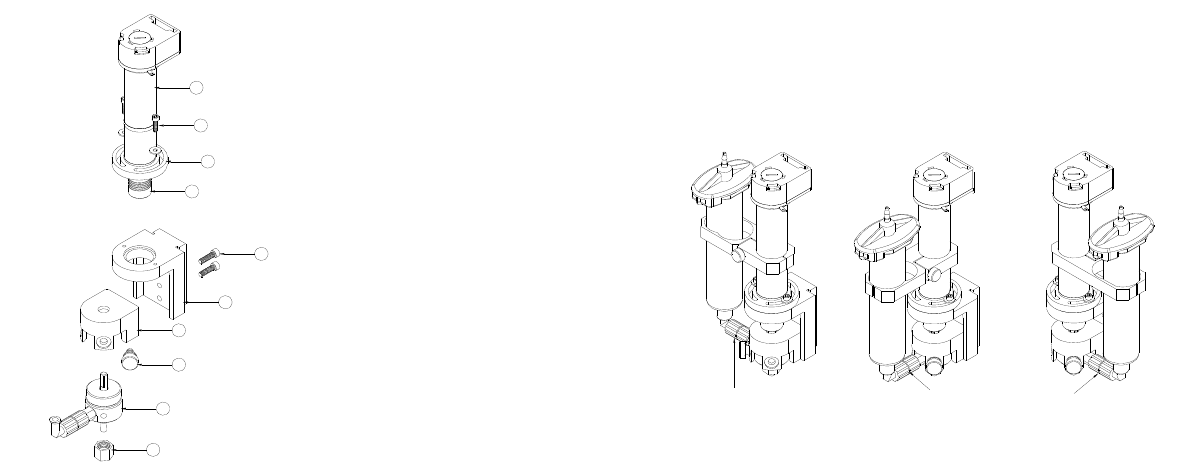
7. CHANGING THE CARTRIDGE ASSEMBLY
The Cartridge assembly can be removed and re-installed while the valve is on
the machine. Following instructions and Refer to Figure 5.0 below to change
the cartridge assembly.
Figure 5.0
7.1 Removing the Cartridge assembly
1. Release material pressure
2. Remove barrel of dispense material from the valve
3. Grasp the cartridge feed screw assembly (10) at the material fitting
inlet then remove the thumb screw (8) completely out of the valve
housing (7)
4. If the set screw on the coupling (4) is tightened then using a hex
wrench to loosen it
5. Pull the cartridge/feed screw assembly out of the valve housing
7.2 Re-install the Cartridge assembly
The Cartridge assembly can be installed in three different locations, left
side, center, and right side position. Figure 6.0 below shows three
possible mounting locations.
11
10
8
7
4
6
5
3
2
1
9
1. Insert the cartridge assembly (10) into the valve housing (7); Make
sure the flat surface of the feed screw shaft aligns with the coupling
(4) “D” shape hole. Note: The Material Inlet fitting can be installed
on the left side, center or right side on the valve housing.
2. If desired, tighten the set screw on the coupling to prevent possible
back lash.
3. Install the thumb screw (8)
Figure 6.0
8. ADJUSTING THE ENCODER MOTOR POSITION
The valve is designed with an adjustable motor mount plate so that motor can
be readjusted in different positions to prevent interference with surrounding
equipment. Refer to Figure 5.0 and follow below instructions to make
adjustment.
1. Loosen the two motor mounting screws (2)
2. Rotate the encoder motor assembly (1) to desired position
3. Tighten the two motor mounting screws (2)
9. DMP VALVE CHANGEOVER OPTION
The valve has the interchangeability feature that allows users to replace valve
housing with the Disposable Material Path (DMP) housing to transform the
valve into the DMP configuration.
Required parts:
7000-DMPBKIT = DMP Bracket Kit (Sold separately)
A0100235 = DMP Valve Housing (Sold separately)
Refer to figure 5.0 and instructions below for replacement procedures
1. Remove the cartridge assembly (10) per section 7.1
Material Inlet Port
at Center
Material Inlet Port
On Left Side
Material Inlet Port
On Right Side