TM1549_Document of Wait Across Machine Function.pdf - 第7页
SMT Software Engineeri ng Group IMOperationsYAMAHAMOTORCO. ,LTD. MDOC-SOFT 50038 7/ 11 7. A p pen dix 7.1. A utomaticse ttings The work of this chapter is not necessar y unles…
SMT Software Engineering Group
IMOperationsYAMAHAMOTORCO.,LTD.
MDOC-SOFT500386/11
Ea29556
CONVEYORINTERLOCKERROR
The entrance sensor at the lower machine
was detected.
There is possibility that the board exist
between machines.
When the function of “Wait Across Machine”
is effective, W Axis cannot be moved.
Please press the [EMERGENCY STOP]
button of the downstream machine and this
machine, and remove the board of
the “the
baord wait across the machine” state
.
When the downstream machine was turned
off, please tuen on the machine.
Note.1 The
[Fast Trans Delay Timer] setting value is the timer to delay the transfer start timing of the
upstream board at sync transfer. The suitable values are different in the chattering timer, the conveyer
speed, the line constitution, etc.
When these errors occurr, please set each 30msec big value than a
present value, and confirm the operating properly.
SMT Software Engineering Group
IMOperationsYAMAHAMOTORCO.,LTD.
MDOC-SOFT500387/11
7.Appendix
7.1.Automaticsettings
The work of this chapter is not necessary unless line constitution is changed.
The following setting is necessary when line constitution is changed or when upstream /
downstream machine is changed. However, the mechanical change of the conveyor in
upstream machine or this machine or downstream machine exists, please refer to "Chapter.7.2.
Manual Settings".
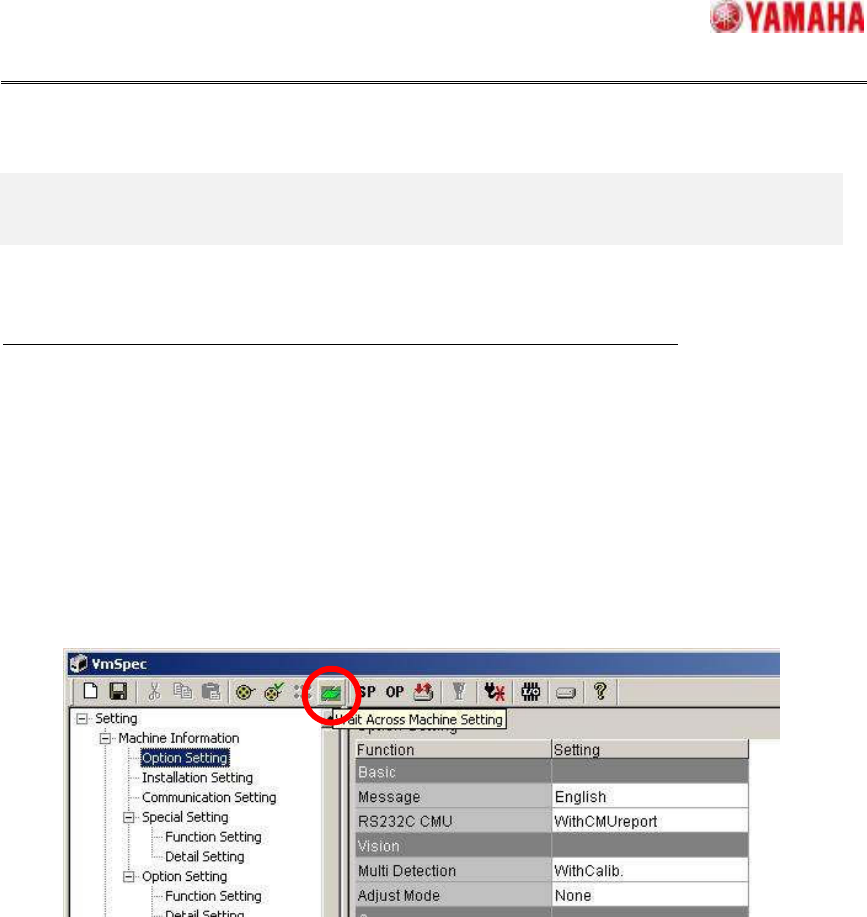
Please tap on [VmSpec] – [Toolbar] – [Wait Across Machine Setting] button (See Fig.7.1).
When it is taped, [Wait Across Machine Setting] screen opens.
Fig.7.1VmSpecScreen
SMT Software Engineering Group
IMOperationsYAMAHAMOTORCO.,LTD.
MDOC-SOFT500388/11
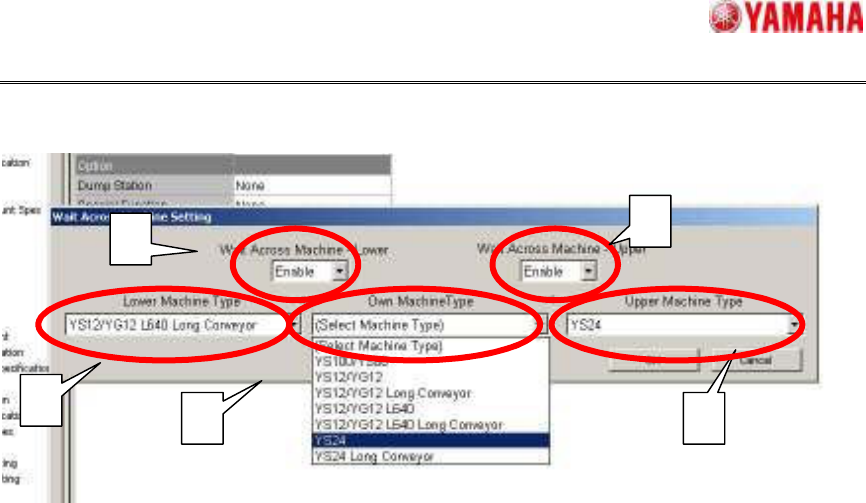
Fig7.2WaitAcrossMachineSetting
Please set it in the following procedures with [Wait Across Machine Setting] screen (See
Fig.7.2).
1. Set “Enable” on [Wait Across Machine – Lower] and [Wait Across Machine – Upper] comb
box.
The following settings are set on [Setting] - [Installation Setting] - [Software].
1) [Wait Across Machine (Upper)] or [Wait Across Machine(Lower)] is set to “Enable”.
2) [Upper Handling] or [Lower Handling] is setto “ADVANCED GATE”.
2. Set the settings on [Lower Machine Type], [Own Machine Type] and [Upper Machine Type].
Please choose the downstream machine, this machine, upstream machine from the combo
box. The following settings at [Machine data] - [Mechanical] - [Position] - [Wait Across
Machine] are set
1) [Upper Machine Max Board Size]
2) [Lower Machine Min Board Size]
3) [Lower Machine Max Board Size]
When the machine type that you want to choose is not displayed at the combo box, please
set “Disable” on [Wait Across Machine –Lower] or [Wait Across Machine – Upper].
1
1
2
2 2