Infinity EX NetworkingInf.pdf - 第16页
INFINITY EX NETWO RKING TESTING THE CONNECTION 27.1 6 Technical Reference Manual Chapter Issue 1 Aug 02 Finding an I P Address If the IP Address of a machine is not kno wn (either PC or DEK Printer) these can be obtained…

INFINITY
EX
NETWORKING
TESTING THE CONNECTION
27.14 Technical Reference Manual Chapter Issue 1 Aug 02
Using a Laptop If ‘Pinging’ the network fails, a laptop computer can be attached to the printing
machine to test the local network is working correctly.
NOTE
Before commencing testing, make a note of the original configurations of both
the laptop and the printer so that they can be reset on completion.
1. Identify the laptop name by selecting Control Panel, Network.
2. Under the Protocols tab select TCP/IP and Properties, select Specify an IP
Address.
3. Enter IP Address 195.100.100.2 and a subnet mask of 255.255.255.0. Select
OK. Close the network dialog and the control panel and re-boot the laptop.
4. Connect the laptop to the printer using a cross-over network cable.
5. On the laptop log in locally as ‘Yourself’ in the laptop name domain.
6. Create a directory called Test, change its properties so that it is shared.
7. Create two sub-directories of Test for ‘data’ and ‘products’.
8. At the printer, check that the printer’s IP Address is 195.100.100.1
NOTE
If the IP Address is changed the printer shall need to be rebooted.
9. On the desk top double click My Computer.
10.Right click on C:Drive.
11.Select Sharing, Select New Share. Type C Drive in the shared name box.
12.Select User Limit and allow user = 1.
13.Repeat these steps for D Drive.
14.From the Start Menu, select Programs and then Windows NT Explorer.
INFINITY
EX
NETWORKING
TESTING THE CONNECTION
Chapter Issue 1 Aug 02 Technical Reference Manual 27.15
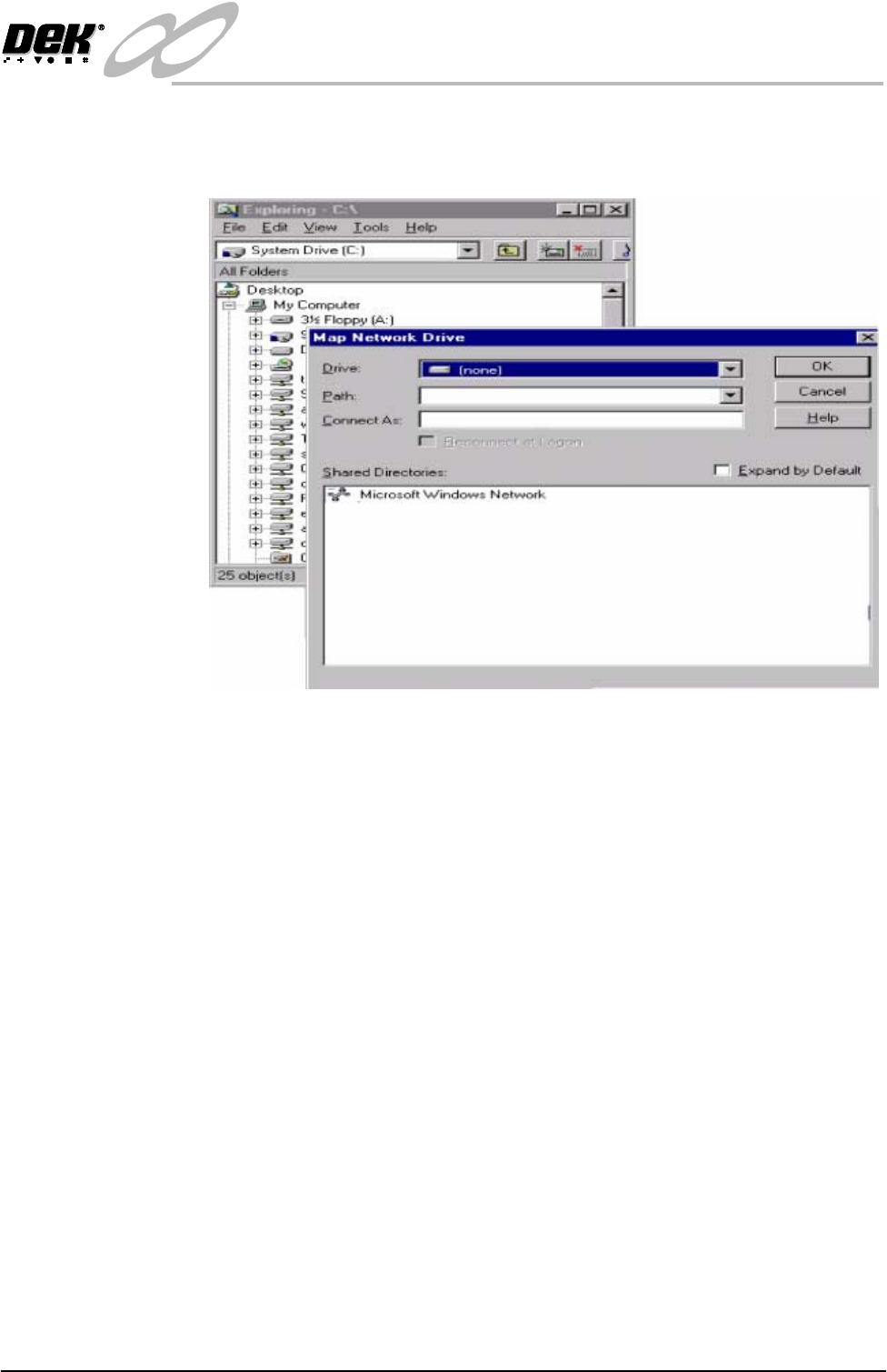
15.Select Map Network Drive from the Tools Menu. In Path type \\Laptop
Name (see above)\Test. When prompted enter the laptop’s Administrator
name and password (if any). Close Windows NT Explorer.
Figure 28-6 Mapping a Network Drive
16.Select Maint. and Set Preferences.
17.Set the comms option to Net_Files.
18.Select Edit Comms.
19. Set the remote drive letter to the mapped drive letter.
20.Set the product data path to Products.
21.Set the data path to Data.
22.Select Enable Comms.
23.Use Housekeeping to transfer some product files (.pr1) to and from the local
and remote disks. Confirm that event.dat is being written to in the data
directory on the laptop.
24.Reset the printer and laptop to their original settings.
INFINITY
EX
NETWORKING
TESTING THE CONNECTION
27.16 Technical Reference Manual Chapter Issue 1 Aug 02
Finding an IP
Address
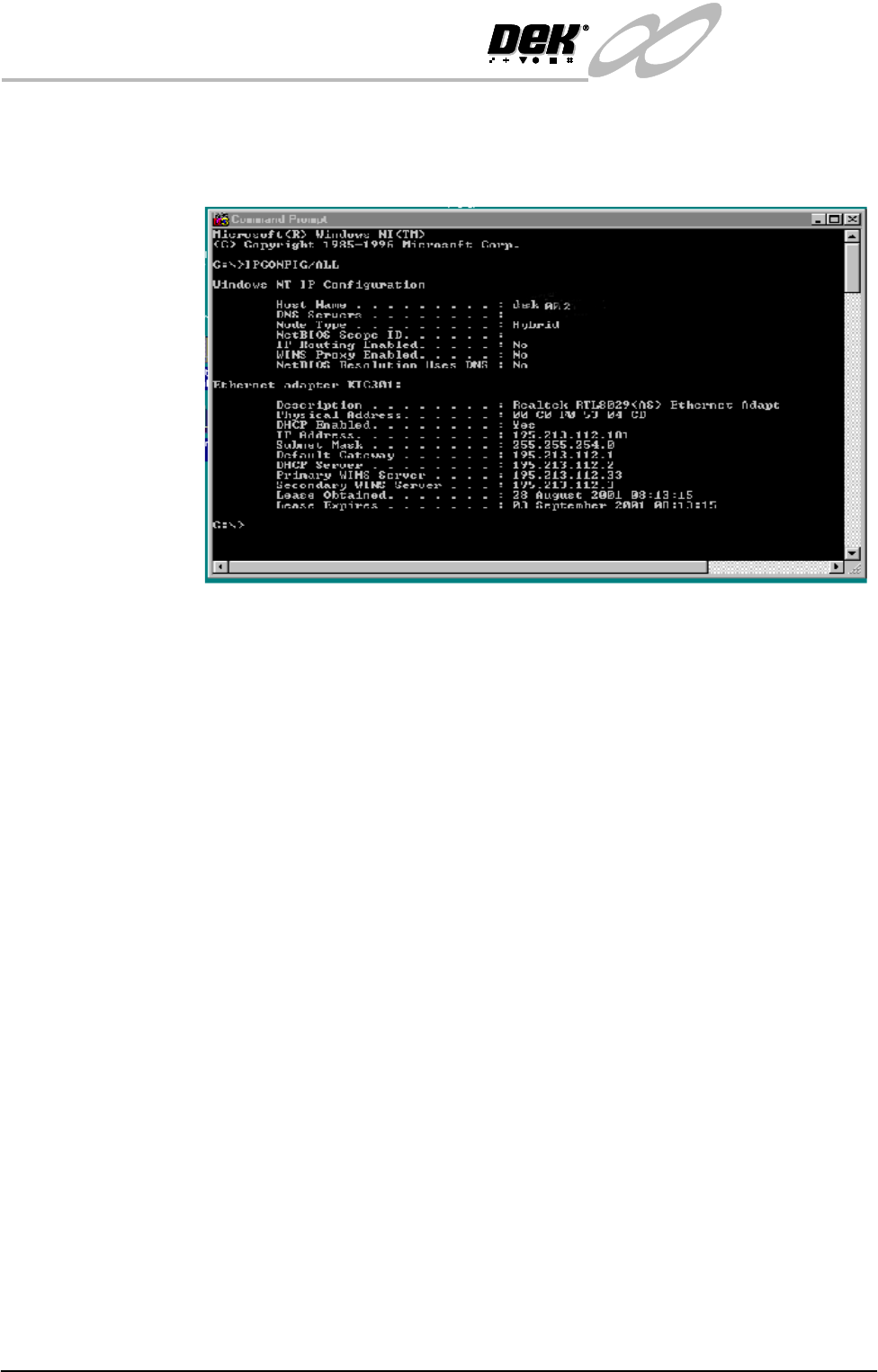
If the IP Address of a machine is not known (either PC or DEK Printer) these
can be obtained by opening the Command Prompt window. At the prompt type
IPCONFIG/ALL
All addresses are listed which the item is connected to including routers and
other servers.