00194547-07_InstallationManual_60103SP2_Hotfix_03.pdf - 第35页
Installation Manual, Station Software Version 601.03 SP2 Edition 11/2006 4.4 Uninst alling the SIPLACE software If it is necessary to uninstall the SIPLACE software, this must be done in one of the ways described below. …
Installation Manual, Station Software Version 601.03 SP2 Edition 11/2006
4.3 Installing the Hotfix 03
1. Reboot the machine and log on as administrator.
2. Insert the installation CD Hotfix 03 in the CD-ROM drive.
3. Open the Explorer and start the 601.03.SP2.Hotfix03.exe under CD ROM drive by double
clicking it. The installation is started.
4. Select the language and click OK.
5. Confirm the InstallShield Wizard dialog by clicking Next.
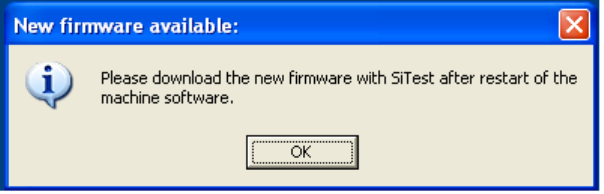
6. The following dialog displays that new firmware is available. Click OK.
7. Click Finish to finish the installation.
8. Reboot the machine.
9. Download the new firmware with SiTest.
10. Reboot the station.
34 of 90
Installation Manual, Station Software Version 601.03 SP2 Edition 11/2006
4.4 Uninstalling the SIPLACE software
If it is necessary to uninstall the SIPLACE software, this must be done in one of the ways described
below.
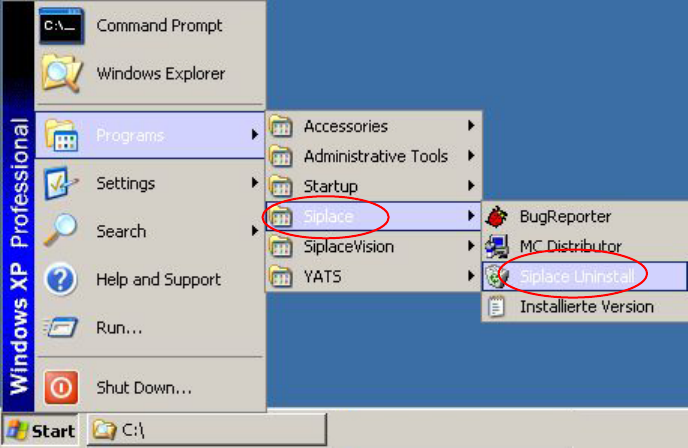
→ Open the Start menu and select Programs Æ Siplace Æ Siplace Uninstall.
Fig. 4-14: Starting uninstallation (alternative 1)
35 of 90
Installation Manual, Station Software Version 601.03 SP2 Edition 11/2006
Or:
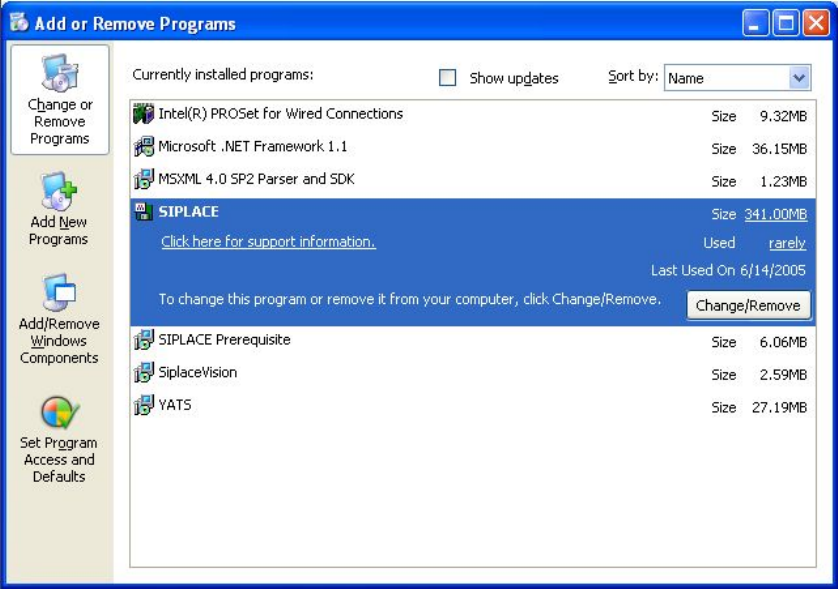
→ Open the Start menu and select Settings Æ Control panel.
→ Double-click Add/Remove Programs.
Fig.
4-15
: Starting uninstallation (alternative 2)
→ Select Siplace from the list of installed programs.
→ Click the Change/Remove button.
36 of 90