RD0001-01_01_EN.pdf - 第7页
W renboard User Manual Copyright © 2022 Richtek T echnology Corporatio n. All rights reserve d. is a registered trad emark of Richt ek T echnolog y Corporatio n RD0001-01_01 August 2022 www .ric htek.com 7 y o u r p o w …
Wrenboard
User Manual
Copyright © 2022 Richtek Technology Corporation. All rights reserved.
is a registered trademark of Richtek Technology Corporation
RD0001-01_01 August 2022 www.richtek.com
6
your power partner.
System LED
If the Wrenboard execute a command, the white LED will be switched on
/ off.
I
2
C voltage exchange / Firmware update button
To exchange I
2
C voltage
Click FN button in normal operation mode, the I
2
C voltage will be
exchanged between 3.3V and 1.8V level.
To enable firmware download mode
Connect Wrenboard to PC and press FN button. If the red and blue
LEDs are blinking alternatively, it means firmware download mode is
ready.
I
2
C and GND pins
SCL (Serial Clock Line)
SCL is a serial clock line with a 2.7kΩ pull-up resistor. It is used to
synchronize the data transfers on the I
2
C bus.
SDA (Serial Data Line)
SDA is a serial data line with a 2.7kΩ pull-up resistor. It is used to
send data and address.
3.3V power pin
It is suggested to limit the output current within 100mA.
1.8V power pin
It is suggested to limit the output current within 100mA.
GPIO
The GPIO pin can be configured as GPIO (P0.1), 1-wire (GSOW) and
PWM function according to programming setting. User can connect this
pin to control device in either function.
5
6
7
8
9
10
Wrenboard
User Manual
Copyright © 2022 Richtek Technology Corporation. All rights reserved.
is a registered trademark of Richtek Technology Corporation
RD0001-01_01 August 2022 www.richtek.com
7
your power partner.
4. Firmware Update
Step 1. Connect Wrenboard to PC
To avoid impacting the other device, please disconnect all available pins on the Wrenboaord.
Step 2. Run Richtek Wrenboard Flasher
(Start > Richtek Technology Corporation > Richtek Bridgeboard Utilities > Firmware Update Tool >
Richtek Wrenboard Flasher)
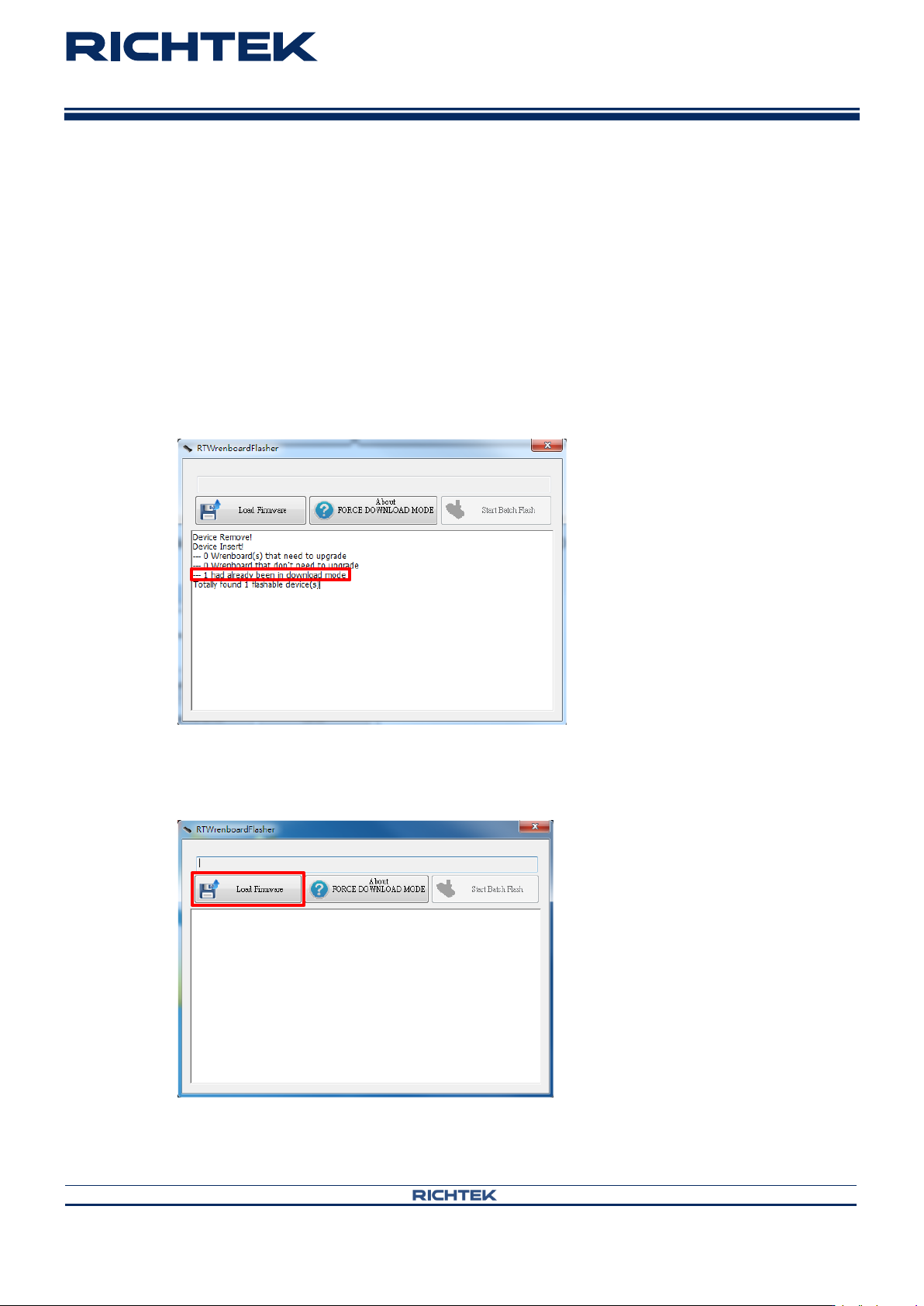
Step 3. Use force download mode if the firmware cannot operate normally. Otherwise go to Step 4.
Press FN button until the red and blue LEDs are blinking alternatively.
Step 4. Load firmware
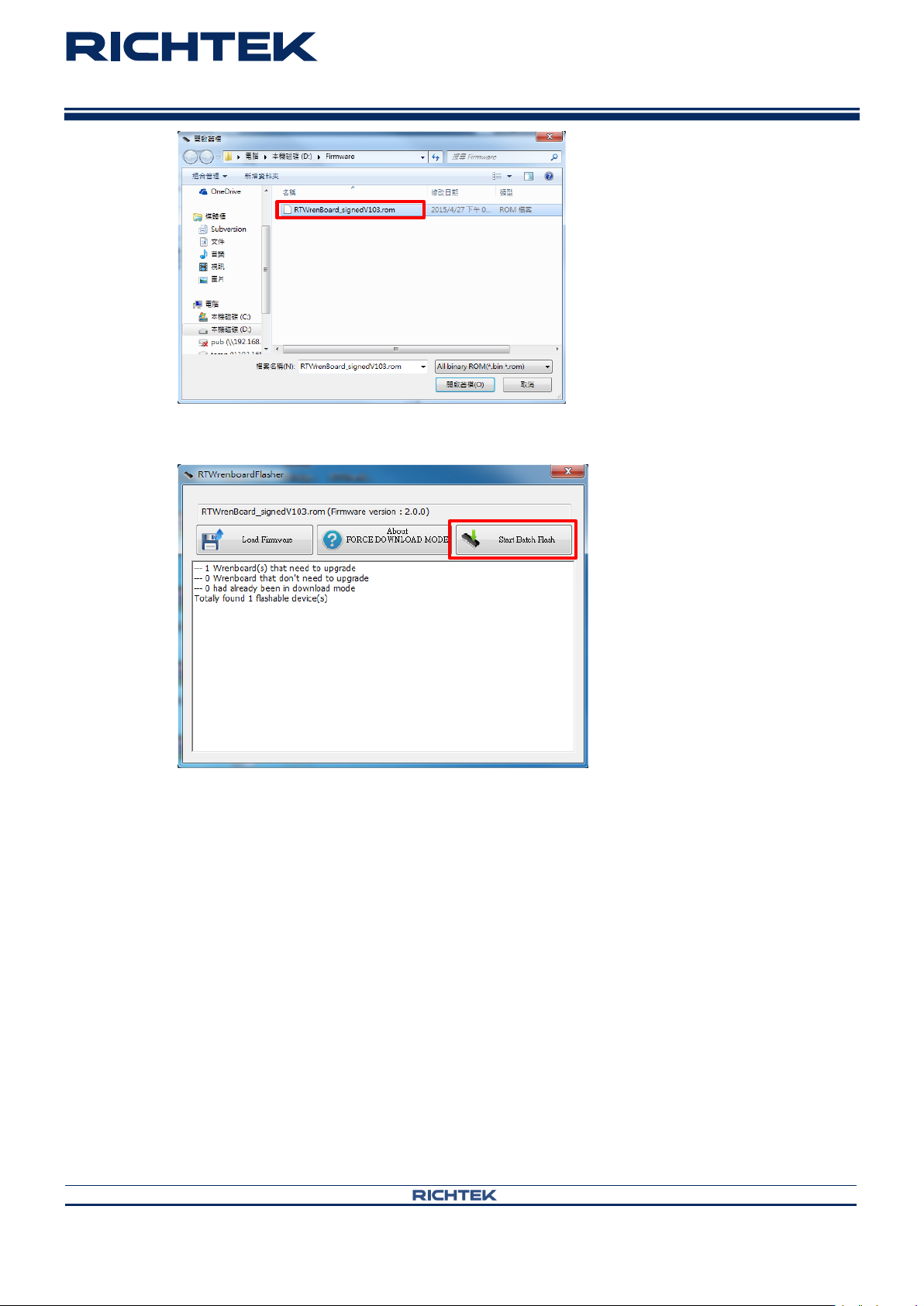
Click “Load Firmware” and select the file you want to install on the Wrenboard.
Wrenboard
User Manual
Copyright © 2022 Richtek Technology Corporation. All rights reserved.
is a registered trademark of Richtek Technology Corporation
RD0001-01_01 August 2022 www.richtek.com
8
your power partner.
Step 5. Install firmware